


November 22, 2020
Question

How to delete templates from 'Your Recent Items' when making a new document?

  • November 22, 2020
  • 3 replies
  • 1284 views

This is geniunely annoying. Every time I want to make a new document, I keep thinking it's on Pixels, when it's on Centimeters and it ends up being a huge canvas. 
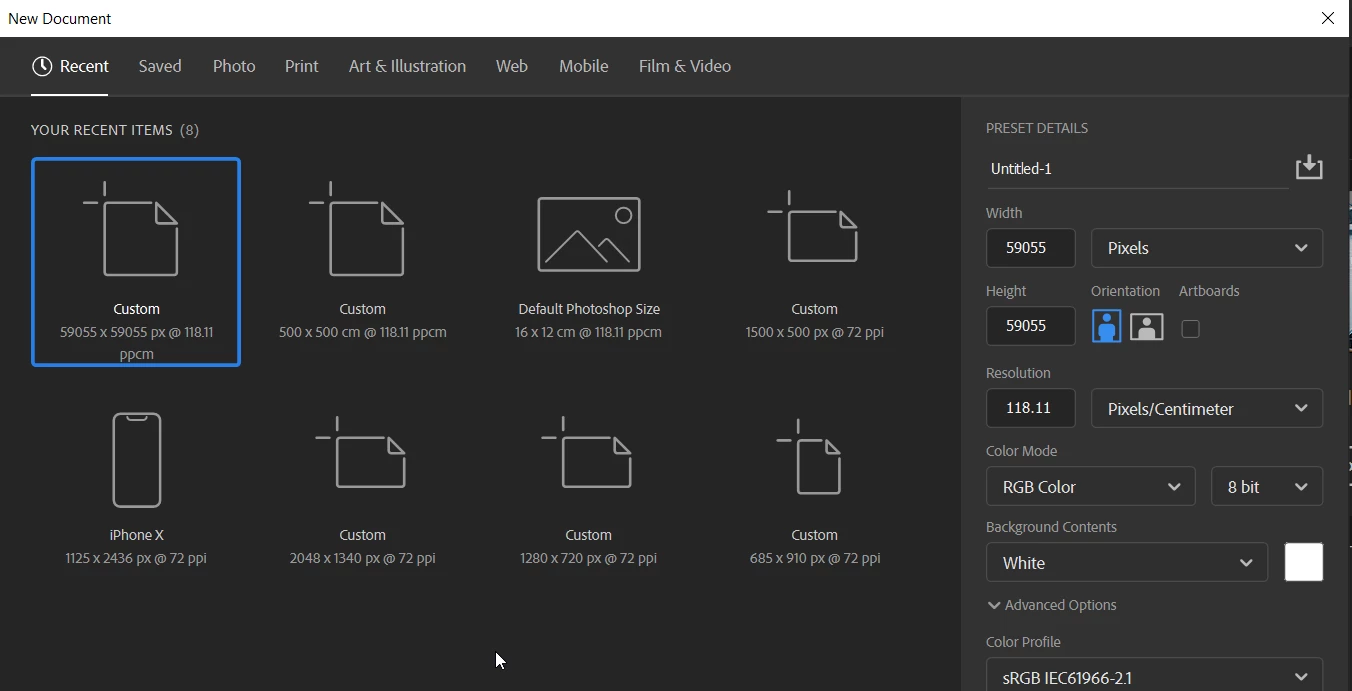
 

How can I clear this list, or set pixels as my default canvas sizes?


This topic has been closed for replies.

3 replies

Stephen Marsh
Community Expert
Community Expert
January 30, 2024

The path to the MRU New Doc Sizes.json file is user account related and Photoshop version specific and similar to the following...


MAC:

/Users/<user>/Library/Preferences/Adobe Photoshop 2021 Settings/MRU New Doc Sizes.json


Win:

C:\Users\<user>\AppData\Roaming\Adobe\Adobe Photoshop 2021\Adobe Photoshop 2021 Settings\MRU New Doc Sizes.json


You can open the .json file in any plain text editor, however, an editor used for code editing which offers syntax highlighting and formatting for JSON or JavaScript is helpful when editing the file to remove unwanted entries. Make a backup before editing just in case you make a mistake with the JSON syntax.


Take note of:


"units": "centimetersUnit",


vs


"units": "pixelsUnit",


Adjusting the width and height as required if changing units.


GilmourB
Inspiring
January 30, 2024

The settings in this panel are sticky, so they do not respect the Preferences set via Edit > Preferences, (they should, but they don't). 

According to my support calls with Adobe, the only way to delete a New Document preset is to delete all of your Photoshop preferences or uninstall Photoshop and re-install Photoshop. I hope this is incorrect because Support built a bunch of "Test" New Document presets on my computer that are cluttering up my interface. If anyone knows how to delete them let us know.

To address your issue, start a new document, move the settings where you want them, create the document. This will set the "sticky" preferences where you want them. 

Note: recently the Art Board setting has been on by default so watch out for that.

.

Corporate photographer based in Calgary, Canada and Oviedo, Spain. Making portraits, architectural, industrial and advertising photography for national and global brands.
Community Expert
November 22, 2020

Are you saying that when you create a new document and set the size, it shows Centimeters instead of Pixels? From my understanding, and just checked to see of this works for me, Photoshop remembers the last settings and uses that as the default for a new image. So, if you had set an image size using Centimeters, then when you create a new image it will show as Centimeters. The exception is when you have something in the cipboard, like copying part of an image and then creating a new one, teh size will be of the copied pixels.


If you're looking to start with a specific set of image settings you could save a Preset as described below: 
https://helpx.adobe.com/au/photoshop/using/create-documents.html