Inspiring
March 25, 2014
Answered

How to determine if layers overlap?

  • March 25, 2014
  • 2 replies
  • 3629 views

I'm trying to find a way to determine if different layers have overlapping pixels.  The layers are randomly shaped and need to fit as closely together as possible, so using the bounds to check for the overlap would not work.  I'm basically looking for a way to detect the overlap based on pixels that are 100% opac.  Is there any easy way to do this through scripting?

This topic has been closed for replies.
Correct answer EnsilZah

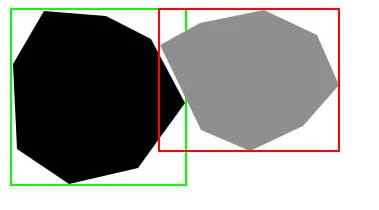
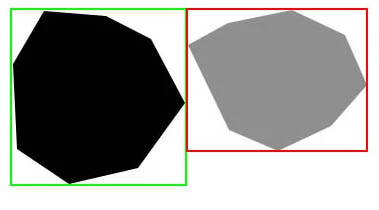
Following a co-worker's expression of "Show me, don't tell me", I've created 2 examples of the issue at hand.  Below are 2 images of the correct and incorrect result of what I'm trying to do based on bounds-based placement (incorrect) and transparent pixel detection placement (correct).  In the examples, the red and green boxes are there to represent the objects' bounds.

Desired outcome:

Bounds based outcome (incorrect for this project):

Note: The mock-up uses solid colors and hard-shapes, but the actual items being used are more detailed inside the shape with generally softer corners (by softer, I mean more rounded).

Anyway, due to interruptions at work I'm still setting up to try the methods suggested by csuebele and EnsilZah.  I'll let you know how those pan out, though I'm still open to other suggestions in the meantime.

Edit: figured I better clarify.  The overlap detection was requested due to their odd shapes, the actual placement is being handled by some code I've been working on; which can account for most, but not all object shapes.  For those that fall into the extra category, the overlap detection will tell me if I need to have the script nudge one layer away from the other a little bit.


I had some free time at work so here's my implementation, only problem is I don't know how to suppress the 'no pixels selected dialog.

alert(checkOverlapping());

function checkOverlapping()

{

    var selectedLayers = getSelectedLayersIdx();

    if (selectedLayers.length != 2) {alert ("Please select the two layers you would like to check"); return null;}

    makeActiveByIndex(selectedLayers[0]);

    selectActivePixels();

    makeActiveByIndex(selectedLayers[1]);

    intersectActivePixels();

    activeDocument.quickMaskMode=true;

    activeDocument.activeLayer.threshold (128);

    activeDocument.quickMaskMode=false;

    try

    {

        activeDocument.selection.bounds;

    }

    catch (e)

    {

        return false

    }

    activeDocument.selection.deselect();

    return true;

}

function cID (inVal) { return charIDToTypeID(inVal);}

function sID (inVal) { return stringIDToTypeID(inVal);}

function selectActivePixels()

{

    var desc15 = new ActionDescriptor();

    var ref8 = new ActionReference();

    ref8.putProperty( cID( "Chnl" ), cID( "fsel" ) );

    desc15.putReference( cID( "null" ), ref8 );

    var ref9 = new ActionReference();

    ref9.putEnumerated( cID( "Chnl" ), cID( "Chnl" ), cID( "Trsp" ) );

    desc15.putReference( cID( "T   " ), ref9 );

    executeAction( cID( "setd" ), desc15, DialogModes.NO );

}

function intersectActivePixels()

{

    var desc18 = new ActionDescriptor();

    var ref13 = new ActionReference();

    ref13.putEnumerated( cID( "Chnl" ), cID( "Chnl" ), cID( "Trsp" ) );

    desc18.putReference( cID( "null" ), ref13 );

    var ref14 = new ActionReference();

    ref14.putProperty( cID( "Chnl" ), cID( "fsel" ) );

    desc18.putReference( cID( "With" ), ref14 );

    executeAction( cID( "Intr" ), desc18, DialogModes.NO );

}

function makeActiveByIndex( idx){

    var desc = new ActionDescriptor();

      var ref = new ActionReference();

      ref.putIndex(cID( "Lyr " ), idx)

      desc.putReference( cID( "null" ), ref );

      desc.putBoolean( cID( "MkVs" ), true );

   executeAction( cID( "slct" ), desc, DialogModes.NO );

};

function getSelectedLayersIdx(){

      var selectedLayers = new Array;

      var ref = new ActionReference();

      ref.putEnumerated( cID("Dcmn"), cID("Ordn"), cID("Trgt") );

      var desc = executeActionGet(ref);

      if( desc.hasKey( sID( 'targetLayers' ) ) ){

         desc = desc.getList( sID( 'targetLayers' ));

          var c = desc.count

          var selectedLayers = new Array();

          for(var i=0;i<c;i++){

            try{

               activeDocument.backgroundLayer;

               selectedLayers.push(  desc.getReference( i ).getIndex() );

            }catch(e){

               selectedLayers.push(  desc.getReference( i ).getIndex()+1 );

            }

          }

       }else{

         var ref = new ActionReference();

         ref.putProperty( cID("Prpr") , cID( "ItmI" ));

         ref.putEnumerated( cID("Lyr "), cID("Ordn"), cID("Trgt") );

         try{

            activeDocument.backgroundLayer;

            selectedLayers.push( executeActionGet(ref).getInteger(cID( "ItmI" ))-1);

         }catch(e){

            selectedLayers.push( executeActionGet(ref).getInteger(cID( "ItmI" )));

         }

     var vis = app.activeDocument.activeLayer.visible;

        if(vis == true) app.activeDocument.activeLayer.visible = false;

        var desc9 = new ActionDescriptor();

    var list9 = new ActionList();

    var ref9 = new ActionReference();

    ref9.putEnumerated( cID('Lyr '), cID('Ordn'), cID('Trgt') );

    list9.putReference( ref9 );

    desc9.putList( cID('null'), list9 );

    executeAction( cID('Shw '), desc9, DialogModes.NO );

    if(app.activeDocument.activeLayer.visible == false) selectedLayers.shift();

        app.activeDocument.activeLayer.visible = vis;

      }

      return selectedLayers;

};

2 replies

Inspiring
March 26, 2014

Alright, I believe this should work.

Select the pixels for layer A

Save selection.

Select the pixels for layer B

Load Mask from layer A as intersection.

(Delete stored mask)

Go into Quick Mask Mode.

Do a Threshold operation at whichever value you deem apropriate to ignore semi-transparent pixels.

Return from Quick Mask Mode.

Check if a selection remains (I believe I did that once with a Try/Catch block when trying to get selection bounds)

dgolbergAuthor
Inspiring
March 26, 2014

Interesting suggestions, I'll have to give them a try and see how it goes.  This would certainly be quicker (and easier) than my current plans using mathematical equations, if they work as expected.

Participant
March 26, 2014

are your images tonal? 

or are they flat and solid?

I would change the opacity and see if they are overlapping.  the odd color would be your overlaps

Chuck Uebele
Community Expert
Community Expert
March 25, 2014

So from your post, I take it that the shapes are irregular and not rectangles?  The bounds comand would work with rectangles, but to try and do this with pixels using extendscript would be painfully slow.

dgolbergAuthor
Inspiring
March 25, 2014

I kind of figured it would be unless there was some kind of option I'm not aware of that already does this (though it sounds like there isn't).  Regardless, it would still be faster than doing the task this will be used with, manually.

Right now, I'm building some code that will find 8 points on the layer (the layers are convex in shape and the points are basically laid out like a compass; ie: N,NE,E, etc.) that I can use to check if any other layers intersect those points.  Not perfect, but better than nothing I figure; though I will need a way to detect all layers that intersect the specific point.

So I guess an alternate question would be; is there an easy way to detect all layers that intersect a specific pixel coordinate?  Preferrably without having to cycle through them all and check bounds vs the point.

Inspiring
March 26, 2014

I would expect it should work with something along the lines of selecting the pixels of the first layer (as in ctrl-click layer) and then intersecting the selection with the second layer (as in ctrl-alt-shift clicking on the second layer) and then testing if the resulting selection is not empty.