

Known Participant
July 7, 2021
Answered

Remove first bounds in Script

  • July 7, 2021
  • 5 replies
  • 2110 views

I have PNG File. I want to remove first bounds in script.

Step 1:- Open PNG File.

Step 2:- Load Selection

Step 3:- I have marked. Remove First Bounds in Script
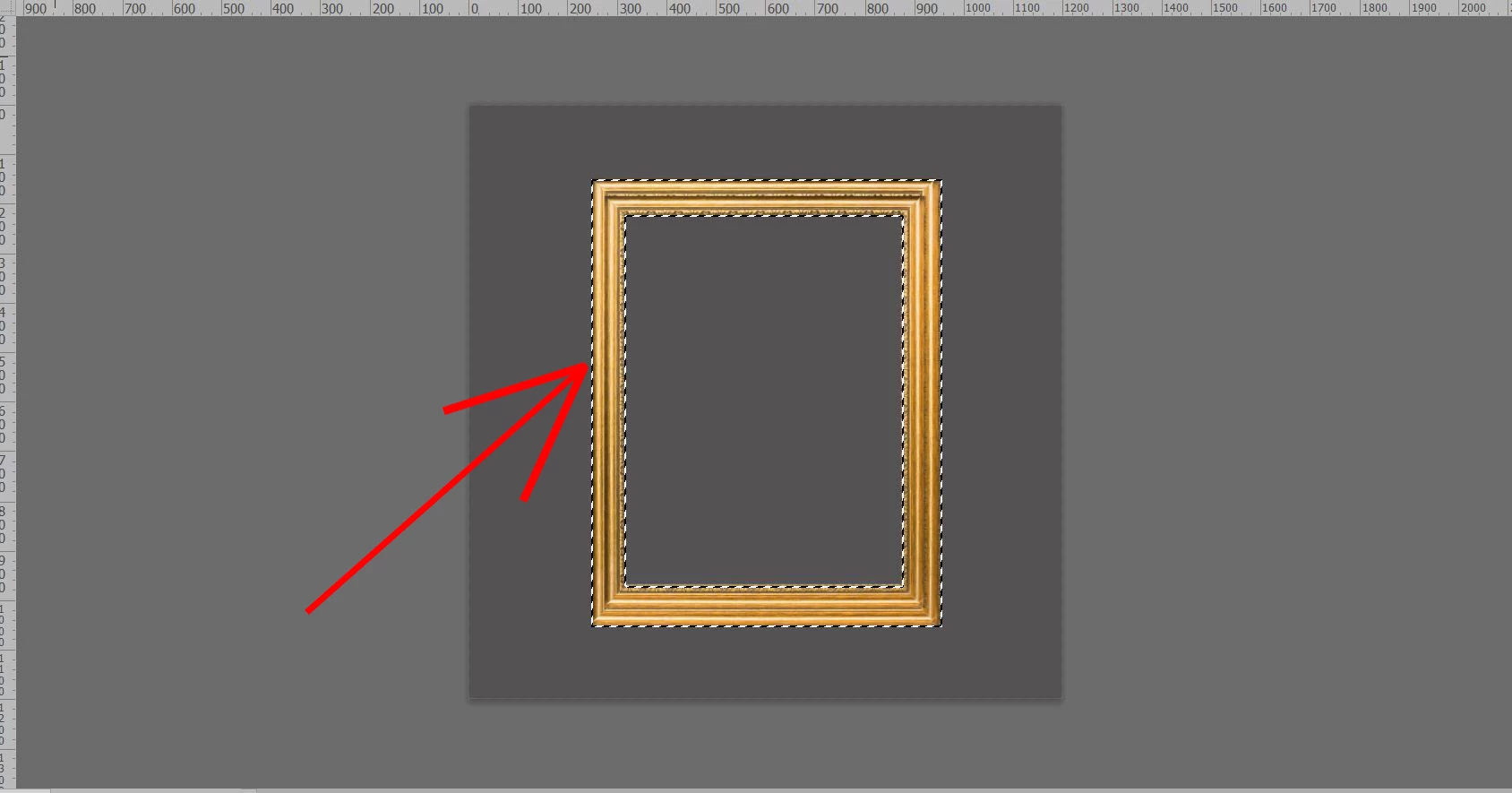


This topic has been closed for replies.
Correct answer Kukurykus
b = (slctn = (aD = activeDocument).selection).bounds;
slctn.store(newChnnl = aD.channels.add()), slctn.select
([[b[0], b[1]], [b[2], b[1]], [b[2], b[3]], [b[0], b[3]]])
slctn.load(newChnnl, SelectionType.DIMINISH)
aD.activeChannels = aD.componentChannels

5 replies

c.pfaffenbichler
Community Expert
Community Expert
July 7, 2021

Do all the images contain frames? 

Then it might be possible to automate the measurement via a Work Path without manual input. 

MXKSAuthor
Known Participant
July 7, 2021

Can you provideo script

Kukurykus
Legend
July 7, 2021

May you cease asking of new stuff, but finish the main problem of this thread?

Kukurykus
KukurykusCorrect answer
Legend
July 7, 2021
b = (slctn = (aD = activeDocument).selection).bounds;
slctn.store(newChnnl = aD.channels.add()), slctn.select
([[b[0], b[1]], [b[2], b[1]], [b[2], b[3]], [b[0], b[3]]])
slctn.load(newChnnl, SelectionType.DIMINISH)
aD.activeChannels = aD.componentChannels
MXKSAuthor
Known Participant
July 7, 2021

Well @Kukurykus Worked It

Kukurykus
Legend
July 7, 2021

That's nice, but would be nicer if you answered for this question: Jul 07, 2021

Inspiring
July 7, 2021

Using ExtendScript you could do the following:


Step 4:- Save the selection bounds to a variable

Step 5:- Invert the selection

Step 6:- Make an intersecting selection with a rectangular marquee using the bounds + an offset

Result: you will now have only the inside of the frame selected (the place where the painting would go)


selectInterior = function () {
    var ADselector = new ActionDescriptor();
    var ARlayerRef = new ActionReference();
    var ARchannelRef = new ActionReference();
    ARlayerRef.putProperty(charIDToTypeID("Chnl"), charIDToTypeID("fsel"));
    ADselector.putReference(charIDToTypeID("null"), ARlayerRef);
    ARchannelRef.putEnumerated(charIDToTypeID("Chnl"), charIDToTypeID("Chnl"), charIDToTypeID("Trsp"));
    ADselector.putReference(charIDToTypeID("T   "), ARchannelRef);
    executeAction(charIDToTypeID("setd"), ADselector, DialogModes.NO);

    var frame = {
        left: app.activeDocument.selection.bounds[0] + 2,
        top: app.activeDocument.selection.bounds[1] + 2,
        right: app.activeDocument.selection.bounds[2] - 2,
        bottom: app.activeDocument.selection.bounds[3] - 2
    }
    app.activeDocument.selection.invert();

    var rectangularSelection = [[frame.left, frame.top],
    [frame.left, frame.bottom],
    [frame.right, frame.bottom],
    [frame.right, frame.top]];
    app.activeDocument.selection.select(rectangularSelection, SelectionType.INTERSECT, 0, false);
};

selectInterior();
MXKSAuthor
Known Participant
July 7, 2021

Very Well Worked It, Thanku so much sir

Kukurykus
Legend
July 7, 2021

What is wrong with you that you only expect answers from others, but when you're asked of something by those users you're ignoring them? We provided you the solution, then you said that does not work, though it does, and you can't even say what kind of result you've got? 😕😕

JJMack
Community Expert
Community Expert
July 7, 2021

A PNG image has a single layer  the layer bounds may be smaller then the document canvas for the PNG subject may be boarded by empty pixels.  The bounds or the Png subject is the layers bounds, The bounds is a rectangle that is so many pixels wide and so many  pixel high  that is located somewhere with in the document Canvas. The layer bounds it either Canvas size or smaller.  The PNG subject may has pixels like you Frame or be any shape and have empty pixels like your frame has an empty image area.     You can load the layer transparency as a selection the get the selection bounds it will be the PNG Subject bounds. You frame's rectangle bounds. Image Crop will then crop off the transparent canvas boarders

JJMack
JJMack
Community Expert
Community Expert
July 7, 2021

It seem to me you know nothing about scripting Photoshop.  And you  also do not know how to use Photoshop well or understand how Photoshop works or does things.  What you seem to want to do is frame an image and perhaps mat the image in the frame and  hang the  framed image on a wall.   This is easy to do by expanding  the image's canvas add a Mat layer. Expand the canvas add a frame layer. Expand the canvas and add a wall layer.  This can be done using Photoshop actions and the images used  can even be a High resolution Print size image.  You will be able to learn how to record Actions and play actions.  Photoshop Action are easy to record and use, Actions are just a recorded sequence of Photoshop Steps.  On a document you perform the sequence of steps the action recorder records the steps and you have your action.  There Are additional features you can use that the Action recorder supports.  Photoshop scripting is programming  Photoshop.  Scripts preform Photoshop steps logically.  You need Programming knowledge, know how to use Photoshop well and understand how photoshop works.   Scripting Photoshop is not easy.   Most Photoshop users will never program a Photoshop script. They may use Script provided by Adobe or made available by other Photoshop Script programmers. Here is how Actions may work.

JJMack
JJMack
Community Expert
Community Expert
July 7, 2021

Crafting Actions Package UPDATED Aug 10, 2014 Added Conditional Action steps to Action Palette Tips.
Contains

Example
Download

JJMack
