Participant
March 7, 2018
Answered

How to merge multiple groups and keep them on their separate layers?

  • March 7, 2018
  • 5 replies
  • 20514 views

Hi Guys


I'm sure there is a really simple way to do this but I can't find the answer anywhere!


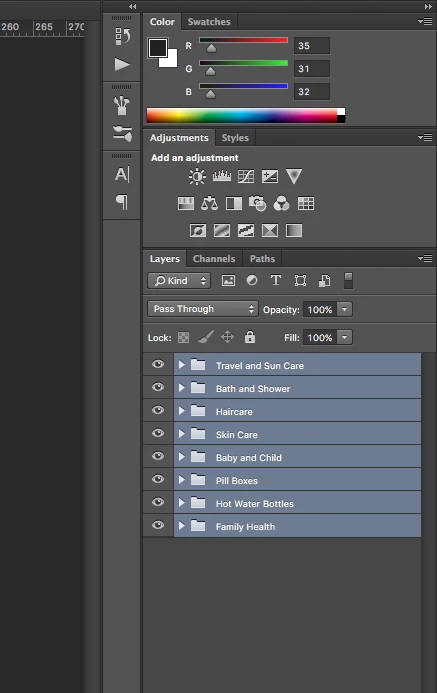
When I create multiple groups on separate layers, there must be a quicker way then right clicking and individually merging each layer so they stay on their respective layers?


A shortcut would save so much time!!


Thanks


Correct answer Kukurykus

I can't help right now but move your topic to Photoshop Scripting  and ask of help r-bin​ that should be easy for him


function sTT(v) {return stringIDToTypeID(v)} $.level = 0

function R() {return ref = new ActionReference()} arr = []


function DoL(v) {R().putEnumerated(sTT(v), sTT('ordinal'), sTT('targetEnum'))}


function bGrnd(v) {R().putIndex(sTT('layer'), v)}


function SC(v) {

     return typeIDToStringID((dsc = executeActionGet(ref))

     .getEnumerationValue(sTT(lS = 'layerSection'))) == lS + v

}


function sNL() {

     DoL('layer'); (dsc = new ActionDescriptor()).putReference(sTT('null'), ref)

     executeAction(sTT('selectNoLayers'), dsc, DialogModes.NO)

}


function mLN(v) {

     R().putIdentifier(sTT('layer'), v);

     (dsc = new ActionDescriptor()).putReference(sTT('null'), ref)

     dsc.putBoolean(sTT('makeVisible'), true)

     executeAction(sTT('select'), dsc, DialogModes.NO)

     executeAction(sTT('mergeLayersNew'), undefined, DialogModes.NO)

}


function prcs(v1, v2) {

     bGrnd(idx = v1), lID = executeActionGet(ref).getInteger(sTT('layerID'))

     if (SC('Start')) {

          bGrnd(idx - 1); if (SC('Content')) v2 ? arr.push(lID) : (sNL(), mLN(lID))

     }

}


try{

     R().putIdentifier(sTT('layer'), 1)

     bG = !(executeActionGet(ref))

     .getBoolean(sTT('background'))

}

catch (err) {bG = 1}


DoL('document'), tL = sTT('targetLayers')

if ((dsc = executeActionGet(ref)).hasKey(tL)) {

     for(lst = dsc.getList(tL), i = 0; i < lst.count;) {

          prcs(lst.getReference(i++).getIndex() + bG, true)

     }

     sNL(); for(i = 0; i < arr.length; i++) mLN(arr[i])

}

else {

     DoL('layer'), prcs(executeActionGet(ref)

     .getInteger(sTT('itemIndex')) - !bG, false)

}

5 replies

Participating Frequently
November 27, 2023

Hi Kukurykus

Thank you for some really helpfull answers. 
Is it possible to change the script, into merging art boards into seperate merged layers? 
Preferable a script that accounts for different amount of artboards if possible?

The script works smooth with groups, but fails when using artboard 😞

Thank you in advance.  

Participating Frequently
November 27, 2023

Correction. 

It actually kind of works, but when having multiple groups inside the artboards, it messes the action up. 
So the script would need to just merge the top art boards, and dont account for the underlying groups. 

And is it possible to make it select all artboards automaticly? Right now i need to select the artboards manual, and i would like to do select ALL art boards, so i can use the final action on different template files with changing amounts of artboards. 


Stephen Marsh
Community Expert
Community Expert
May 29, 2020

I'm adding a new reply rather than a threaded-reply...


It would be helpful to show actual before/after images of the expanded layer sets/groups and the desired result.


It is more helpful to show an actual image than to describe it in words! Both are needed, this entire topic thread is a mystery to me!

Kukurykus
Legend
May 29, 2020

There is already solution in this thread, so what for you restart it?

Stephen Marsh
Community Expert
Community Expert
May 30, 2020

Hi Kukurykus – the solution does not work for me, so I am trying to understand the problem!


I created a very simple test, 2 layer groups, each group had 2 layers inside. I selected the groups and ran your code... There is no apparent result, except that the previously selected groups are now deselected? There is nothing in the history panel and no layers or groups are merged.


My best guess was that each layer group should be merged into a single layer maintaining the stacking order of the layers (CMD/CTRL E or merge group) and that the script should do this for all selected layer sets/groups... Or is it that the group should be retained and all layers inside the group are merged?


I know that this is an old thread from 2018 that has recently been bumped by MrCocktail in 2020, I just don't understand the requests or the solutions!


Photoshop CC2019 on Mac OS Mojave 10.14.6

Inspiring
May 9, 2018

Was this ever resolved? I've run into a similar issue. I'm trying to create font using the Fontself plugin, and need to merge several groups while still keeping each character/glyph on its own layer. I'm asking here because I couldn't find this topic in Photoshop Scripting

Kukurykus
Legend
May 11, 2018

I updated my previous post. Regarding your question tell me what that Fontself plugin does and is that needed for the script you want or script can work separately, without / after that plugin. I don't understand what you mean by keeping each glyph / character on its own layer as the script I wrote for jamesc16840069 merges each group into new single layers. Explain what you exactly mean, should be group of layers merged into new layer while glyphs/characters (what are they exactly?) will be kept on separate text layers? Write step by step what you exactly want...

Raimundo Illanes
Inspiring
March 7, 2018

You can try also, to convert it to a smart object> Layer > Smart Object > Convert to Smart Object, or just try right click at the name and Convert to Smart Object. That way you will have an embed separated PSB file.

macpawel
Participating Frequently
March 7, 2018

First select all groups and

Just use CTRL+E or Cmd+E on mac shortcut - and thats all

pawel

Participant
March 7, 2018

Almost there, but these commands only do one layer at a time, or if select all and then Cmd+E it merges all layers into one layer.

Doesn't take long to Cmd+E individual layers, but would be quicker if I could do all layers at the same - prob not!

Thanks anyway

Kukurykus
KukurykusCorrect answer
Legend
March 7, 2018

I can't help right now but move your topic to Photoshop Scripting  and ask of help r-bin​ that should be easy for him


function sTT(v) {return stringIDToTypeID(v)} $.level = 0

function R() {return ref = new ActionReference()} arr = []


function DoL(v) {R().putEnumerated(sTT(v), sTT('ordinal'), sTT('targetEnum'))}


function bGrnd(v) {R().putIndex(sTT('layer'), v)}


function SC(v) {

     return typeIDToStringID((dsc = executeActionGet(ref))

     .getEnumerationValue(sTT(lS = 'layerSection'))) == lS + v

}


function sNL() {

     DoL('layer'); (dsc = new ActionDescriptor()).putReference(sTT('null'), ref)

     executeAction(sTT('selectNoLayers'), dsc, DialogModes.NO)

}


function mLN(v) {

     R().putIdentifier(sTT('layer'), v);

     (dsc = new ActionDescriptor()).putReference(sTT('null'), ref)

     dsc.putBoolean(sTT('makeVisible'), true)

     executeAction(sTT('select'), dsc, DialogModes.NO)

     executeAction(sTT('mergeLayersNew'), undefined, DialogModes.NO)

}


function prcs(v1, v2) {

     bGrnd(idx = v1), lID = executeActionGet(ref).getInteger(sTT('layerID'))

     if (SC('Start')) {

          bGrnd(idx - 1); if (SC('Content')) v2 ? arr.push(lID) : (sNL(), mLN(lID))

     }

}


try{

     R().putIdentifier(sTT('layer'), 1)

     bG = !(executeActionGet(ref))

     .getBoolean(sTT('background'))

}

catch (err) {bG = 1}


DoL('document'), tL = sTT('targetLayers')

if ((dsc = executeActionGet(ref)).hasKey(tL)) {

     for(lst = dsc.getList(tL), i = 0; i < lst.count;) {

          prcs(lst.getReference(i++).getIndex() + bG, true)

     }

     sNL(); for(i = 0; i < arr.length; i++) mLN(arr[i])

}

else {

     DoL('layer'), prcs(executeActionGet(ref)

     .getInteger(sTT('itemIndex')) - !bG, false)

}