

Inspiring
May 20, 2020
Answered

How to release clipped layers

  • May 20, 2020
  • 2 replies
  • 4954 views

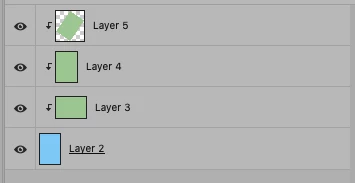
How to release clipped layers with javascript? I need to write a script which will release all clipped layers.

P.S. Number of clipped layers are not always 3 (like on example below)
This topic has been closed for replies.
Correct answer Stephen Marsh

Ok, below is an example.

P.S. Structure of layers is different case by case, also names of layers are not definded.
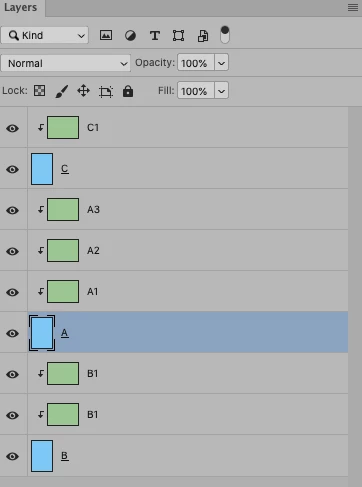

OK, so layer A is selected. What now? Is it that A1/A2/A3 should then be unclipped, while the clipped layers of B and C remain unchanged? What you require is not clear to me...


// Release clipping layers from base layer
#target photoshop
app.bringToFront();
function main() {
    app.runMenuItem(charIDToTypeID("GrpL"));
    app.runMenuItem(charIDToTypeID("GrpL"));
}
app.activeDocument.suspendHistory("Release clipping layers", "main()");


Presuming that the "base" layer A is selected, the above script will toggle clipping on/off – which has the side effect of releasing clipping on all the layers originally clipped to layer A! 

2 replies

Stephen Marsh
Community Expert
Community Expert
May 20, 2020

OK, try this one:


/* 
release all clipped layers.jsx

How to release clipped layers:
https://community.adobe.com/t5/photoshop/how-to-release-clipped-layers/td-p/11145702

Credit to:
https://stackoverflow.com/questions/56668542/how-to-identify-clipping-mask-using-javascript-without-ratios-for-photoshop
*/

#target photoshop
app.bringToFront();

function main() {
    var doc = app.activeDocument, layers = doc.layers;

    for (var x = 0; x < layers.length; x++) {
        doc.activeLayer = doc.layers[x];
        var ref = new ActionReference();
        ref.putEnumerated(charIDToTypeID("Lyr "), charIDToTypeID("Ordn"), charIDToTypeID("Trgt"));
        var desc = executeActionGet(ref);
        if (desc.hasKey(charIDToTypeID('Grup')) && desc.getBoolean(charIDToTypeID('Grup'))) {
            unGroup();
        }
    }

    function unGroup() {
        var c2t = function (s) {
            return app.charIDToTypeID(s);
        };
        var s2t = function (s) {
            return app.stringIDToTypeID(s);
        };
        var descriptor = new ActionDescriptor(), reference = new ActionReference();
        reference.putEnumerated(s2t("layer"), s2t("ordinal"), s2t("targetEnum"));
        descriptor.putReference(c2t("null"), reference);
        executeAction(s2t("ungroup"), descriptor, DialogModes.NO);
    }
}
app.activeDocument.suspendHistory("Ungroup Layers", "main()");


milevicAuthor
Inspiring
May 21, 2020

Thanks, this works, but this script release all clipped layers on a file. Can I limit this function only on selected layer?

Stephen Marsh
Community Expert
Community Expert
May 21, 2020

You didn't specify that it should only be selected layers, just that the number would be variable... I'll see what I can do, but no promises.


EDIT: The previous code that I first posted works on selected layers, however, there are limitations. Can you post a cropped screenshot of the layers panel with the exact layer structure and selected layers?

Stephen Marsh
Community Expert
Community Expert
May 20, 2020

The following code will release single or multiple selected clipped layers...


Raw SL Code:


var idUngr = charIDToTypeID( "Ungr" );
    var desc24 = new ActionDescriptor();
    var idnull = charIDToTypeID( "null" );
        var ref14 = new ActionReference();
        var idLyr = charIDToTypeID( "Lyr " );
        var idOrdn = charIDToTypeID( "Ordn" );
        var idTrgt = charIDToTypeID( "Trgt" );
        ref14.putEnumerated( idLyr, idOrdn, idTrgt );
    desc24.putReference( idnull, ref14 );
executeAction( idUngr, desc24, DialogModes.NO );


Previous code passed through Clean SL, converted to a function that you can call:


unGroup();

function unGroup() {
	var c2t = function (s) {
		return app.charIDToTypeID(s);
	};

	var s2t = function (s) {
		return app.stringIDToTypeID(s);
	};

	var descriptor = new ActionDescriptor();
	var reference = new ActionReference();

	reference.putEnumerated( s2t( "layer" ), s2t( "ordinal" ), s2t( "targetEnum" ));
	descriptor.putReference( c2t( "null" ), reference );
	executeAction( s2t( "ungroup" ), descriptor, DialogModes.NO );
}


However, you will need to make the layer selection yourself or perhaps somebody else can help there...

Stephen Marsh
Community Expert
Community Expert
May 22, 2020

It was not originally obvious to me, however presuming a selected layer/s:


app.runMenuItem( charIDToTypeID("GrpL") );
