


Participating Frequently
September 25, 2018
Answered

How to use + symbol on text box?

  • September 25, 2018
  • 1 reply
  • 5624 views

Hey,

When text goes out of a text box, a plus symbol appears in the bottom right, as so:
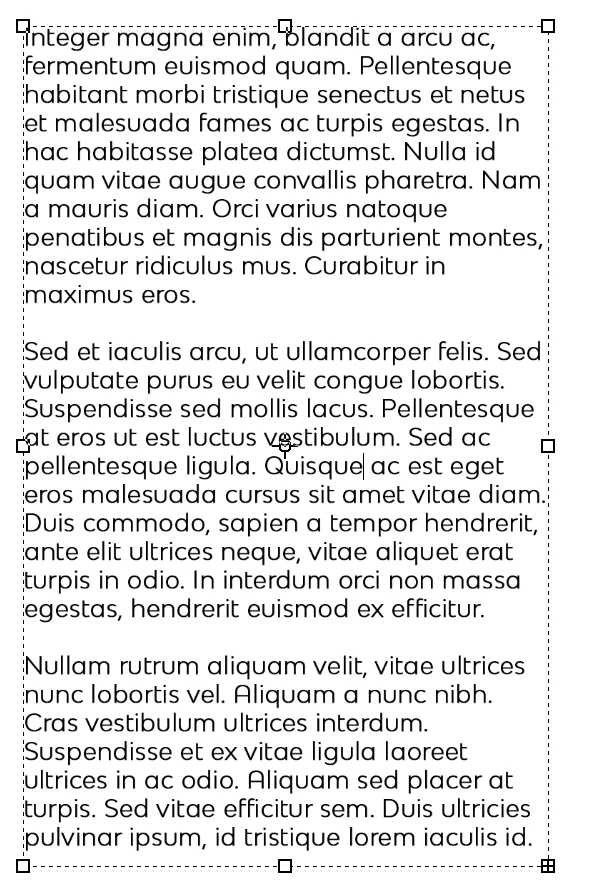
If I'm right, I'm pretty sure this symbol allows me to make a new linked textbox that continues the text. I just can't figure out for the life of me how to use it, nor could I figure out the proper search term for it in google.

Thanks for your help!!!

This topic has been closed for replies.
Correct answer John Waller

There is no text overflow feature for text boxes in Photoshop.

The + symbol shows that there is too much text to fit in the text box at that font size. Your options then are to edit the text, or resize the font or the text box. No threading unfortunately. That's in Illustrator and InDesign.

The overflow symbol in Illustrator and InDesign appears slightly above the bottom right hand corner handle of the text bounding box.

Text overflow

1 reply

John Waller
Community Expert
John WallerCommunity ExpertCorrect answer
Community Expert
September 25, 2018

There is no text overflow feature for text boxes in Photoshop.

The + symbol shows that there is too much text to fit in the text box at that font size. Your options then are to edit the text, or resize the font or the text box. No threading unfortunately. That's in Illustrator and InDesign.

The overflow symbol in Illustrator and InDesign appears slightly above the bottom right hand corner handle of the text bounding box.

Text overflow

Participating Frequently
September 25, 2018

ahhhhh I see, thank you!