Known Participant
April 29, 2012
Answered

Image preview in Open dialog window (Photoshop CS6)

  • April 29, 2012
  • 13 replies
  • 92448 views

Hi

We had a possibility to see images preview in Open File dialog window of Photoshop CS5 but in new CS6 version there is not such possibility. Should I forget about that nice option and use Mini Bridge?

This topic has been closed for replies.
Correct answer Noel Carboni

Just for clarity:

What we're talking about being missing from Photoshop CS6 is the preview near the bottom of the dialog that was there in Photoshop CS5 and earlier:
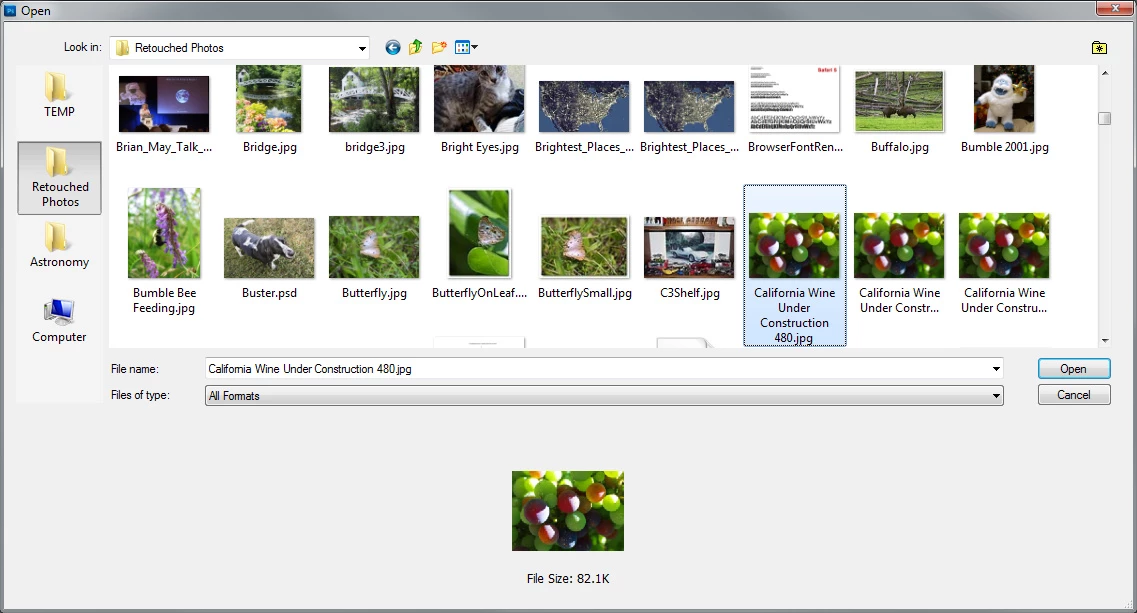
This is what you see now with Photoshop CS6:
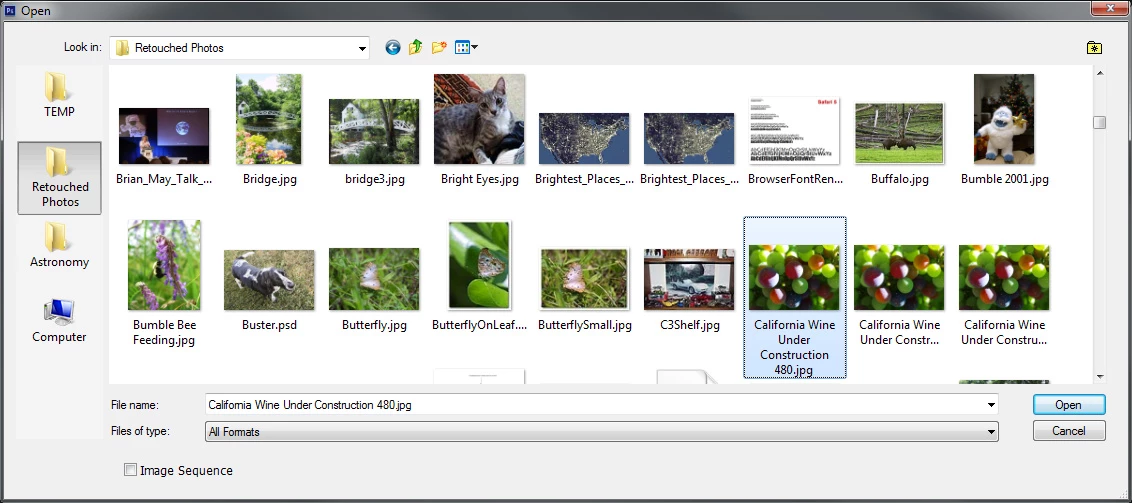
They're both Operating System dialogs.  It's just that Adobe has augmented the dialog to add additional preview functionality in the Photoshop CS5 and earlier dialogs and that has been removed for some unknown reason.  Note that they have NOT removed all augmentation - that little [  ] Image Sequence box is not provided by Windows.

-Noel

[MODERATOR] Marking this post as correct as it perfectly illustrates the issue. This topic is further discussed here: Photoshop: No image preview on Open dialog box in CS6

Message was edited by: Brett N

13 replies

Participant
September 22, 2017

Photoshop image are not displayed in my my preview lane Help me

Participant
January 22, 2016

Seriously, fix this, its comical that your flagship image editing program cant preview its own files... Straight up ridiculous that it used to and you removed the feature... That we all use dozens of time a day.

February 18, 2013

This software works perfectly, it's free, does not expire, and it really does the job we need with previews without having to open additional menus. This installed windows 7 ultimate 64 bit, and Photoshop CS6. All Good.

This address is Original download version 1.9, in 32 and 64 bits. after this version began to charge for this software. Virus-free and functional. I recommend.

I hope to be of help to someone in need. good luck

Mystic Thumbs

Mystic Thumbs 1.98 (last freeware version)
OS: Windows 7, Vista and Windows XP, support - x86 and x64.
The definitive image thumbnail generator for Windows Explorer.
MysticThumbs generates thumbnails of many image types not natively supported by Windows. It does this transparently and in the background for Explorer so you don't have to run a seperate application to preview your images.
It is a native Windows Explorer plugin which means you don't have to do anything other than install it. This means you don't have any new interfaces to learn, think about or otherwise deal with.
Home (shareware)

Known Participant
December 11, 2012

I have spent several hours trying out different solutions to this glaringly obvious issue. None of the options are acceptable and I'll tell you why.

Having a thumbnail preview of the image files via a "large icon" view of the files doesn't solve the issue completely. First, it takes me more time to find the files I am looking for because my file listing is now much more spread out. If I make the icons any smaller then the previews are worthless. Secondly, unlike the OS dialog outside of Photoshop the file open dialog inside Photoshop CS6 truncates file names. So now I have no idea what file type I am going to be opening unless I inspect each and every file to find the PSD version versus a JPG version, etc.

I don't care who wants to blame who or what issues stand in the way. The end result is that common functionality that has previously existed has been removed and not replaced with anything else. Workflow is key to those who work in related fields and use Photoshop and at this time I don't see any acceptable solutions. Bridge is clunky and slow, all of the plugins and codecs that keep being pushed do not solve the issue and two corporate behemoths are playing the blame game when in the end the user is the one who suffers.

Noel Carboni
Legend
December 11, 2012

Alas, we have entered the time of vendors delivering less and charging more.

Just click once on the icon to see the full filename.

-Noel

Known Participant
December 11, 2012

One more workaround that doesn't give me a valid solution with a directory of neatly named files (read: longer than several characters) and so I am eternally lost.

Maybe a downgrade is in order for me... I am seeing no benefit from CS6 at all and obvious detraction from my workflow as noted in this thread.

As a professional in software development I understand the issues Adobe and Microsoft are facing. What makes good product and customer service is to find a solution to those problems. The consumer should never suffer. Bad PR, bad mojo and a small, but very compelling reason, to stop buying further Adobe products.

A preview. That's ALL that was needed. Not being able to provide that is just rediculous.

The responses from Chris in the other thread that shows at the top of a Google search, while honest and up-front, do nothing to further a solution.

Inspiring
July 31, 2012

I just wish they'd bring the image preview back in the Open Dialog. I try to use Mini Bridge (which I absolutely detest) and get the message that the images are too large and that I have to have Bridge running already. Not acceptable.

Participating Frequently
May 23, 2012

Naturally, the Adobe rep was entirely unhelpful and gave me a bunch of prelisted answers. No surprise there. At the end, he just ended up referring me to http://feedback.photoshop.com to submit feedback, which I've already logged a Problem thread for this topic. Make sure you guys go there and add your support to that thread so maybe Adobe will actually do something about it. Without more people making a fuss over it, they won't even look into it. Here's the thread: http://gsfn.us/t/2vgwb

Participating Frequently
May 23, 2012

Well, Marian, it's definitely better than nothing. I went ahead and installed it. It has a couple of nice features, but still leaves much to be desired for those of us that like browsing in List view. Having to right click on the file and find "SageThumbs" in a submenu every time I want a quick preview is still cumbersome. I like my programs to be quick, efficient, and effortless.

Which brings me back to Bridge and why it's no better. I'm with Jaques on this one. Running a program on top of another just to OPEN a file? I mean...how lame is that? This is the OPEN function for goodness sake. It's been in like every program ever made where you can save files. And all of a sudden, it's not good enough and we need Bridge to do the work for us? Bridge's new slogan--"Adobe Bridge: For those of us that like to piss away system resources just for the hey of it". I'm not saying it doesn't have some good things once in a while for comparison purposes, and I'll use it here and there, but really, when I just need to open a file and maybe glance for half a second at a preivew to make sure I'm opening the correct file, is it too much to ask for Adobe just to leave well enough alone? I really can't imagine another so-called "bug" that should be higher on Adobe's priority list than this one right now that needs fixing.

May 23, 2012

Promofuse wrote:

... leaves much to be desired for those of us that like browsing in List view...

You can still browse in List view with a preview pane to the right and/or with a preview in the lower left corner. You just need to look in Explorer instead of Photoshop's File->Open.

Instead of CTRL-O, press WINDOWS-E.

https://sagethumbs.googlecode.com/svn/trunk/sagethumbs-icon-view.png

https://sagethumbs.googlecode.com/svn/trunk/sagethumbs-after.png

Participating Frequently
May 23, 2012

I'll give you that one Marian. That will probably have to be my go-to solution for now. Still a pain in the arse and ineffecient, but I think I can keep from getting straight-up ticked off for now, not to mention it still seems better than running Bridge in the background. I'm actually talking to an Adobe rep right now on instant chat and will let you guys know if he can tell me anything (though I would bet most of my money on "no"). Thanks for the workaround for now Marian.

Participating Frequently
May 23, 2012

Right Noel. That's exactly the problem I'm talking about. I am very curious as to what this Sage Thumbs that Marian suggested is. Kind of looks like the Apple dialog box preview. I'm sure it would work fine in Windows Explorer, but the question is; does it work within Photoshop's "Open" dialog box? If so, I'd be all for it. Though....I'm not usually a fan of installing third party software that changes Windows functionality/appearance. It always seems to slow it down and cause problems later.

May 23, 2012

Promofuse wrote:

...I'm sure it would work fine in Windows Explorer, but the question is; does it work within Photoshop's "Open" dialog box?...

That's the same thing!

Here's what it looks like in my CS5 File Open dialog...

station_two
Inspiring
May 23, 2012

So as not to hijack this thread, it would be interesting to open a new thread or even a poll just to inquire why folks don't use Bridge in this scenario.

I always launch Bridge before Photoshop.

Oh well, each to his own…

May 23, 2012

For those that do not want to pay for file previews in Explorer...

Sage Thumbs is not quite ideal in accurately previewing color of CMYK PSDs but it is free.

https://code.google.com/p/sagethumbs/

You might also try the last freeware version of Mystic Thumbs (1.98)

http://www.321download.com/LastFreeware/page40.html

PECourtejoie
Community Expert
Community Expert
May 23, 2012

In CS6, Adobe uses the Os dialog, where there is no thumbnail (there seems to be a bug that a Microsoft employee claims to be fixed, and Adobe says it isn't:

http://forums.adobe.com/message/1641868#1641868 )

Were you using the Adobe dialog in CS5?

station_two
Inspiring
May 23, 2012

Well, it's definitely not a problem in my Mac version of CS6, where even raw files and raw DNGs show their preview in the Photoshop Open dialog box.  So, it's very likely a Microsoft problem.

Noel Carboni
Noel CarboniCorrect answer
Legend
May 23, 2012

Just for clarity:

What we're talking about being missing from Photoshop CS6 is the preview near the bottom of the dialog that was there in Photoshop CS5 and earlier:

This is what you see now with Photoshop CS6:

They're both Operating System dialogs.  It's just that Adobe has augmented the dialog to add additional preview functionality in the Photoshop CS5 and earlier dialogs and that has been removed for some unknown reason.  Note that they have NOT removed all augmentation - that little [  ] Image Sequence box is not provided by Windows.

-Noel

[MODERATOR] Marking this post as correct as it perfectly illustrates the issue. This topic is further discussed here: Photoshop: No image preview on Open dialog box in CS6

Message was edited by: Brett N

