Waterbear
Participating Frequently
May 23, 2014
Answered

Is there a way to quickly break a single text box into multiple text boxes?

  • May 23, 2014
  • 5 replies
  • 5758 views

I was advised to post my issue from the Photoshop section to this section. (*Note: I only have Photoshop, so saying "Use this other Adobe product" isn't a real answer for me.)

C/P from other post here: Is there a way to quickly break a single text box into multiple text boxes?

I have wished for this feature for many years, and I want to know if maybe there is a script that can do this

The scenario:

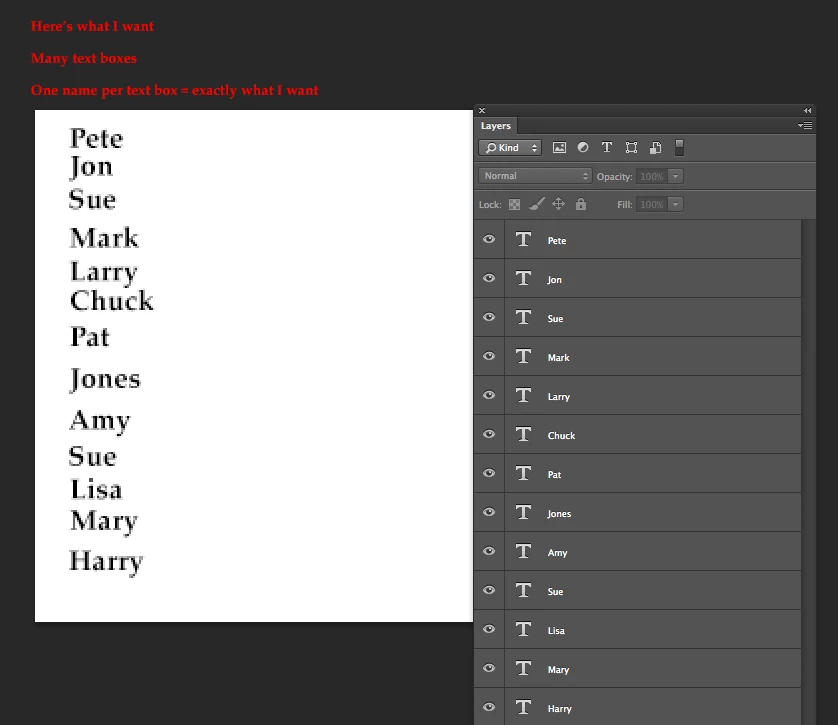
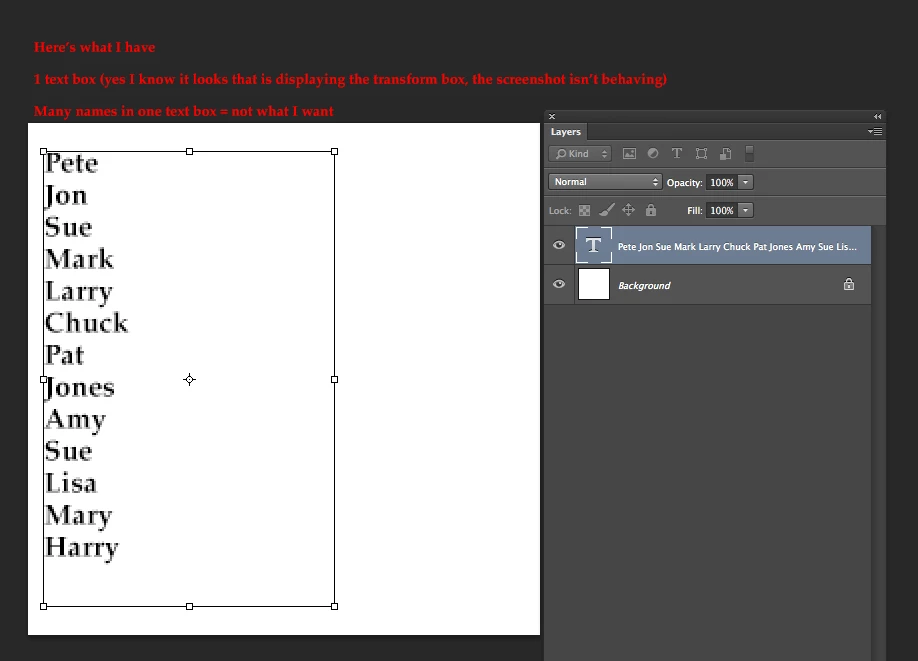
I have one text box, containing 20 names. I want 20 text boxes, each containing 1 name.

I know how to manually do it, but I want to be able to do this super fast, ie. make the machine do it for me.

Thanks!
Correct answer c.pfaffenbichler

I don’t think what you want is convenient to achieve in various possible situations.

Hndling different fonts, sizes and other settings would be highly cumbersome.

If all the text has the same type parameters you can give this a try.

// split lines from active typelayer;

// makes sense if the type properties are uniform;

// 2014, use it at your own risk;

#target photoshop

if (app.documents.length > 0) {

var myDocument = app.activeDocument;

var theLayer = myDocument.activeLayer;

if (theLayer.kind == LayerKind.TEXT) {

// get text an dleading;

var theText = theLayer.textItem.contents.split("\r");

try {

var theLeading = theLayer.textItem.leading;

}

catch (e) {

var theLeading = theLayer.textItem.size * 1.2;

};

var theOffset = 0;

// work off the array;

for (var m = 0; m < theText.length; m++) {

// duplicate layer, change its contents and move it;

var theNewText = theLayer.duplicate(theLayer, ElementPlacement.PLACEBEFORE);

theNewText.textItem.contents = theText;

theNewText.translate(0, theOffset);

// amend offset;

theOffset = theOffset+theLeading

}

}

};

5 replies

Waterbear
WaterbearAuthor
Participating Frequently
May 27, 2014

Perfect! 

As a note to new users, in addition to breaking up the entires, the script seems to generate 2 empty layers (just delete them) and keeps the original (which is useful).

Thanks, c.pfaffenbichler !

c.pfaffenbichler
Community Expert
Community Expert
May 27, 2014

Does your type layer contain blank paragraphs?

Anyways, keep in mind that the resulting type layers will have identical type properties and disregard variance.

So if you had one line in a different font that would be ignored (the font, not the line).

Participant
August 19, 2017

Hi there c.pfaffenbichler

I know you wrote the above answer numerous years ago, but I was wondering if it was possible to do the same script for Illustrator? I have a text box containing many lines of text and I'd love each line as individual points of text (but not individual layers). Is this even possible?

Thanks in advance for your advice and help.

Mjc

c.pfaffenbichler
Community Expert
Community Expert
May 26, 2014

So did the Script work as expected for you?

c.pfaffenbichler
Community Expert
Community Expert
May 24, 2014

Paste the code from the previous post into a new file in ExtendScript Toolkit or a text editor and save it as a jsx-file into Photoshop’s Presets/Scripts-folder.

After restarting Photoshop the Script should be available under File > Scripts and can be assigned a Keyboard Shortcut directly, recorded into an Action, be used in a Configurator-Panel or started from ExtendScript Toolkit directly.

c.pfaffenbichler
Community Expert
c.pfaffenbichlerCommunity ExpertCorrect answer
Community Expert
May 24, 2014

I don’t think what you want is convenient to achieve in various possible situations.

Hndling different fonts, sizes and other settings would be highly cumbersome.

If all the text has the same type parameters you can give this a try.

// split lines from active typelayer;

// makes sense if the type properties are uniform;

// 2014, use it at your own risk;

#target photoshop

if (app.documents.length > 0) {

var myDocument = app.activeDocument;

var theLayer = myDocument.activeLayer;

if (theLayer.kind == LayerKind.TEXT) {

// get text an dleading;

var theText = theLayer.textItem.contents.split("\r");

try {

var theLeading = theLayer.textItem.leading;

}

catch (e) {

var theLeading = theLayer.textItem.size * 1.2;

};

var theOffset = 0;

// work off the array;

for (var m = 0; m < theText.length; m++) {

// duplicate layer, change its contents and move it;

var theNewText = theLayer.duplicate(theLayer, ElementPlacement.PLACEBEFORE);

theNewText.textItem.contents = theText;

theNewText.translate(0, theOffset);

// amend offset;

theOffset = theOffset+theLeading

}

}

};

Participant
May 4, 2024

I tryed the code running Photoshop 2024 and just return 'Array', so I fixed it.

Here is the new version guys. Enjoy:


// split lines from active typelayer;

// makes sense if the type properties are uniform;

// 2014, use it at your own risk;
// 2024, update code to new photoshop versions and add 'How to Use' Comments;

/* How to use:
  - Create a Text Layer with all the text with break lines
  - Select the layer
  - Go to File > Scripts > Split Text Lines
  - Enjoy!
*/

#target photoshop

if (app.documents.length > 0) {

  var myDocument = app.activeDocument;

  var theLayer = myDocument.activeLayer;

  if (theLayer.kind == LayerKind.TEXT) {

    // get text an dleading;

    var theText = theLayer.textItem.contents.split("\r");

    try {

      var theLeading = theLayer.textItem.leading;

    }

    catch (e) {

      var theLeading = theLayer.textItem.size * 1.2;

    };

    var theOffset = 0;

    // work off the array;

    for (var m = 0; m < theText.length; m++) {

      // duplicate layer, change its contents and move it;

      var theNewText = theLayer.duplicate(theLayer, ElementPlacement.PLACEBEFORE);

      theNewText.textItem.contents = theText[m];

      theNewText.translate(0, theOffset);

      // amend offset;

      theOffset = theOffset + theLeading

    }

  }

};


Participant
May 8, 2024

How to to split numbers, alphabets into saperate layers?
I have this in single layer: ABCDEFGHIJKLMNOPQRSTUVWXYZabcdefghijklmnopqrstuvwxyz0123456789.,;:?!-_~#"'&()[]|`\/@°+=*$£€<>%
I want result like this: 
A
B
C
D... and so on
All numbers and albhabets in separate layers.