


Copy link to clipboard
Copied
Some initial background on the project and what it is I'm doing:
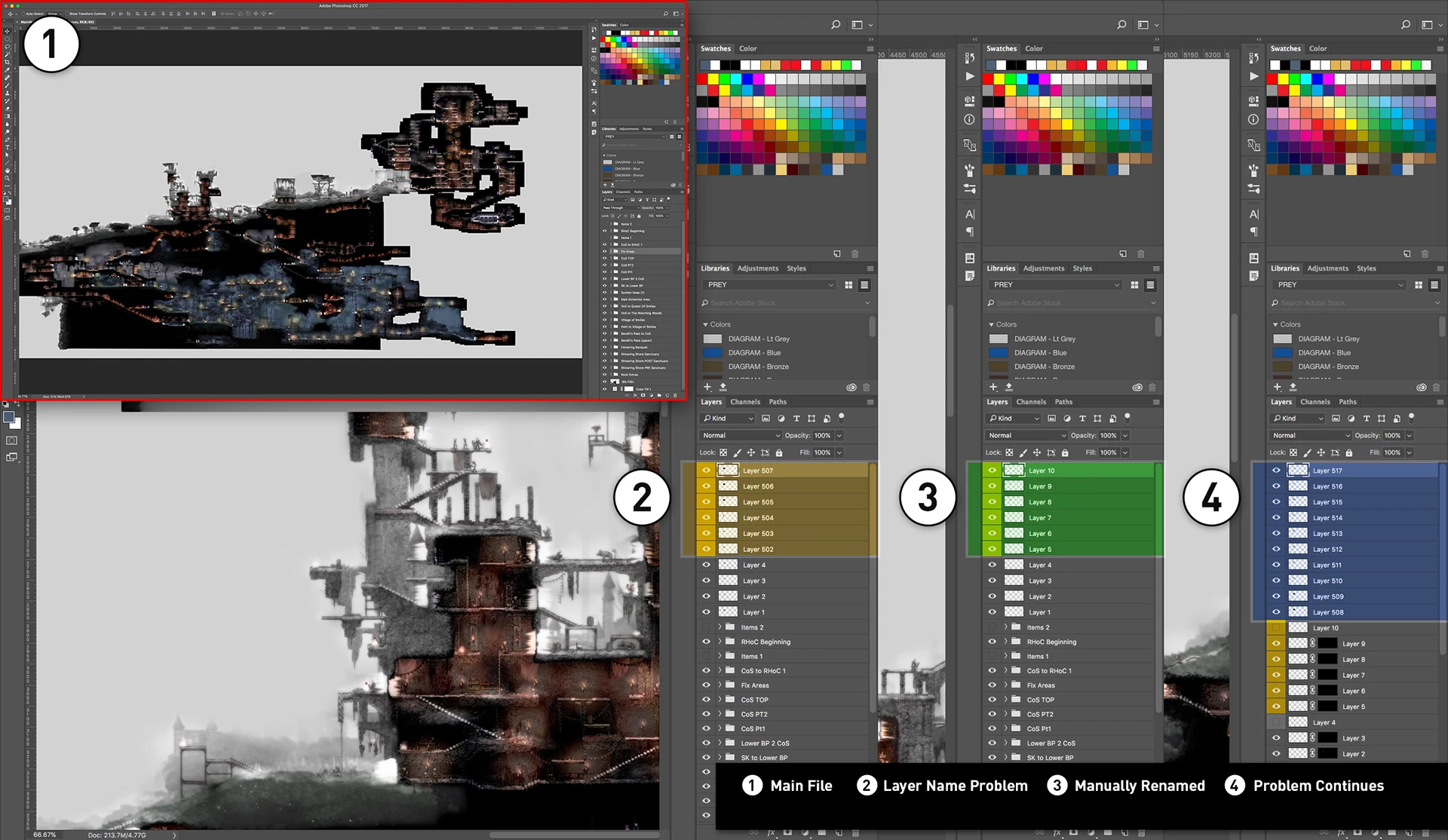
PROBLEM - I've reached a point where whenever I copy an open document and paste it into my main project file it no longer starts at Layer 1 it now starts at Layer 502 (or higher). I've gone through all my Groups and Layers and nothing is named Layer #. I tried deleting a few extra layers and it would actually start from Layer 1 but after getting to Layer 4 the next pasted layer would be Layer 502. Anyone know why this would be doing this? Is there some kind of limit to this auto naming when pasting or creating a new layer?
Copy link to clipboard
Copied
Sound like you letting Photoshop generate layer name. The name of the layers that Photoshop generate may depend on the contents of document being pasted into. IMO you would be better off duplicating the layers into the main document where you can control the name or use Drag and drop where you can drag all the layer you need at once from a document into the main document where you want them in the layer stack and retain the dragged layers names.
There is no need to ue the clipboard.
The are several want to copy layer between Document the easiest way IMO is the target, Select, Drag and Drop method with both documents open in Photoshop.
Here I create two 500px by 500px documents. In one I create three gray color layers in the other 6 Primary colors layers.
Let say I want to copy the Red Green and Blue layers from the Colors document to layers above the white layer in the GrayShades document.
I would target the White layer in the GrayShades document. Then target the red layer in the colors document. Hold the CTRL key and add the Green and Blue layers to the Targeted layers by clicking on the layers in the Layers palette. Finally I hold the Shift key down and drag the three layers from the Layers Palette and drop the onto the GrayShades Document.
Copy link to clipboard
Copied
I was letting Photoshop generate the layer names, and I've been relying on it's naming convention in order to keep track of 100's of layers at a time. For instance I'd name 200 screenshots something like "Screenshot_001.jpg, Screenshot_002.jpg" and so on because I knew when I pasted them into my main file it would name that "Screenshot_001.jpg" pasted layer "Layer 1". And the pasted "Screenshot_002.jpg" layer would be named "Layer 2" and so on. I was relying on that to keep track of 100's of these pasted layers, because renaming them manually would be a nightmare and drastically slow an already slow process. It's been fine for 1000's of screenshots and suddenly it's stopped doing what it was doing and gone haywire so that that same "Screenshot_001" is now "Layer 502". I'm wondering why this auto naming system has suddenly changed.
EDIT: Thought I'd make it clear that I was naming the actual Screenshot files things like "Screenshot_001.jpg", not the layers. I'm just opening those files, running an action and pasting them into my main document.
Copy link to clipboard
Copied
There are layer renaming extensions that might help, but I have never used them so can't say how they function
Layrs Control 2 - free PS extension
It sounds like there's a ship load of work in making video game graphics, but I guess that is par for the course with anything like stop motion, or a Disney type movie where large teams of animators put thousands of hours in.
Copy link to clipboard
Copied
You state the Photoshop still add layer names with a sequential numbered layer names. Is there a difference in document structure where the document with Layer 1 through layer X started as a single layer document. Where the Document with Layer 502 to layer X was not flat when you pasted in the first screenshot. I believe the content of the document being pasted into can influences the names that Photoshop will generate,
Copy link to clipboard
Copied
I'm taking screenshots of paused frames of a Quicktime video (on Mac) so I end up with a ton of PNGs each of which has a single layer. I'm running two actions, one that crops and flattens it (so it's just the single flattened 'Background' layer) and then another that copies all and closes the document (I had to split the actions up because every now and then some don't crop correctly). I then paste that copied layer into my main file which has the amount of layers I mentioned in my original post (380). All of the layers in my main file are manually named so there are no layers that are named 'Layer #'. Until I start pasting in these copied layers of course and then PS has been automatically naming them 'Layer 1, Layer 2, Layer 3', and so on. Because it automatically names them like that I figured I'd take advantage of it and start naming my screenshot files to correspond with that auto naming function (so I'd just start naming them things like 'Screenshot_001.jpg, Screenshot_002.jpg', etc). It was just a quicker way to do things because manually renaming 100's of layers slows things down quite a bit.
So I've been doing things this way for weeks now without a problem. All of a sudden it seems like I've reached some kind of internal program limit where it will no longer continue counting up from Layer 1 when I start pasting copied layers, after a couple of layers it now jumps to Layer 502. I don't know what this is but I've started to just rename them as I paste them in (all this time I didn't know you could just hit Tab when typing in a layer name and it'll automatically move to the next layer below allowing you to rename much quicker). It's slower but it seems like I don't really have a choice anymore.
Copy link to clipboard
Copied
I'm having a similar issue with the photoshop generated layer name. I can create a new document and the first 30 layers behave as expected. But at some random point whether I paste something in or create a new layer, the "count" jumps to 500, 1000, or some other random number.
Copy link to clipboard
Copied
Not much to go on in you post.30OK but at some random point not OK. I can not reproduce your problem on my system system I gave up trying after pasting ine 267 layers.
Supply pertinent information for quicker answers

Copy link to clipboard
Copied
Thanks. I wasn't actually looking for a solution, because it's a random issue I can't replicate it all the time.
I only wanted to let the original poster know that I too, had experienced.
Also, your message seems a bit aggressive. Maybe consider your tone next time.
Copy link to clipboard
Copied
Look I only referenced the guidline on this site if you don't like them its not my problem.
Copy link to clipboard
Copied
Just reading over this topic, two things came to mind:
1) The move tool has an option to select the layer being clicked on (don’t move the layer by mistake)
2) With all this copy/paste going on, I’m guessing that you are going to have a bloated file due to excessive amounts of DocumentAncestors metadata:
Prepression: Metadata Bloat – photoshop:DocumentAncestors
3) Make regular, multiple backups, it sounds like you have invested a lot of time that would be a shame to be lost
Get ready! An upgraded Adobe Community experience is coming in January.
Learn more