


Exit
  • Global community
    • Language:
      • Deutsch
      • English
      • Español
      • Français
      • Português
  • 日本語コミュニティ
  • 한국 커뮤니티
0

PEN TOOL IS AUTOMATICALLY CREATING SHAPE LAYER IN PHOTOSHOP. I DON'T WANT SHAPE LAYER.

Community Beginner ,
Jun 12, 2020 Jun 12, 2020

Pen tool Horror. I have been using it without any problem untill now. I just want to pen tool around a certain object in an image, then crop it out. Once I click on my image with the pen tool, A NEW SHAPE LAYER APPEARS!! How do I make it go back to the way it was? I dont want a shape layer, I just want to work on my image. Help please. 
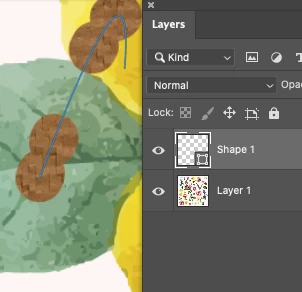
 

Screen Shot 2020-06-13 at 12.52.37 AM.png


{Thread title edited by moderator}


5.4K
Translate
Report
Community guidelines
Be kind and respectful, give credit to the original source of content, and search for duplicates before posting. Learn more
community guidelines
Adobe
Adobe Employee ,
Jun 12, 2020 Jun 12, 2020

Hi there,


We're sorry about the trouble with Photoshop while using the pen tool. Please check the top panel in Photoshop to see if the option to create shape is selected in the drop down when you are using the pen tool. If it is, change that to path and that should help with your issue.


Screenshot_7.png


If the issue persists, you can try resetting the pen tool using the steps mentioned here: https://helpx.adobe.com/photoshop/kb/basic-troubleshooting.html#tool


Please let us know if it helps!

Regards,

Nikunj

Translate
Report
Community guidelines
Be kind and respectful, give credit to the original source of content, and search for duplicates before posting. Learn more
community guidelines
Community Beginner ,
Jun 13, 2020 Jun 13, 2020

Screen Shot 2020-06-13 at 12.35.38 PM.png

Thankyou. Unfortunately I cant find the top panel on my laptop. can you please advise how to get there? Thats how my photoshop looks like right now. 

Translate
Report
Community guidelines
Be kind and respectful, give credit to the original source of content, and search for duplicates before posting. Learn more
community guidelines
Guest
Jun 13, 2020 Jun 13, 2020

Hi

Go to Window > Workspace > Reset Essentials, this will retore the Workspace to the default

2020-06-13 10_42_26-Adobe Photoshop 2020.png

Translate
Report
Community guidelines
Be kind and respectful, give credit to the original source of content, and search for duplicates before posting. Learn more
community guidelines
Community Beginner ,
Jun 13, 2020 Jun 13, 2020

THANKYOUUUUUU IT WORKS. 

Translate
Report
Community guidelines
Be kind and respectful, give credit to the original source of content, and search for duplicates before posting. Learn more
community guidelines
Community Expert ,
Jun 13, 2020 Jun 13, 2020

Window > Options 

Translate
Report
Community guidelines
Be kind and respectful, give credit to the original source of content, and search for duplicates before posting. Learn more
community guidelines
Community Beginner ,
Jun 13, 2020 Jun 13, 2020

Screen Shot 2020-06-13 at 12.52.22 PM.png

I tried going to Windows and clicking Options. still I dont see that bar.

Translate
Report
Community guidelines
Be kind and respectful, give credit to the original source of content, and search for duplicates before posting. Learn more
community guidelines
Community Expert ,
Jun 12, 2020 Jun 12, 2020

The Options Bar is the primay place to look for unintened settings when a Tool’s behaviour seems baffling. 

Translate
Report
Community guidelines
Be kind and respectful, give credit to the original source of content, and search for duplicates before posting. Learn more
community guidelines
New Here ,
Jul 13, 2023 Jul 13, 2023

yeah well why would photoshop revert settings on its own without me telling it?  I had the inverse problem.  I never want my pen tool to create paths, I onlt want shapes and I've always only wanted shapes.  But today out of the blue I'm using the pen tool and it creates a path, and since I never make paths, I'm having to google the problem since it's been years since I had to troubleshoot the issue.  

Translate
Report
Community guidelines
Be kind and respectful, give credit to the original source of content, and search for duplicates before posting. Learn more
community guidelines
Community Expert ,
Jul 13, 2023 Jul 13, 2023

Photoshop Preferences can get corrupted, but I think »Shape« is the Pen Tool’s default Drawing Mode, so that would likely not be the cause here. (Though frankly I am not going to reset the Preferences now to make sure …) 

I can’t recall a keyboard shortcut to switch between Drawing Modes, so an accidental shortcut-hit doesn’t seem very likely either. 


Are there any people other than yourself with access to your computer? 

Translate
Report
Community guidelines
Be kind and respectful, give credit to the original source of content, and search for duplicates before posting. Learn more
community guidelines
Community Beginner ,
Nov 26, 2024 Nov 26, 2024

This is nonsense. I tried the workaround. It doesn't work. Complexification is at work here. I want a simple rectangle without creating a layer as I want to crop an image, nothing more. Simplify is hard, complexifiaction is easy. Think people, this is becoming a real drag.

Translate
Report
Community guidelines
Be kind and respectful, give credit to the original source of content, and search for duplicates before posting. Learn more
community guidelines
Community Expert ,
Nov 27, 2024 Nov 27, 2024

If you want to crop why use the Pen Tool instead of the Crop Tool? 

Which Tool are you using exactly? 

Could you please post screenshots with the pertinent Panels (Toolbar, Layers, Options Bar, Paths, …) visible? 

Translate
Report
Community guidelines
Be kind and respectful, give credit to the original source of content, and search for duplicates before posting. Learn more
community guidelines
Community Expert ,
Nov 27, 2024 Nov 27, 2024
LATEST

@remoran , can you explain what the actual problem is that led you to post what seems like a curiously disconnected accusation of »Complexification«? 

The behaviour of the Pen Tool, as well as other Path-related Tools, does not seem to have been changed significantly recently. 

Translate
Report
Community guidelines
Be kind and respectful, give credit to the original source of content, and search for duplicates before posting. Learn more
community guidelines