
Participating Frequently
August 19, 2013
Question

Photoshop CC giving out of memory error while it's really not supposed to.

  • August 19, 2013
  • 3 replies
  • 15395 views

I recently encounter a problem where photoshop kept giving me out of memory error while it's really not. I'm using photoshop CC 32 bit on win 8 64 bit with 16G ram equipped. I understand that 32 bit will not detect all my memory but it should still have around 3G of RAM to use, 3255MB to be exact if I let photoshop to use 100% percent of it, which I did. But it gives me the error message when I had only used around 2323MB which is 1G less than expected. I have inserted images so you know exactly what I'm talking about.
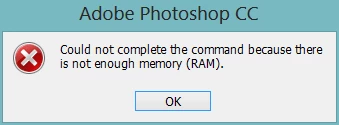
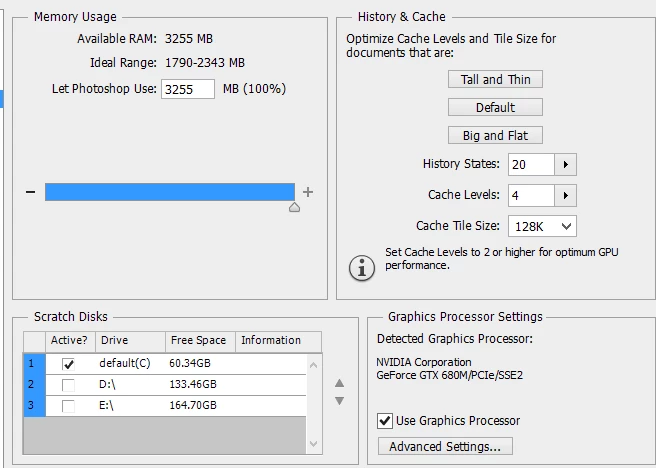
I do not have this problem back like a month ago, it only starts recently after all recent update was automatically applied. Any idea why this happen and how to solve it? Thanks

This topic has been closed for replies.

3 replies

station_two
Inspiring
August 19, 2013

CurtY beat me to it while I was still typing.  There's no disagreement on any part of our advice to you.

station_two
Inspiring
August 19, 2013

First, in that Prefs  dialog box, you only have your C: drive checked as a scratch disk.  It only has 60 GB available, at that is not much to share between the swap files of the OS and Photoshop scratch.  Check at least one of the two boxes to the left of your two other drives to make it active as a secondary scratch disk.

The rule of thumb I follow says to figure on 50 to 100 times the size of your largest file ever multiplied by the number of files you have open.  I have seen the scratch file exceed 300 GB once, an admittedly rare occurrence, but it often exceeds 200 GB when stitching large panoramas and the like.

As an example—and stressing that I'm aware that others have even more scratch space than I do—I keep two dedicated, physically separate hard drives as my primary and secondary Photoshop scratch disks with half a TB available and a lot of GB free on my boot drive for the OS.  I also have 16 GB of RAM installed.

Additionally, if you only have a single HD, i.e. your boot drive, you'd need it to be large enough to accommodate both the swap files of the OS as well as Photoshop's scratch.

Second, as long as you're running a 32-bit build of Photoshop, reduce that maximum allotment of usable memory from 100% to something like 65% or less.

If you don't agree with that last piece of advice, please don't try to argue with me.  Just disregard it if you don't believe me, as I am not interested in further debating this point that has been discussed ad nauseam here before.

Good luck.

FufskiAuthor
Participating Frequently
August 19, 2013

Do I still reduce that allocation even I have 16G of RAM? Even when photoshop giving me that out of memroy error I have used only around 40% of my total RAM available. For other's see my reply to Curt Y above. But thanks for the advice

station_two
Inspiring
August 19, 2013

In short:  your settings, setup and machine resources leave a lot to be desired, despite your 16 GB of RAM you are choosing to waste by remaining in 32 bits..

August 19, 2013

Your setting will not work.  Since you have allocated 100% of the resources to PS the computer has nothing to  operate with.  While CC may work with 3 gig of ram it will not be happy and you will have to be conservative on what you do.

Also you only have 60 gigs free on you C drive, which is also your scratch drive.  Don't know how big the drive is but you need 10-20% free space on drive for system to operate normally.

Depending on what you do you can eat up 60 gigs on your scratch drive for one project.

You really need a min. 64 bit program with 8 gig or ram, and much larger drives.

FufskiAuthor
Participating Frequently
August 19, 2013

Well, actually I have 16G of RAM on my computer, it's just Photoshop 32 bit can only recognize 3255MB. My OS is win 8 64 bit so the OS recognize all the RAM

My C drive is a SSD of 238G, 61.7G free space should be sufficiently enough. I used to have less than that and it doesn't have this problem, and the project I worked on are the same: both photo editing of RAW format around 20MB per file. I used to be able to have around 20 tabs open at the same time but now I can do only four, I was using Photoshop CS6 back then. Also I used to work on another computer with only 8G of RAM and around 120GB free scracth disk, which works better.

station_two
Inspiring
August 19, 2013

You're not interested in learning how to solve the issue.  As I said, I have no interest in debating this issue, especially since you are the type that knows better than the community he's asking to help him.  That's entirely your right and privilege. 

A forum search would lead you to some of the innumerable threads where this has been discussed already.
