


Participant
September 6, 2018
Question

Photoshop CS6 Activation Server expired - need work-around

  • September 6, 2018
  • 3 replies
  • 5366 views

I own a properly licensed copy of Photoshop CS6 which I used without problem until earlier this year.

My workflow was to open my files Adobe Camera Raw (ACR) and often I was able to do all the editing I wanted in ACR and batch save everything  as edited jpegs. I could do this for jpeg files as well as for RAW files.

Now I cannot open files in ACR. I get the following message:
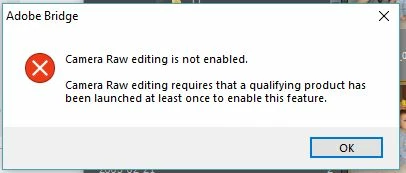
So I checked Photoshop and saw that Hellp>deactivate is grayed out (not clickable) which means the product cannot be deactivated and moved to another computer and also seems to mean I can't use ARC. I have been told by support that the activation server has expired.

I know Adobe wants me to buy a subscription, but I bought a perpetual license for a product that still fulfills my needs - or did until the activation server was taken off-line.

When I open a RAW file in photoshop, it does launch ARC, so at least I can still convert my RAW files and work on them in ARC and Photoshop.

However, I cannot launch ACR directly or for working on jpegs, which I found to be convenient.

Is there a work-around?

Thanks.

.

    This topic has been closed for replies.

    3 replies

    September 7, 2018

    Hi

    Take a look at the answer marked correct here to see if it helps

    Camera Raw editing is not enabled

    D Fosse
    Community Expert
    Community Expert
    September 6, 2018

    Note that this is a Bridge error message - not a Photoshop error message. It appears you are opening raw files from Bridge.

    The error message, as usual, means exactly what it says. The "qualifying product" is Photoshop. Although Bridge doesn't require licensing in itself, it is intended to run in a licensed environment. This is what the error message is asking for.

    So it's a Bridge problem. What Bridge version? If it's newer than Photoshop, it won't work, and you get this message.

    Participant
    September 6, 2018

    You are correct that the error happens in Bridge.  However, I assumed that it is happening because when it check for a licensed product it no longer gets a reply through photoshop since the activation server no longer exists for CS6

    I have posted my versions in reply to the response above.

    I don't think the problem is that Bridge is newer.  It is the version I installed years ago when I installed Photoshop.

    Bridge is 5.0.2.4 x64

    Photoshop is 13.0.1 x64

    ACR is 9.1.1.461 (i assume the 461 is my camera)

    gener7
    Community Expert
    Community Expert
    September 6, 2018

    You are allowed 2 activations, so you can install and activate on the second one.

    There are no announcements that the consumer CS6 activation server has been closed. If that were the case, you would be directed to a free non-activation copy as in the case of CS3.

    If you suspect a connection error to the servers, See this:

    Please refer this article Activate and deactivate Adobe products and also check if the connection is prevented by any of the system features listed here:- Resolve connection errors with Adobe Creative Cloud and Creative Suite applications

    There is a case where deactivation would be grayed out is if you somehow got sold a volume license or Enterprise copy. Then it is tied to that one computer.

    JJMack
    Community Expert
    Community Expert
    September 6, 2018

    Did you ever install a trial version of the creative cloud version of Photoshop?  Your CS6 open what  versions does Help>About>Photoshop  and Help>About Plug-ins>Camera RAW show?

    Windows Perpetual CS6 should be version 13.0.1.3

    Mac Perpetual CS6 should be version 13.0.6S\

    Subscription CS6 shoulf be version 13.1.2

    CS6 ACR should ve version 9.1.1

    Bridge CS6 should be

    JJMack
    Participant
    September 6, 2018

    No I never installed a trial version of creative cloud

    Bridge is 5.0.2.4 x64

    Photoshop is 13.0.1 x64

    ACR is 9.1.1.461 (i assume the 461 is my camera)