



Putting fileinfo data on bottom of image for use in building a photobook for printing/binding
I wonder if someone on here could help me with a problem I have? I am not a script expert by any means. The term "amateur" is probably pretty accurate!
I have a few hundred pictures I want to include into a (to be printed) photobook. I want to put some key EXIF/Fileinfo data on the images so that they remind me of what file, when it was taken, with what and with what settings. I found an excellent script (by JJmack?) which does what i want with one exception. The script (below) puts the info on the image starting on the top left (0,0) and I really want it to start on the bottom left (so that it looks like a caption). I have tweaked the original 5 lines of data down to one line, and have reduced the font size but I simply do not have the skills to amend it to add the selected text to the bottom left.
I was hoping that someone on this forum might be kind enough to help - not least because I am sure there are others who would want to the same thing? Or am I being a complete idiot and there is a simpler way to achieve what I am trying to do?
Grateful for any help 

Michael.
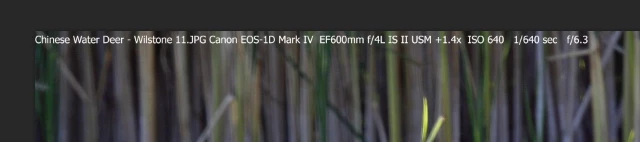
Apologies - can't find way to insert file so had to copy and paste:
// This script was hacked from one I downloaded from the web JJMack 2008
/* Script to stamp copyright and camera data of shot */
// This script is supplied as is. It is provided as freeware.
// The author accepts no liability for any problems arising from its use.
/*
<javascriptresource>
<about>$$$/JavaScripts/StampExif/About=JJMack's Stamp Exif.^r^rCopyright 2009 Mouseprints.^r^rScript utility for action.^rNOTE:Add Text Layer with Fomatted EXIF Data!</about>
<category>JJMack's Action Utility</category>
</javascriptresource>
*/
// enable double-clicking from Mac Finder or Windows Explorer
#target photoshop // this command only works in Photoshop CS2 and higher
// bring application forward for double-click events
app.bringToFront();
// ensure at least one document open
if (!documents.length) {
alert('There are no documents open.', 'No Document');
}
// if at least one document exists, then proceed
else {
main();
}
///////////////////////////////////////////////////////////////////////////////
// main - main function
///////////////////////////////////////////////////////////////////////////////
function main() {
/* Null business owner */
var Biz = "";
var Owner = "";
/* Variables You can hard code your business owner here */
// var Biz = "Mouseprints";
// var Owner = "John J McAssey";
/* sizeFactor influences text size 1 will use largest font 2 will half that font size */
var sizeFactor = 1.5;
/* textX and TextY positions text placement 0 and 0 Top Left corner of image in pixels */
var textX = 0;
var textY = 0;
/* Internal Photoshop Text name */
var fontName = "ArialMT";
var fontName = "TimesNewRomanPSMT";
var fontName = "Tahoma";
/* Text Color */
textColor = new SolidColor;
textColor.rgb.red = 255;
textColor.rgb.green = 255;
textColor.rgb.blue = 255;
/* END Variables You can hard code your business owner here */
// remember users Ruler avd Type Units and set ours
var strtRulerUnits = app.preferences.rulerUnits;
var strtTypeUnits = app.preferences.typeUnits;
app.preferences.rulerUnits = Units.PIXELS;
app.preferences.typeUnits = TypeUnits.PIXELS;
/* Trying to figure out font size for the number of lines to cover the document height */
/* and getting setting text area to cover the document was a trip. Adobe Postscript trip */
/* I believe that 72 or 72.27 Point/Pica Size Photoshop Preference maybe I should see if */
/* I could retrieve it. Anyway mine is set to 72 Setting the document resolution taking */
/* the document width and dividing by 72 would probably yield number of characters that */
/* would fit in the document width. Setting the documents resolution comes into play */
/* with Photoshop text support. Using the documents height and dividing the by the number */
/* of lines of text I needed I hoped would yield the font size I needed. However that */
/* did not work the text area was correct the number of text lines did not fit. I needed */
/* to use a smaller font. When the document resolution is set to 72 DPI and I set a text */
/* layer font size to 72 and the text area the number of pixels I want and observing */
/* Photoshop's text options bar there I see a one 1 to one relationship. 72 px = 72 px. */
/* If I set the documents resolution lower and set a Photoshop text layer font size to */
/* 72 px I see Photoshop scale the number to a lower number of pixels in the option bar. */
/* Just what I needed. Setting the Documents resolution to 60 DPI let the number of line */
/* I needed fit on the document. However Photoshop also scaled the text area I set down */
/* in size and that number of lines did not fit within that area. I needed to scale the */
/* text area up. Scaling the Text area up using 72/resolution did the trick... */
var testres = 60;
res = app.activeDocument.resolution;
if(res!=testres){ app.activeDocument.resizeImage(app.activeDocument.width.value,app.activeDocument.height.value,testres); }
/* Define var to be used to avoid undefined */
var expTime = "";
var expPgm = "";
var expCmp = "";
var mtrMode = "";
var ev = "";
var flshCode = "";
var flshMode = "";
var focLength = "";
var Fstop = "";
var ISO = "";
var Model = "";
var CameraModel = "";
var Artist = "";
var maxF = "";
var wbMode = "";
var phoTime = "";
var picYr = "";
var lens = "";
var cpyrt = "";
var remShutter = "";
var remAperture = "";
var remISO = "";
var lat = "";
var latRef = "";
var lon = "";
var lonRef = "";
var docName = app.activeDocument.name;
/* END var to be used to avoid undefined */
try { // get active document
var doc = app.activeDocument;
}
catch (e){
alert("No Document Open..." );
}
var exifInfo = "";
try {
// alert( "doc.info.exif=" + doc.info.exif );
var numExifItems = doc.info.exif.length;
// alert( "numExifItems=" + numExifItems );
for (var i = 0; i < doc.info.exif.length; i++){
exifInfo = exifInfo + doc.info.exif[0] + " = " + doc.info.exif[1] + "\r";
/* ---------------------------------- Extracting Data I want to Stamp formated ----------------------------------------------------------------------- */
checkThisItem(doc.info.exif[0], doc.info.exif[1])
key=doc.info.exif[0];
keyData=doc.info.exif[1];
if (key == "Artist") {
// alert ("Key=" + key + " Data=" + keyData );
Artist =("By " + keyData + " ");
}
if (key == "Date Time Original") {
// alert ("Key=" + key + " Data=" + keyData );
var phoTime = keyData;
var dateArray1 = phoTime.split(" ", 2);
phoTime = dateArray1[0];
phoHour = dateArray1[1];
var dateArray2 = phoTime.split(":");
var monthsArray = ["January","February","March","April","May","June","July","August","September","October","November","December"];
phoTime = monthsArray[dateArray2[1]-1]+" " + dateArray2[2]+ ", " + dateArray2[0] +" @ " + phoHour;
var picYr = dateArray2[0];
}
if (key == "Model") {
// alert ("Key=" + key + " Data=" + keyData );
Model = (keyData + " ");
}
if (key == "Max Aperture Value") {
// alert ("Key=" + key + " Data=" + keyData );
maxF = ("maxF " + keyData + " ");
maxF = ( keyData + " ");
}
if (key == "Focal Length") {
// alert ("Key=" + key + " Data=" + keyData );
focLength = ("@ " +keyData + " ");
}
if (key == "Exposure Program") {
// alert ("Key=" + key + " Data=" + keyData );
expPgm = (keyData + " ");
if (expPgm == "Not defined") { expPgm = "Exposure Program Not Recorded "; }
}
if (key == "Exposure Bias Value") {
// alert ("Key=" + key + " Data=" + keyData );
expCmp = ("Bias " + keyData + " ");
}
if (key == "Metering Mode") {
//alert ("Key=" + key + " Data=" + keyData );
mtrMode = (keyData + " Metering ");
}
if (key == "White Balance") {
// alert ("Key=" + key + " Data=" + keyData );
wbMode = ("White Balance " + keyData + " ");
}
if (key == "ISO Speed Ratings") {
// alert ("Key=" + key + " Data=" + keyData );
ISO = ("ISO " + keyData + " ");
remISO = keyData;
}
if (key == "Exposure Time") {
// alert ("Key=" + key + " Data=" + keyData );
expTime = (" " + keyData + " ");
remShutter = keyData;
}
if (key == "F-Stop") {
//alert ("Key=" + key + " Data=" + keyData );
Fstop = (" " + keyData + " ");
remAperture = keyData;
}
if (key == "Flash") {
// alert ("Key=" + key + " Data=" + keyData );
var flshCode = keyData;
var flshMode = "Flash Code=" + flshCode + " ";
if(flshCode==1){var flshMode = "Firing Flash ";}
if(flshCode==9){var flshMode = "Firing Flash ";}
if(flshCode==13){var flshMode = "Firing Flash ";}
if(flshCode==15){var flshMode = "Firing Flash ";}
if(flshCode==25){var flshMode = "Firing Flash ";}
if(flshCode==29){var flshMode = "Firing Flash ";}
if(flshCode==31){var flshMode = "Firing Flash ";}
if(flshCode==65){var flshMode = "Firing Flash ";}
if(flshCode==69){var flshMode = "Firing Flash ";}
if(flshCode==71){var flshMode = "Firing Flash ";}
if(flshCode==73){var flshMode = "Firing Flash ";}
if(flshCode==77){var flshMode = "Firing Flash ";}
if(flshCode==79){var flshMode = "Firing Flash ";}
if(flshCode==89){var flshMode = "Firing Flash ";}
if(flshCode==93){var flshMode = "Firing Flash ";}
if(flshCode==95){var flshMode = "Firing Flash ";}
if(flshCode==0){var flshMode = "without Flash ";}
if(flshCode==16){var flshMode = "without Flash ";}
if(flshCode==24){var flshMode = "without Flash ";}
if(flshCode==88){var flshMode = "without Flash ";}
if(flshCode==32){var flshMode = "No Flash ";}
}
if (key == "GPS Latitude") {
//alert ("Key=" + key + " Data=" + keyData );
lat= ("Lat: " + keyData.replace(/\.00/g,'') + " ");
}
if (key == "GPS Latitude Ref") {
//alert ("Key=" + key + " Data=" + keyData );
latRef= (keyData + " ");
}
if (key == "GPS Longitude") {
//alert ("Key=" + key + " Data=" + keyData );
lon= ("Lon: " + keyData.replace(/\.00/g,'') + " ");
}
if (key == "GPS Longitude Ref") {
//alert ("Key=" + key + " Data=" + keyData );
lonRef= (lon + keyData + " ");
}
}
/* Copyright Year(s) */
var thisYr, toDay
var toDay = new Date();
var thisYr = toDay.getYear() + 1900;
if(picYr!="" && thisYr!=""){ var cpyrt = picYr + "-" + thisYr + " ";}
if(picYr=="" && thisYr!=""){ var cpyrt = thisYr + " ";}
if(picYr==thisYr){ var cpyrt = thisYr + " ";}
/* For cameras that don't set Artist or set unknown in the Exif substitute Owner if set */
if(Artist=="" && Owner!=""){var Artist = "By " + Owner + " ";}
if(Artist=="By unknown " && Owner!=""){var Artist = "By " + Owner + " ";}
/* Lens info */
xml = app.activeDocument.xmpMetadata.rawData;
lensOffset = xml.indexOf("<aux:Lens>") + "<aux:Lens>".length;
if(lensOffset > 0) {
lens = xml.substr(lensOffset, xml.length - lensOffset);
lens = lens.substr(0,lens.indexOf("</aux:Lens>"));
}
/* Hack for my cameras with fixed lens */
if(lens=="" && Model=="E990 "){var lens = "9-28mm";}
if(lens=="" && Model=="E-20,E-20N,E-20P "){var lens = "9-36mm";}
if(lens=="" && Model=="E-10 "){var lens = "9-36mm";}
if(lens=="" && Model=="E-10 "){
var Model = "E-10 ";
var lens = "9-36mm";
}
if(lens=="" && Model=="Canon PowerShot SD700 IS "){var lens = "5.8-23.2mm";}
if(lens!=""){var lens = lens + " ";}
else {var lens = "Unknown Lens ";}
/* Hack for my ultra compact cameras program mode not recorded */
if(Model=="Canon PowerShot SD700 IS "){var expPgm = "Ultra Compact Camera ";}
//alert (remShutter + " " + remAperture + " " + remISO);
ev = calcEV(remShutter, remAperture, remISO);
/* ---------------------------------- END Extracting Data I want to Stamp formated -------------------------------------------------- */
//}
}
catch (e){
alert("No EXIF data exists..." );
}
if ( exifInfo == "" ) {
alert( "No EXIF data exists..." );
}
else {
// alert( "exifInfo=" + exifInfo );
text_layer = doc.artLayers.add(); // Add a Layer
text_layer.name = "EXIF Stamp"; // Name Layer
text_layer.kind = LayerKind.TEXT; // Make Layer a Text Layer
text_layer.textItem.color = textColor; // set text layer color
/* Do not set TextType to Pargarph Text for StampEXIF so action can position text layer
text_layer.textItem.kind = TextType.PARAGRAPHTEXT; // Set text layers text type
*/
text_layer.textItem.font = fontName; // set text font
text_layer.blendMode = BlendMode.NORMAL // blend mode
text_layer.textItem.fauxBold = false; // Bold
text_layer.textItem.fauxItalic = false; // Italic
text_layer.textItem.underline = UnderlineType.UNDERLINEOFF; // Underlibn
text_layer.textItem.capitalization = TextCase.NORMAL; // Case
text_layer.textItem.antiAliasMethod = AntiAlias.SHARP; // antiAlias
// var fontSize = Math.round((doc.height- textY) / ((numExifItems +1) * sizeFactor)); // Calulate font size to use Item nomber + last \r
/* Calulate font size to use for StampExit keep size same for landscape and portrait base on document size */
if (doc.width >= doc.height) {var fontSize = Math.round(doc.height / (30 * sizeFactor));}
else {var fontSize = Math.round(doc.width / (30 * sizeFactor));}
if (fontSize<10){fontSize=10}; // don't use Font size smaller then 10
text_layer.textItem.size = fontSize; // set text font Size
// text_layer.textItem.position = Array(textX, textY ); // set text layers position in and down
text_layer.textItem.position = Array(textX, (textY + fontSize )); // set text layers position in and down for Stamp add in fontsize
textWidth = ((doc.width - textX) * 72/testres ); // Text width document width - offset
textHeight = ((doc.height - textY) * 72/testres ); // Text height document height - offset
/* Do not set Text Area for StampEXIF so action can position text layer
text_layer.textItem.width = textWidth; // set text area width
text_layer.textItem.height = textHeight; // set text area height
*/
/*
alert(
"res=" + res + " sizeFactor=" + sizeFactor + " numExifItems=" + numExifItems
+ "\r" + "fontsize=" + fontSize + " font=" +fontName
+ "\r" + "Image area width=" + doc.width + " height=" + doc.height
+ "\r" + "text area width=" + textWidth + " height=" + textHeight
+ "\r" + "Text Position top left=" + textX + "," + textY
+ " bottom right=" + (textX + textWidth )+ "," + (textY + textHeight )
);
*/
/*
try{
text_layer.textItem.contents = exifInfo;
}
catch (er) {
alert("Error Setting Contents...");
}
*/
/* ----------------------------------------- Data Stamp format ----------------------------------------------------------------------- */
if (!app.activeDocument.info.copyrightNotice=="") {var Notice = app.activeDocument.info.copyrightNotice; }
else { var Notice = "Copyright \u00A9 " + Biz + " " + cpyrt; }
if (lat!="" && lon!="") { gps = "\r" + lat +latRef + lon + lonRef;}
else {gps = ""; }
text_layer.textItem.contents = docName + " " + Model + lens + ISO + expTime + Fstop;
if (app.activeDocument.info.instructions == "" ) {
app.activeDocument.info.instructions = docName + " " + Model + lens + ISO + expTime + Fstop;
}
}
if(res != testres){ app.activeDocument.resizeImage(app.activeDocument.width.value,app.activeDocument.height.value,res); }
app.preferences.rulerUnits = strtRulerUnits;
app.preferences.typeUnits = strtTypeUnits;
}
///////////////////////////////////////////////////////////////////////////////
// END - main function
///////////////////////////////////////////////////////////////////////////////
// -----------------------------------------
// calcEV()
// -----------------------------------------
function calcEV(shutter, aperture, iso) {
evString = new String("");
isoValue = new Number(0);
shutterValue = new Number(0);
apertureValue = new Number(0);
evValue = new Number(0);
apertureValue = aperture;
apertureValue = apertureValue.substr(2,apertureValue.length -2); // Strip off "f/"
shutterValue = shutter;
shutterValue = shutterValue.substr(0,shutterValue.indexOf(" ")); // Strip off ending " sec"
if ( shutterValue.indexOf("/") != -1) {
topShutter = shutterValue.substr(0,shutterValue.indexOf("/"));
bottomShutter = shutterValue.substr(shutterValue.indexOf("/") + 1,shutterValue.length -(shutterValue.indexOf("/") + 1));
shutterValue = topShutter / bottomShutter;
}
isoValue = iso;
//alert ("apertureValue = " + apertureValue + " shutterValue = " + shutterValue + " isoValue = " + isoValue );
if (isoValue>0 && shutterValue>0 && apertureValue>0) {
evValue = Math.LOG2E * Math.log(Math.pow(apertureValue, 2) * (1 / shutterValue) * (100 / isoValue));
evValue = Math.round(evValue * 10) / 10;
evString = "EV " + evValue;
}
return evString;;
}
function checkThisItem(key, keyData) {
// alert("Key=" + key + " Data=" + keyData );
}
 AdChoices