


April 10, 2018
Question

Repost: color shift

  • April 10, 2018
  • 2 replies
  • 2015 views

Sorry for not following up on replies to my initial request, my wife broke a leg so I have been occupied with domestic duties.

This shows the same unedited sRGB image in Irfanview, Faststone Image Viewer and PS CC 2018. All are up to date versions, CM is on for Irfanview and Faststone Viewer. PS workspace is sRGB, colour settings are default.
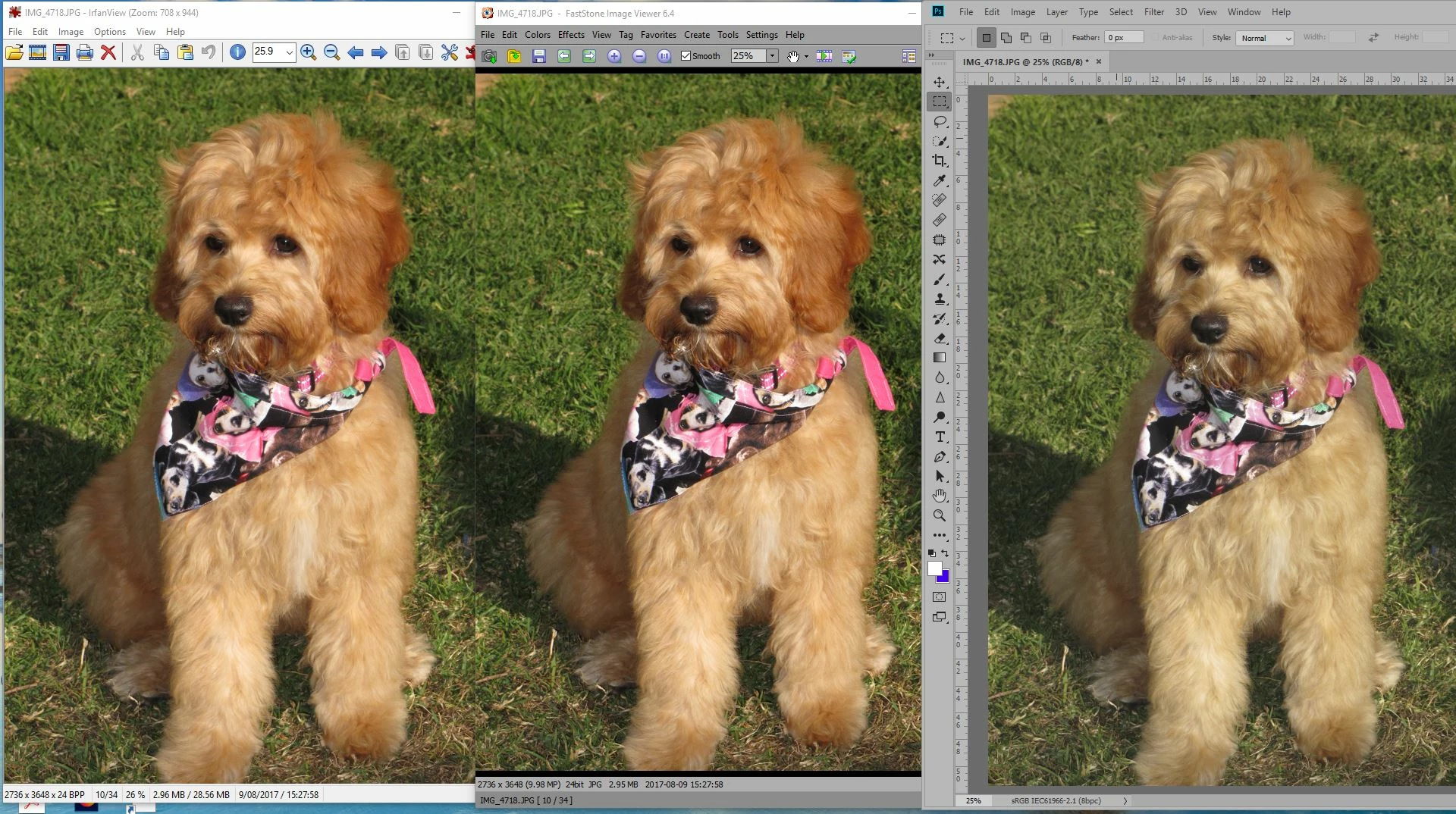
A DisplayCal profile has been set as the default for all users. Changing Proof Setup to that profile rather than the default CMYK has no effect though if I select “Preserve RGB Numbers” the PS display then matches the others.

I have reinstalled PC and run SFC and DISM checks on Win 10. I am not sure when this change occurred. I had been using CS 3 with Breezebrowser for a number of years with no problems and moved up to PS CC some time ago with no problems. This change between PS and viewers, including Breexe Browser only cropped up recently, probably this year which has been very quiet for editing.

I would appreciate any further suggestions. Thanks

    This topic has been closed for replies.

    2 replies

    D Fosse
    Community Expert
    April 13, 2018

    Most of them should also have an sRGB emulation easily accessible, for those rare occasions when you don't have color managed software available for what you want to do.

    Technically that requires switching the profile as well - but since those apps aren't color managed it doesn't matter. They don't know a profile from a sandwich. Just remember to set the monitor back to native for Photoshop.

    April 14, 2018

    Reset the monitor to default and profiled with Wide Gamut LCD(CCFL) selected. The profile loaded as default.

    Initial measurements were.

    Overview

    Profile in use

    Hope this helps and is what you wanted,

    Composite with the current profile, a snip tagged in PS.

    Mylenium
    Brainiac
    April 10, 2018

    Well, are the monitor profiles actually active? Is PS set to proof to monitor color? That aside, I wouldn't really put much stock in tools like IrfanView and their simplistic CM. Your whole issue is basically a giveaway that your system may not be color managed, after all, for whatever reason that may be.

    Mylenium

    April 10, 2018

    Thanks  for your suggestions,

    Yes, the monitor profile is set as the default and the video card gamma table can be turned on and off. This of course makes a change to the whole screen. Earlier profiles created when I used a Spyder 3 still show the same sort of difference between the viewers and PS.

    I edit when necessary for web display so have little reason to use proof colours.

    PS workspace is set to sRGB and colour settings for PS are default. You suggest that Colour management may not be correct, where else could there be an issue? I understand that CM in the viewers may be simple but for sRGB images I have never seen this sort of difference before. Can you suggest an alternative viewer?

    Regards

    rob day
    Community Expert
    April 10, 2018

    A DisplayCal profile has been set as the default for all users. Changing Proof Setup to that profile rather than the default CMYK has no effect though if I select “Preserve RGB Numbers” the PS display then matches the others.

    That would seem to indicate that the Irfanview application is using your monitor's RGB space rather than the sRGB profile to display the image.

    What happens if you do a save as of the image out of Photoshop, embedding the sRGB profile (check Embed Color profile), and open that file in Irfanview?