


Participating Frequently
August 29, 2013
Answered

Save in file location?

  • August 29, 2013
  • 2 replies
  • 5242 views

Hey all. I'm really confident with actions, but new to scripting. I'm looking write something to 'save as' a file into the open file's location. So whatever file I'm working on, when I run the action or script it will save to the current folder. I haven't found a way to do this with actions so I want to know if I can with scripts.

For example, on the desktop I have a test1 folder and test2 folder. I can record an action to save an open image from test1 to test1, but then open images from test2 go back into test1. My work around right now is another action (file/automate/batch) to run the saving action and open the dialog box where I can direct it where to save.

I appreciate any help.

-Matt
This topic has been closed for replies.
Correct answer JJMack

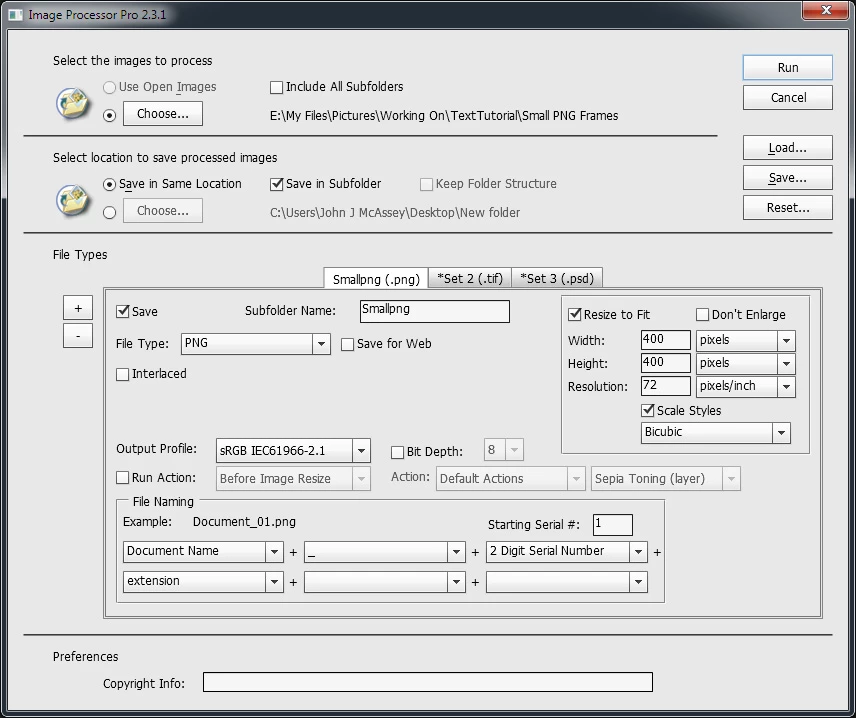
I can think of two scripts that are available that you may want to check out. The Image Processor script that ships with Photoshop found under menu File>Scripts>Image Processor...  The second one you need to download and install. Download is on Russell Browns Web Site. The script name is Image Processor Pro... its a plug-in script once installed you will find it under menu File>Automate>Image Processor Pro.... These scripts can process collection of files from various sources. From the Bridge, Open Documents in Photoshop, or files In a folder or tree.  Output files can be saved to the same location of the document being process associated file.

2 replies

c.pfaffenbichler
Braniac
August 30, 2013

Does this help?

// 2013, use it at your own risk;

#target photoshop;

if (app.documents.length > 0) {

var thedoc = app.activeDocument;

// getting the name;

var docName = thedoc.name;

try {

var basename = docName.match(/(.*)\.[^\.]+$/)[1];

}

catch (e) {

var basename = docName;

};

//getting the location;

try {

var docPath = thedoc.path;

}

catch (e) {

var docPath = "~/Desktop";

};

// psd options;

psdOpts = new PhotoshopSaveOptions();

psdOpts.embedColorProfile = true;

psdOpts.alphaChannels = true;

psdOpts.layers = true;

psdOpts.spotColors = true;

// check if file of that name exists;

if (File(docPath+"/"+basename+".psd").exists == true) {

var theConfirm = confirm ("file exists; overwrite?", true, "file exists");

if (theConfirm == true) {

thedoc.saveAs((new File(docPath+"/"+basename+".psd")),psdOpts,false);

}

}

else {

//save psd:

thedoc.saveAs((new File(docPath+"/"+basename+".psd")),psdOpts,false);

}

};

//that’s it; thanks to xbytor;

JJMack
Braniac
August 30, 2013

Most actions that are batched do not open files an only need a Save As if the need to set the file type to be saved.  When the do contain a Save As step these steps are often over road by the batch option.

Input file are from a folder and optionally image file in lower levels, or open file ,or files selected in the bridge, or imported.

Output files may be saved by the action being batch but most to the time it the batch processor that saves the output files. Over riding save as commands or overwriting the input file using the save on close option or saved into an output folder set by the user. For the batch processor can set output file name using user set options.  It hard to name output file well in actions for they cant not use  logic  to retrieve document names and generate output names based on document names.

A script can do just about anything you want to do. One can open files from where ever and save file any where it has write athority.

JJMack
mschuenkeAuthor
Participating Frequently
August 30, 2013

Thanks for the reply. I understand how the batch works, as that is how I have been saving files. Mine is set to use open files and save to a folder, which is where I hit the choose option and select the folder where the open files live. Looks like scripts are the answer because I need to have the save destination be a variable. Something like save to open file location, does that exist in a script?

JJMack
JJMackCorrect answer
Braniac
August 30, 2013

I can think of two scripts that are available that you may want to check out. The Image Processor script that ships with Photoshop found under menu File>Scripts>Image Processor...  The second one you need to download and install. Download is on Russell Browns Web Site. The script name is Image Processor Pro... its a plug-in script once installed you will find it under menu File>Automate>Image Processor Pro.... These scripts can process collection of files from various sources. From the Bridge, Open Documents in Photoshop, or files In a folder or tree.  Output files can be saved to the same location of the document being process associated file.

JJMack