New Participant
August 2, 2017
Question

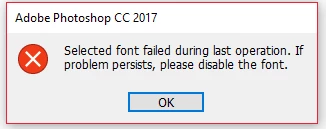
'Selected font failed during last operation...'

  • August 2, 2017
  • 7 replies
  • 5941 views

This has been a recurring problem for a while now but I only ever really needed to use the basic fonts, like Arial or Calibri...maybe even Comic Sans from time to time (:P), but now those have even 'failed' and there are seemingly no other fonts that are accessible. I have browsed around for other solutions but haven't seen anything that could help (being for earlier versions of Photoshop). Any help would be much appreciated.

    This topic has been closed for replies.

    7 replies

    New Participant
    January 24, 2020

    I have the same problem. Selected font failed during last operation in Windows 10, Photoshop CC 2019.

    designbymiranda
    New Participant
    October 3, 2017

    Here's what fixed mine (Windows 10):

    • Go to the windows start menu, and search "Show hidden files and folders"
    • Go to "Hidden files and folders" folder > Select the "Show hidden files, folders, and drives" button > OK

           ( This allows you to see the App Data folder. )

    • Navigate to your C Drive > Users > [Username] > App Data > Roaming > Adobe > [ Photoshop version ]
    • Delete the CT Font Cache folder
    • Restart photoshop
    New Participant
    October 17, 2017

    This worked for me.  It was a very annoying error, so the help is really appreciated.

    New Participant
    August 26, 2017

    I've got the same problem.  I don't use a font manager and NONE of my fonts are working... this is a nightmare!

    Terri Stevens
    Brainiac
    August 26, 2017

    you have not said what your operating system is or the version of Photoshop you are using which makes helping you almost impossible.

    If it's CC2017 and you are using Windows 10 try deleting the CT Font Cache folder and restarting the computer

    It is located at

    C:\Users\[username]\AppData\Roaming\Adobe\Adobe Photoshop CC 2017\CT Font Cache

    kenh31255390
    New Participant
    August 21, 2017

    Not sure if this will help you or not but I was having the exact same problem and searched high and low and did not come up with a solution. One step that worked for a short while was to create a new profile. Once I did that I was able to see my missing fonts. However this only lasted until I rebooted my computer.

    I finally uninstalled Suitcase Fusion and everything started working again. This is the last time I will install that program. I have been using it for about 10 years and it has caused more photoshop crashes that I can count and now it somehow corrupted the windows font library. Now I am able to see all my fonts and everything is working as it should.

    Terri Stevens
    Brainiac
    August 21, 2017

    are you using a font management program? I have seen that error with Suitcase Fusion where it clears if you deactivate the font and then immediately reactivate.

    New Participant
    August 21, 2017

    I tried uninstalling, updating, and still getting the same issue. Please help.

    Akash Sharma
    Brainiac
    August 10, 2017

    Hi aR1d,

    Please take a look at the articles below as per your operating system and let us know if that helps.

    Troubleshoot font problems | Windows or Troubleshoot fonts in Adobe applications | Mac OS X

    Thanks.

    Akash

    New Participant
    August 12, 2017

    There's no solution from that, please check again this issue hit all photoshop users without solution ...