



Arttek_314
Participating Frequently
September 13, 2019
Answered

shift + F5 does not work correctly.

  • September 13, 2019
  • 6 replies
  • 20362 views

phohotospo version: 20.0.1 x64
my operating system: windows 10 x64
Photoshop keyboard shortcuts are the default.
I have a problem. shift + F5 does not work correctly.
Running select> grow instead of fill
Is there a way to fix this
This topic has been closed for replies.
Correct answer Jeff Arola

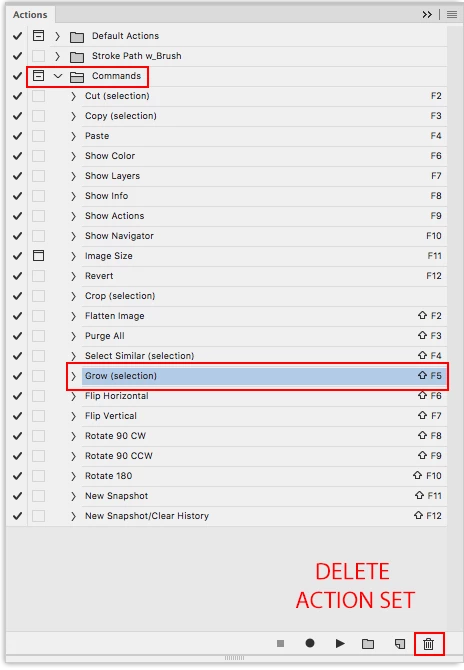
Sounds like you have the Commands action set loaded which has Shift-F5 assigned to Select>Grow and

supersedes other keyboard shortcuts.


Go to Window>Actions and check for the Commands action set.


If Commands are loaded you can delete the set by clicking on the word Commands and then dragging to the Trash Can   icon at the bottom of the actions panel. This just deletes the actions from the actions panel, not your hard drive.


6 replies

Participating Frequently
January 29, 2023

For me this problem is still present in the newest version. I have no Action which uses this shortcut and F5 on it's own doesn't get recognized, too. For example, if I go to the keyboard shortcut settings and try to assign F5 to any menu item, nothing happens when I press F5 to assign it. Photoshop doesn't recognize that the key was hit.

F5 works fine in my OS and in other software. And it always worked fine in Photoshop up until around 1-2 month ago.


I'm using a Razor Blackwidow Ultimate 2013 Keyboard with the Synapse 2.21 driver, if that matters.


Adobe Photoshop Version: 24.1.1 20230112.r.238 4bbfa7a x64
Operating System: Windows 10 64-bit

Participant
April 12, 2023

Its true. the same issue.
Please fix

djuncheg117156386
Inspiring
August 10, 2020

2020 years. This problem still not solved in current PS version

Jeff Arola
Community Expert
Community Expert
August 10, 2020

Please explain.

Participant
November 17, 2020

I got same problem. Shift +f1 F2 F3 F4 .... All not working! Conflict to windown system. Shift +F3 is changing the computer sound. Shift + F5 not any response. Shift + F8 changing the window screen. Already check the Command shoutcut key, and shown Fill: Shift+F5  . Also deleted the glow. 


Jeff Arola
Community Expert
Jeff ArolaCommunity ExpertCorrect answer
Community Expert
September 13, 2019

Sounds like you have the Commands action set loaded which has Shift-F5 assigned to Select>Grow and

supersedes other keyboard shortcuts.


Go to Window>Actions and check for the Commands action set.


If Commands are loaded you can delete the set by clicking on the word Commands and then dragging to the Trash Can   icon at the bottom of the actions panel. This just deletes the actions from the actions panel, not your hard drive.


Arttek_314
Participating Frequently
September 14, 2019
Jeff, Thank so much for your help, I really solved my problem. You're great
gener7
Community Expert
Community Expert
September 13, 2019

Try re-assigning he shortcut to Edit > Fill  Go to Edit > Keyboard shortcuts, select Application Menus, find the Edit > Fill command, and follow the instructions below


September 13, 2019

Have you tried updating to version 20.0.6

davescm
Community Expert
Community Expert
September 13, 2019

What is shown in Edit >Keyboard Shortcuts > Select >Grow?


Dave

Arttek_314
Participating Frequently
September 13, 2019


Arttek_314
Participating Frequently
September 13, 2019

field emtpy