


bugtrot
Participating Frequently
January 29, 2017
Question

Shrinking Preset UI?
  • January 29, 2017
  • 1 reply
  • 327 views

15b0dc2198f80c1420815c85e675f228.png

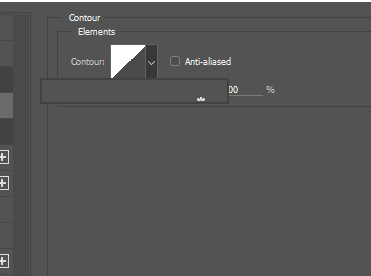
So my preset selection window has been 'shrinking' over time and I don't know what's caused it. It's now so small that I cannot select anything within it. I have no idea how to make it bigger or wider. How can I fix this?

    This topic has been closed for replies.

    1 reply

    Simmer1
    Inspiring
    January 29, 2017

    Hi,

    Just right click on any Layer Icon with your Layers Palette and from the drop down menu select Large Thumbnails.

    bugtrot
    bugtrotAuthor
    Participating Frequently
    January 29, 2017

    That only changes the size of the preview icons in the layer palette. Changing the size of icons, no matter where I do it, has had no effect on getting the window I'm talking about to resize so that everything within it actually shows.

    Simmer1
    Inspiring
    January 29, 2017

    Some changes such as to UI windows take effect the next time you open the program so try closing down Photoshop then opening it up again.

    Thanks,

    Sim