Inspiring
December 5, 2018
Answered

When using the transform command, to place a guide in the center ...

  • December 5, 2018
  • 1 reply
  • 773 views

Hello

When using the transform command, to place a guide in the center, as

soon as I touch the ruler or anything, the transform disappear

Whats is going on?

Any ideas?

Thanks
    This topic has been closed for replies.
    Correct answer Norman Sanders

    I found that if you hold down the Cmd key as you click and drag from the ruler the Transform frame remains visible.

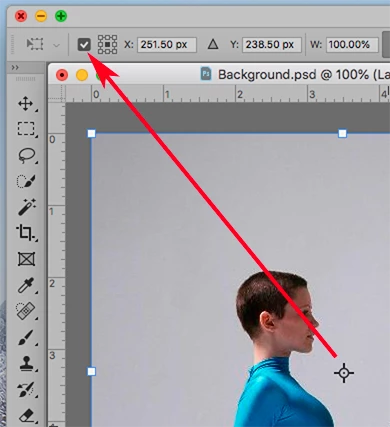
    Also, the center mark may be turned off and on here:

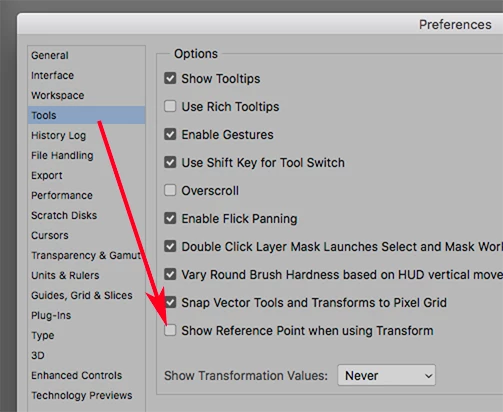
    .. or can be set in Preferences here:

    1 reply

    Chuck Uebele
    Community Expert
    December 5, 2018

    Unfortunately, that is the new behavior for transforming: guides aren't retained when place while transforming. We let Adobe know about this, but not sure anything will be done.

    Norman Sanders
    Norman SandersCorrect answer
    Brainiac
    December 5, 2018

    I found that if you hold down the Cmd key as you click and drag from the ruler the Transform frame remains visible.

    Also, the center mark may be turned off and on here:

    .. or can be set in Preferences here:

    Inspiring
    December 5, 2018

    Thank you Beautiful people!

    The funny thing is that I was using it before today, so not sure what happened.
    Deleted the preference file, have to restore all my favorite settings. 

    What worked for me was to hold the Cmd key that work.

    So, thanks a lot.

    Saludos