


- Home
- Premiere Elements
- Discussions
- Re: Adobe Premiere Elements 8 Error 150:30
- Re: Adobe Premiere Elements 8 Error 150:30
Adobe Premiere Elements 8 Error 150:30

Copy link to clipboard
Copied
I called the support # and they say that they can't help me with Adobe Premiere Elements 8 Error 150:30.
I checked and I don't have enough RAM to purchase the 2021 version of the software. I am using Windows 10 on a desktop computer.
What can you do to help rectify this error?


 11
Replies
11
11
Replies
11




Copy link to clipboard
Copied
What did you do to generate the error? Have you installed the program on more than two machines without deactivating one of them?
Copy link to clipboard
Copied
I haven't logged into this program in a very long time. I only installed it once on this computer.
Copy link to clipboard
Copied
OK. But what did you click on to generate the error? If possible, post a screenshot of what you are seeing and the error message that allowed you to tell us that it is a 150:30 error. (And you can always add RAM to a desktop computer.)
Copy link to clipboard
Copied
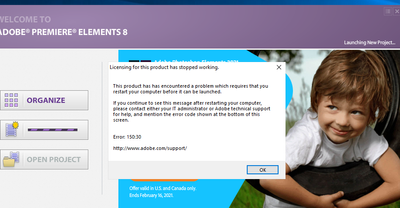
This is the home screen. I clicked on the NEW PROJECT and this is what I see. The Lauching New Project....... in the Upper Right Hand Corner never loads.
When I purchased this computer, I installed to highest amount of RAM at the time. I don't think I could update my RAM.

Copy link to clipboard
Copied
Moved from Photoshop Elements forum to Premiere Elements forum.
Copy link to clipboard
Copied
How do I find the conversation once it is moved?
Copy link to clipboard
Copied
@nancym23968720 Easiest way is to click on your avatar in the top RHS of the screen and select My profile.
That will show you all the posts you're involved in.

Copy link to clipboard
Copied
The only link I have says it is about a Mac, but it may help with your Windows problem
Code 150:30 License fix https://helpx.adobe.com/x-productkb/global/error-licensing-stopped-mac-os.html

Copy link to clipboard
Copied
Nancy,
By computer standards your version 8 is very old. It was written so fare before your operating system, you can only expect errors as you contingu. If you can't run the newer version, you might consider the video editor built into the Windows 10 Photo program. It may be better for what you might be doing with version 8.
Copy link to clipboard
Copied
Two ideas that MAY work to run old programs in Windows 10
-RIGHT click the program icon or EXE and select a compatibility mode in the pop up option window
-and/or select Run as Administrator to assign FULL Windows permissions
-also https://helpx.adobe.com/x-productkb/global/create-local-administrator-account-windows.html

Copy link to clipboard
Copied
Here is a Windows link:
https://helpx.adobe.com/creative-suite/kb/error-licensing-stopped-windows.html


Get ready! An upgraded Adobe Community experience is coming in January.
Learn more
 AdChoices