
Gaming footage quality decreases after exporting the video
Hello!
I'm aware that there have been similar question asked before, but I feel that my case might be a bit different, since I couldn't find a solution to my problem.
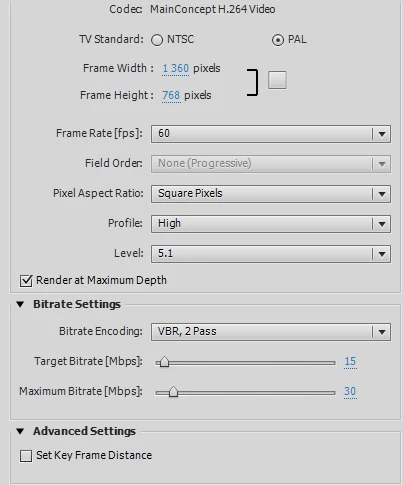
So, I have a few questions about exporting on Adobe Premiere Elements 12. I create gaming videos on YouTube. I record console games with Elgato HD (in 720p 60 fps) and PC games with Fraps (in 1080p 60 fps). The raw, non-edited video is in great quality. However, when I export the edited video, my quality drops. It's still good, but not as good as the original footage, which bothers me. I know for sure I have something wrong with my exporting settings, but I can't figure out what. I've tried rising the bitrate, but even when I set it to as high as it's possible, the quality doesn't match the original.
Here are the settings I've used to export my Fraps recorded videos:
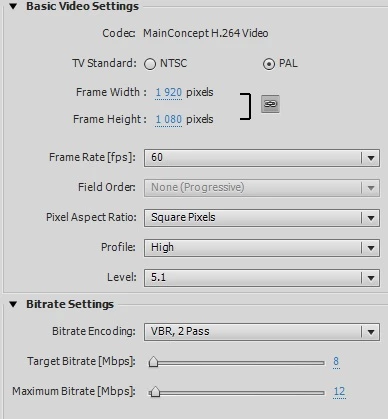
Videos are usually edited to about 20-30 minutes, and with these settings the exporting takes about 2 hours.
But here's the one thing that confuses me. The source.
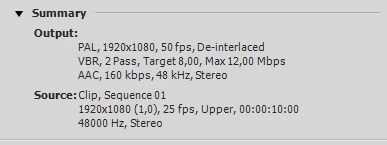
If I've understood correctly, the source means the original footage. Why does it say here it's 25 fps, when it isn't. Here are the video properties:
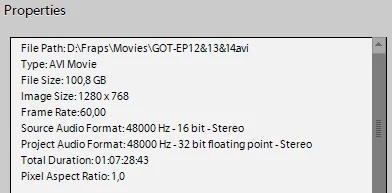
It says it's 60 fps, and it clearly is when I view the footage. So could this be the problem, or have I misunderstood the whole "source" part?
Lastly, here's a side by side pictures of the exported and the raw videos (recorder with Fraps on PC):
Left: Exported
Right: Raw

I think the difference is a bit difficult to notice here. The raw one is definitely darker, but I think that is because of the game settings. Another weird thing the exporting does; changes the lighting. The exported one is also smudgier.
So the question is: How do I export the video in its original quality?
Thanks in advance!
- Aino
 AdChoices