


Participating Frequently
December 26, 2020
Question

Motion Keyframes Disappear

  • December 26, 2020
  • 1 reply
  • 416 views

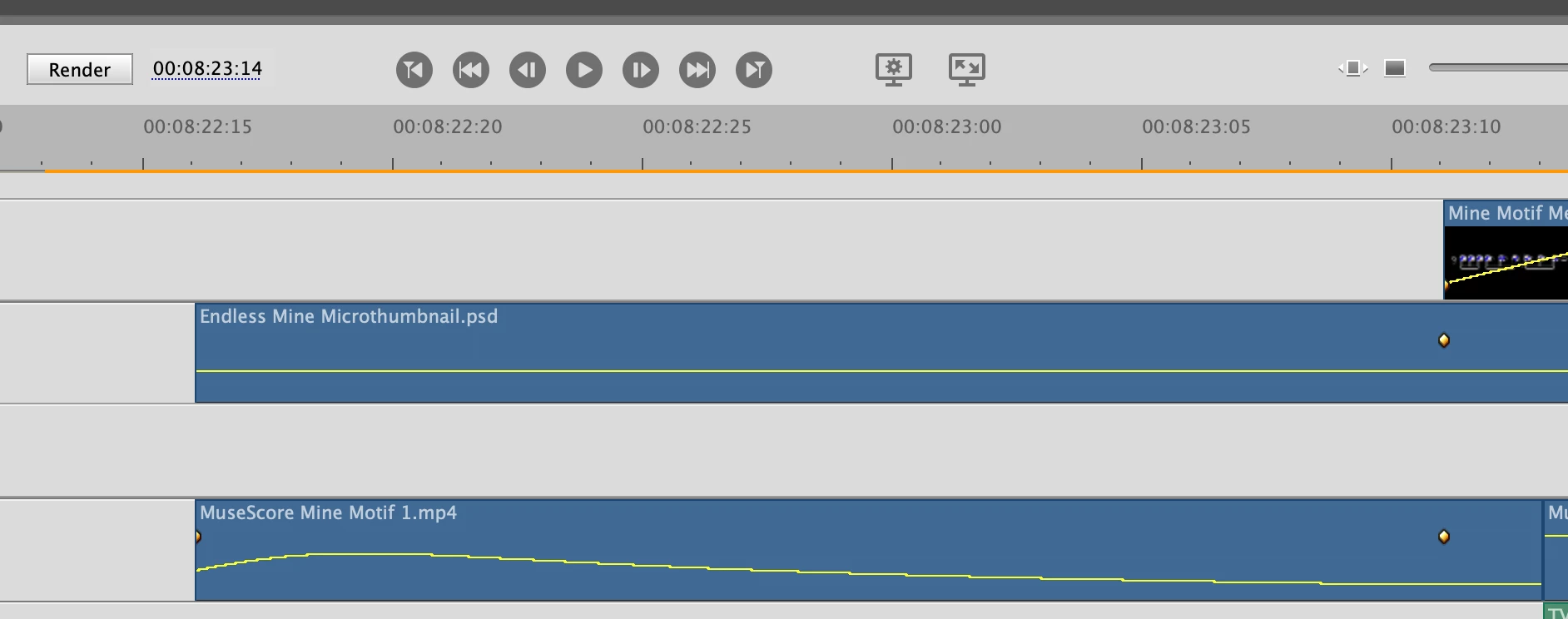
I'm having a recurring issue in which I add motion keyframes to a video or image layer, and it works fine upon creation.  But then I go back to work on other parts of the project and eventually return, the keyframes are "undone" - some of them just aren't there - so the animation/motion is lost.


In this example screenshot, the lower clip "MuseScore Mine Motif 1" has the desired motion keyframes.  The image "Endless Mine Microthumbnail" previously had the same type of motion, but you can see, the first "starting point" keyframe is missing, so the animation/motion is lost.  This problem has ocurred multiple times recently - does anyone know what the source of the issue is, or how to fix it? I have created several projects in the past using this type of animation/motion keyframes system and never had this issue, but lately it's been occurring frequently.
 

This topic has been closed for replies.

1 reply

Brainiac
December 27, 2020

Since you have the tracks collapsed for these images, it's hard to see which properties you're keyframing. It could be that your Endless Thumbnail is displaying something other than motion. 


What do you see when you look on the keyframe controller in the clip's Applied Effects panel?

ZeavoAuthor
Participating Frequently
December 27, 2020

Hi Steve, thanks for following up.

The first two images below show the first/successful file - on the timeline you can see the start and end point of the motion/position keyframe, and the applied effects is immediately below it.

The second two images show the problem file which used to have keyframes just like the first file, but now the starting keyframe is lost (as a result the motion is lost, the file just appears in its end position. I've also included the applied effects view for the second/problem file.

Some version of this problem has happened multiple times.

Brainiac
December 29, 2020

Sorry, Zeavo. I'm just not sure what's going on.