



HOTELECHOMIKE
Inspiring
December 27, 2018
Answered

PE14: Moving Set of Keyframes in Sync

  • December 27, 2018
  • 1 reply
  • 566 views

This one is probably for Steve...

PE14.1 on a WIN7 PC...

I've used Steve's method for drawing lines on maps (cropping from one graphic to another).

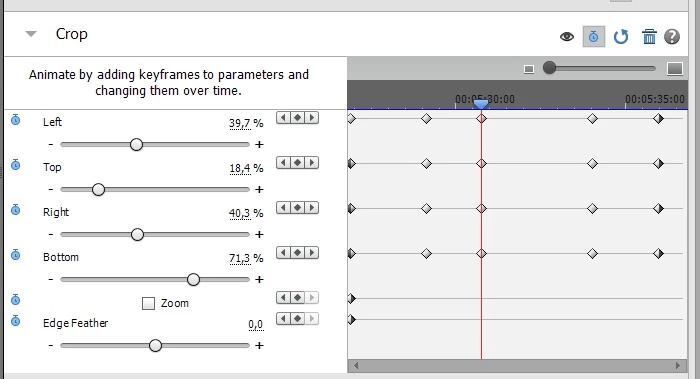
Now I'm trying a more complex route on a map that involves several "steps" - the route is not

a simple "crop from left to right" or "bottom to top":
Now, its a bit tricky getting the intervals between the various steps in the timeline correct.

Assuming I wish to move the 4 keyframes through which the red timeline (above) goes a bit to the right,

is it possible to select the four so that they move together or do I have to move each one individually & hope

that they reappear in sync?
This topic has been closed for replies.
Correct answer Ann Bens

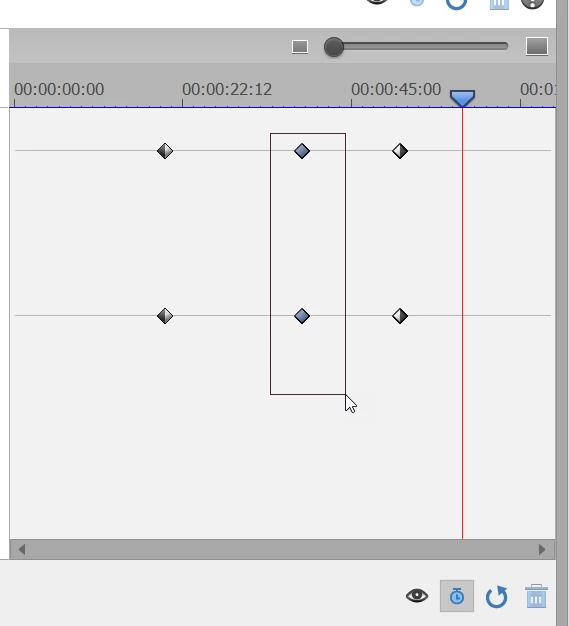
Lasso as in press left button mouse hold down and move mouse over keyframes.

1 reply

Ann Bens
Adobe Expert
December 27, 2018

Just lasso the keyframes and move them to the left or right.

HOTELECHOMIKE
Inspiring
December 28, 2018

Err - how (to lasso)?

By trail-and-error I Shift-clicked the first 3 & whilst still holding the Shift key with cursor over the 4th I found that moving the cursor left/right had the desired effect.  Is this what you meant?

Ann Bens
Ann BensCorrect answer
Adobe Expert
December 28, 2018

Lasso as in press left button mouse hold down and move mouse over keyframes.