


New Participant
November 12, 2020
Answered

Premiere elements 2018 quits when importing mp4 from snagit-editor (2021)

  • November 12, 2020
  • 2 replies
  • 781 views

Hi,

My Premiere elements 2018 quits when importing mp4 from snagit-editor (version 2021). Does anyone kwno how to solve this? Are there different types of mp4 files?


Thanks for any help, 


Robert
 

This topic has been closed for replies.
Correct answer Bill Sprague

Yes.  Video files are 'containers' that include 'codecs', frame rates and more.   Premiere Elements is aimed at users of consumer cameras.  Screen capture software can create challenges.  There may be Snagit output choices that resolve the issue.  Another work around may be using the (free) conversion program called Handbrake.  It should be able to 'translate' the Snagit files to an MP4 file with more universal contents. 

2 replies

Adobe Expert
November 13, 2020

I'm happy to see you found a solution!  And, thanks for coming back and saying so!

You wrote that "Handbrake is now called Wondershare and isn't free anymore."  It appears to me that Handbrake is still viable, free and available.  https://handbrake.fr/

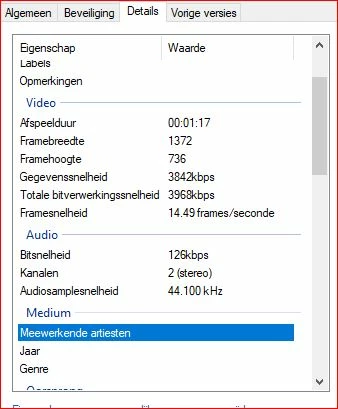
My best guess is that the reason your version of Premiere Elements is balking at your source file is the "Frameratemodus : Variabel".   Version 2018 seemed to be less capable of variable frame rate sources such as from the iPhone.  Newer versions seem to have improved because phone video shooting has exploded!.  If it is important for your work, consider testing the free trial of the newest 2021 version.  

Bill SpragueCorrect answer
Adobe Expert
November 12, 2020

Yes.  Video files are 'containers' that include 'codecs', frame rates and more.   Premiere Elements is aimed at users of consumer cameras.  Screen capture software can create challenges.  There may be Snagit output choices that resolve the issue.  Another work around may be using the (free) conversion program called Handbrake.  It should be able to 'translate' the Snagit files to an MP4 file with more universal contents. 

Brainiac
November 12, 2020

If you'd like to know the specific reason your MP4 is causing problems open your MP4 in the free download MediaInfo. In MediaInfo, set View to Text and then copy the text from this report and paste it to this forum.


As Bill says, it's pretty likely that screen capture software is using a compression system that's not compatible with this editor.