



mattchristensen
Community Manager
Community Manager
August 22, 2025
Question

Now in Beta: Cleaner, More Organized Menus Across Premiere Pro

  • August 22, 2025
  • 36 replies
  • 6709 views

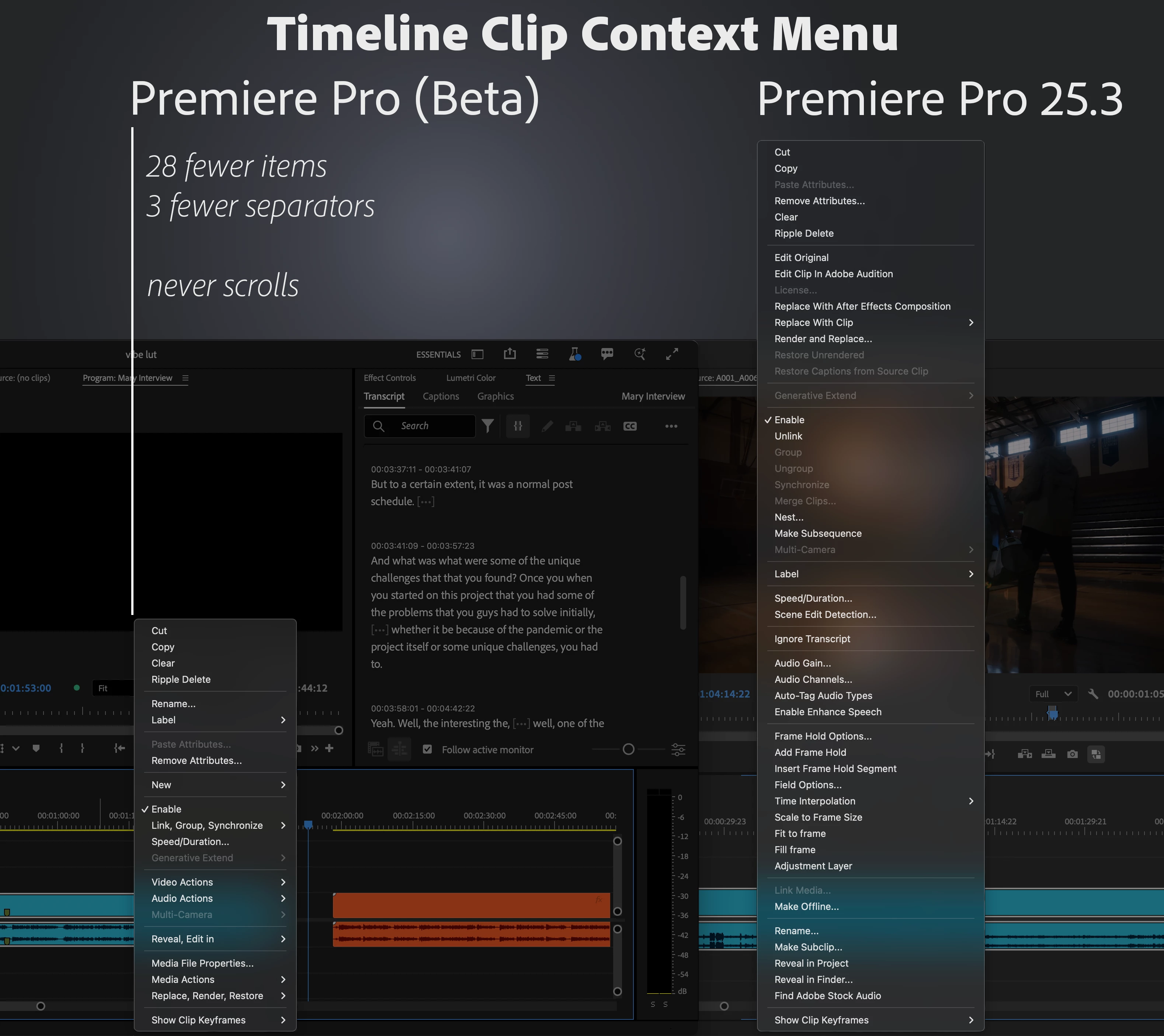
We’ve taken a fresh look at the application, panel, and context menus across Premiere Pro and developed a new organizational system to bring editors all the same functionality in a more concise and discoverable way. Even on a 13-inch laptop, you’ll never have to scroll a menu to get your work done.


Our approach to organizing the menus:

  1. Aggressively organize into submenus. Commands stay in the same menu as before, but the submenus mean the menu stays short and readable.
  2. Give useful names to the new submenus. Editors new to Premiere Pro can more quickly learn what the menu items do.
  3. Be consistent when similar items appear in different menus. Whether in the Project or Timeline panel, common items like “Label” or “Media File Properties” appear in the same parts of menus.


Across the application, menus that were updated average a 40% reduction in height, with some menus shrinking by half.


This is a big change to the feel of using Premiere Pro, and while we took time and care with these new menus, some parts may still need more work. Try them out while they’re in beta [version 25.6 build 39 or later] and let us know how they are working for you. Thank you!
 

36 replies

hellopaul4
Inspiring
September 4, 2025

I'm not keen on some of the menu items now being hidden away in sub-menus, in particular the "render in to out" and "Remix Properties" which I often use. I find it easier and much faster to find a thing in a long menu than a menu full of sub-menus.


And I do share the opinion of many on this forum that those of us who have used PPro for years (decades, even?!), we've developed muscle memory of where to find stuff, and to change that is a really bad idea. I'm all for having the option to switch between the condensed sub-menu option and traditional long menus as a preference, which would keep everyone happy.


In ye olden days, I worked on Quantel stuff - Henry and Editbox, and NOTHING was customisable on there, which meant I knew exactly where every on-screen button was, and could even continue editing, incredibly quickly, while looking at the client (not for long!) because I knew precisely where, on the graphics tablet, to click. It's like me typing right now on a QWERTY keyboard. We all know it's a crap layout deliberately designed to slow down typing, but I know where almost all of the keys are and can type at a reasonable speed while only glancing at the keyboard. If someone suggested "let's put rarely used letters, like Q, Z and X, under a 'sub-button' and just move things around" nobody would be happy! Let's not move stuff around in PPro for the sake of it, please.

Known Participant
September 4, 2025

I've used the new layout for a while and have been using PP for many years.  Every time I want to find something in one of the sub menus (which is frequently); I grind to a stop to try and find the correct location.   The muscle memory thing has now gone and everything takes much longer.  I suppose I will eventually get used to it but wish we had been given a choice.

iDag
Participating Frequently
August 31, 2025

optimize the contextual as you wish. JUST LEAVE THE POSSIBILITY TO RETURN THE MENU APPEARANCE TO THE WAY IT WAS BEFORE YOUR STUPID OPTIMIZATIONS THAT INCREASE THE NUMBER OF CLICKS AND SLOW DOWN THE WORKFLOW!!! EVERYONE SHOULD HAVE A CHOICE! AND NOT THIS TYPE OF YOUR STUPID CHANGES IN THE NEW INTERFACE AND ITS COLORS


Please do not write in capital letters!!! Mod.

R Neil Haugen
Legend
August 31, 2025

Please respectfully recognize your experience is your experience, and like for all of us, is not necessarily shared by any other user. We are all different ... your post would indicate you would think all the users who like the changes are somewhat ... mentally deficient, perhaps?


Do you really want to say that in a public forum?


I'm not a fan of some of the changes at all. But many users love them. I will not imply they are idiots, they just think and work differently from me ... as does everyone.

Everyone's mileage always varies ...
iDag
Participating Frequently
August 31, 2025

Who are you, who lives on this forum forever and is so smart? Get to work, and stop teaching everyone how to live! Who are you to explain to me that the experience of a decade of work in a familiar color environment must be crossed out by a bunch of idiots from the newly-minted programmers and designers of the new school, so that I accept it and so that millions of people accept it? Who are you to explain to me that the previous 10 years were bad only because now someone decided to cross it out under the guise of improvement? Go and do your job, old man!

R Neil Haugen
Legend
August 31, 2025

Like most anything in any video post app, everybody has a different idea as to usefulness or appearance or whatever. All are of course valid as opinions ... and most welcome to get posted here. Especially here, where we can affect how new things are finalized.


But just remember the vast majority of users won't post, sadly. Especially if they like something. Those of us who don't have a far higher likelihood of taking the time, right?


So please do so respecting that everyone else will see it differently, even those who seem to agree with you. Be polite, of course, and enjoy the differences of opinion and working patterns.

Everyone's mileage always varies ...
Known Participant
August 31, 2025

It seems like a lot of people are upset with this update and you keep replying to them trying to prove how no so bad this update is. 

R Neil Haugen
Legend
August 31, 2025

To me that is an odd reading. I keep pointing out that of the millions of daily users, they will be all over the place. No two users do anything the same way, nor do they have the same 'view' of the UI overall. At most, "we" may agree on a few things.


How is that trying to prove anything? I simply can't see it.


If you don't like it, fine ... and do please say so here, in full detail of how it affects your working processes. That is all useful and I wish more posted their data.


Just don't ever assume anyone else shares your viewpoint, out of simple respect for other users.


Remember, those who like something normally never post, so you never see their comments. Right?


And please understand, I have posted epic rants here myself, when I disagreed strongly with a decision.


Such as when they discontinued SpeedGrade, still one of the most short-sighted decisions I can recall.


But ... I did keep comments professional, respectful, yet thoroughly detailed as to why that decision was not ... wise ... nor useful for the users.


And from comments both 'here' and at NAB, that series of posts were definitely recognized as rants ... 😉


Everyone's mileage always varies ...
_nicdean
Community Expert
Community Expert
August 30, 2025

This update addresses a valid issue where the context menu has grown long. As evidenced in this thread it is a divisive change and some folks dislike it.


I believe I have a simple solution to please everyone.


Measure the pixel dimensions of menu height and the user's screen height.

  • If user's screen height has enough vertical space, show the standard menu
  • If user's screen height is too small, show the condensed version


With this solution, a small 13" laptop would automatically show the condensed menu. Professional editors on large 4K monitors with ample screen space get the big menu and don't have to search through submenus.


Or take the easy way out and add a checkbox in Preferences > Timeline called "Minimal Clip Context Menu". We can then move on to more important and functional features inside Premiere.

RRKing
Inspiring
October 15, 2025

This is how it's always been done when we developed applications that were cross platform or in different enviroments as some would have tiny screens and some large including ones with no keyboards.  Seems simple enough and wouldn't reqwuire a thread on the subject and as you said could focus on more important things. 

Personally, I hate the new nesting of everything. reminds me of relational database design.  just becuase you can normalize doesn't mean you need to normalize everything. Denormalization can help and in this instance it seem some can be nested and some not.  

Participant
August 30, 2025

Can we have an option to switch it back? Sub mneus mean extra time when editing. I know some people will like it. I don't. 

Participant
August 29, 2025

Looks nice but practically speaking, I really hate it. Can you at least give us the option to turn this off?

R Neil Haugen
Legend
August 30, 2025

Please, to have the best effect, be specific as to what bothers you. The more specificity we give them now, the less annoying it might be.

Everyone's mileage always varies ...
Participant
August 30, 2025

It just slows everything way down. Either you're a keyboard shortcut person and the menus don't matter, or you're a mouse person and navigating to 2-3 submenus is way slower than a quick scroll. And if you're on a moderately large display, you don't even need to scroll. Not to mention that the actual organization they've landed on seems way too granular. Not only is there more to memorize, but we have to memorize a structure that seems arbitrary and unnecessarily 'organized'.

R Neil Haugen
Legend
August 28, 2025

Just spent a little bit of time with this, and unlike most others, it seems both sensible and logical. 


And that's on a 2560/1080 main monitor. On my laptop's 16" screen, this would be a vast improvement.


Even on that LG ultrawide desktop monitor, I've had to go to the bottom/scroll ... and then realize oops I'd missed it farther up, unscroll, search, find it. So the speed of use is much better with this change.


And further, the organization of similar items makes sense to me. Unusually so.

Everyone's mileage always varies ...
Known Participant
August 29, 2025

I am also a mouse person (I know I should be using shortcuts).

I would regularly save my Project and previously it was just "File" and "Save"; now "File", "Save", "Save"

Same for Reveal in Project/Explorer which was quick and easy before but now you have to do "Reveal/Edit in",  "Reveal in Project/Explorer"

I suppose I will have to get used to this new layout but it does seem a bit of a pain for how I work.

Would it not be possible to allow some sort of customization so that users could specify which items could appear in the top level; sort of a favorites.  I would certainly include the things I do constantly which are these and also the Optical Flow setting that someone else mentioned.

R Neil Haugen
Legend
August 29, 2025

Personally I would never waste the time for saving via mouse even with my hand on it.


CTRL(Cmd)-S is just so fast ... and easy ... doesn't even take a brain cell anymore to do ... 😊

Everyone's mileage always varies ...
Ann Bens
Community Expert
Community Expert
August 28, 2025

Why is Optical flow buried so deep?


Known Participant
August 27, 2025

I geniuenly do not like it!! 


For the sake of organization, you made things harder to reach. The organizations wasn't even intuitive, you just put everything into groups without taking considereation of the most used options like Nesting. Now things have gotten futher away from reach!! 

_nicdean
Community Expert
Community Expert
August 25, 2025

Cool 👍


Rather than spending much time and energy reorganizing menu items and moving UI elements, add an app-wide search feature (aka Mac Spotlight, but for Pr).


The Help menu sort of does this, but only works on Mac and often shows irrelevant items and has bad search. It also doesn't do the command when you click it. It just brings you to the menu item you are seeking.


Use fuzzy seach, auto-complete, let users add favorite items. If someone searches "size" it should be smart enough to show you options for Scale, Transform Effect, Fit Frame, Fill Frame, etc. Everything related to "size".


Example Products where this already works:

  1. Spotlight on Mac
  2. Excalibur from Knights of the Editing Table
  3. FX Console for After Effects
  4. Raycast


We don't need to reinvent the wheel or massively change UI. Just let people access what they already want to do, faster.

Inspiring
August 25, 2025

Especially now that fxconsole is half broken because of the properties window; a native solution would be a highly desired feature.