



Francis-Crossman17221443
Community Manager
Community Manager
January 16, 2025
Answered

[Now Released] Label colors in sequence tabs

  • January 16, 2025
  • 16 replies
  • 4119 views

We can now display and change the label color of sequences right in the sequence panel.
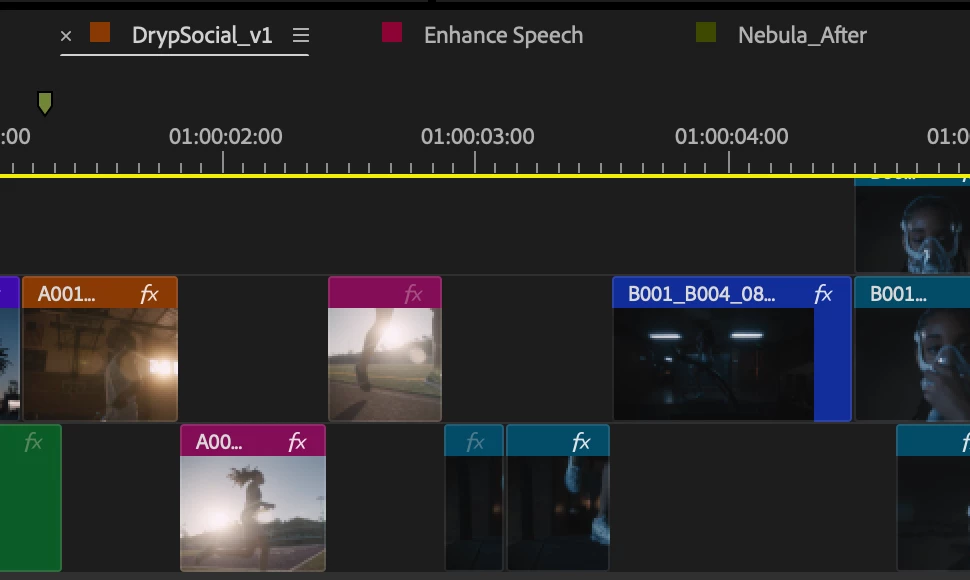


Steps to access the feature

  1. Update to the latest beta (v25.2 build 81 or later)
  2. Go to Timeline Display Settings (wrench in Timeline panel)
  3. Enable the following option: Show Sequence Label Color (it is off by default).
  4. This option will add a Label color swatch to the left of the Timeline > Sequence panel, similar to After Effects.


You can also assign a keyboard shortcut.  The Timeline > Sequence panel’s contextual menu (e.g., right-click) also has a Label dropdown menu at the bottom. This will change the label color for just that sequence and update the same sequence in the Project panel (and vice versa). You can also assign specific Timeline panel shortcuts to each Label color separate from Timeline clip Label colors to avoid conflicts.


Known bugs

  • Timeline Sequence Label color name changes are not reflected in Keyboard Shortcuts editor.  You can change the name of the label color, but the name changes are not reflected in the Keyboard Shortcuts editor.


Questions we have for you

  • Should this be on by default?


We want to know what you think.  Please join the conversation below.

Correct answer Christine Steele

Yes! This is helpful. I think it should be on by default. 

16 replies

Participant
June 17, 2025

Can i turn this off? And how, thank you!

DJP2014
Inspiring
June 17, 2025

Yes -- It's in the Timeline Display Settings (wrench icon) > Show Sequence Label Color

Participating Frequently
April 3, 2025

Being able to color the entire tab will help exponentially! MORE COLORS!

Participant
April 12, 2025

When is this coming to the next 25 build? I was just wishing this feature existed! Entire tab would be nice if it doesn't cause issues.

Community Expert
April 2, 2025

Yes, this is a great addition and very helpful. My thoughts:


  • I think I understand why it's under the wrench menu with the "show" items but then under the hamburger menu we have an actual Label submenu to change them. Seems they should be together. 
  • Having the whole tab the color instead of the little square would be easier to see and take up less real estate. 
  • The underline for the selected timeline tab is very bright and visible and works great. 
Known Participant
February 4, 2025

This is great, but can we have the whole tab coloured rather than just a small square. How many times do I hunt for the active sequence when I'm editing??? A LOT. So a bright red tab, would be fantastic. Can we identify a sequence as the Master Sequence please?

DJP2014
Inspiring
February 4, 2025

Yes, I second this. Nice if we had the option to only show a label for the 'Master' sequence. This was how I worked in Final Cut Pro 7 back in the day.

Community Manager
February 4, 2025

I shared this update in the Korean Premiere Pro Beta Community and would like to share users' feedback.

It should be enabled by default so that users can immediately recognize that the new feature has been applied. By keeping it enabled by default, it would be helpful if a dedicated page explaining this feature appears on the additional features intro screen when launching Premiere after an update.

Thanks,
Bannie - Korean Beta Community Manager for Adobe Premiere Pro

Known Participant
January 27, 2025

As for me, this is a great solution, another small function that makes it easier to navigate among our materials. I don't know if it wasn't there before or I didn't notice, but there was an additional workspace PRELUDE like in the old days 🙂 small addition but made me happy!

theok8577996
Inspiring
January 24, 2025

Thats great, but I think rename sequence and copy option should be there too.

Now you first have to find the sequence in the projectpanel....

Shebbe
Community Expert
Community Expert
January 24, 2025

I believe it doesn't exist by default, but you can map "Reveal Sequence in Project" to a keyboard shortcut.

Shebbe
Community Expert
Community Expert
January 23, 2025

Regarding the further improvement of readability, I think there are many options left. If a full color on the tab is not desired, these alternatives should definitely be possible and further improve information parsing speed.


Participating Frequently
January 23, 2025

Option 3 makes it VERY clear which is the selected tab.  I support this.

DJP2014
Inspiring
January 23, 2025

I like it! Should the colored swatches also dim when inactive, same as the sequence names? That might make it easier to identify the active sequence.


On by default.

Participating Frequently
January 20, 2025

Color coding sequences helps with quickly identifying different sequences that you have open.  This is a very much needed function.  I, however, think that more of the tab should contain the selected color instead of a simple square on the left side.  If you cannot color code the entire tab, perhaps just the outline of the tab will help, almost like a inside Stroke for the shape.