



Exit
  • Global community
    • Language:
      • Deutsch
      • English
      • Español
      • Français
      • Português
  • 日本語コミュニティ
  • 한국 커뮤니티
39

P: 25.6.2 Missing Text Panel; Empty UXP Panels

Community Expert ,
Nov 22, 2025 Nov 22, 2025

Update 2, 12/13/25: See staff post indicating that this is fixed without updating the PR version:
https://community.adobe.com/t5/premiere-pro-bugs/p-25-6-2-missing-text-panel-empty-uxp-panels/idc-p/...


To test, you only need to open the stock panel: Window -> New Adobe stock. It should load with content. If it does not, and hangs with the spinning circle frozen, post back here. The workarounds should still be working if you have any issues.


Update 12/3/25: This update is based on my tests as of this morning. This does not appear fixed by updating to 25.6.3. This bug report focused on workspaces and the text panel. The list of symptoms is longer. There is another long thread that focuses on failure of export commands:
https://community.adobe.com/t5/premiere-pro-bugs/p-premiere-pro-won-t-export-ui-frozen-need-help/idi...


Trigger: For some users, when the Adobe Stock panel is open, whether it is in focus or not, after 10-15 seconds, it fails to load and causes one or more of the symptoms identified. The Stock Panel is open by default in the Essentials, Learning, Editing, and Libraries workspaces, and perhaps others. Once the problem is triggered, you cannot recover without restarting PR. Reloading the project alone does not work.


Symptoms (Incomplete list):

  • The Export mode/dialogue window cannot be accessed using Ctrl+M; File -> Export -> Media; Quick Export; or clicking on the Export tab. File -> Export -> Send to media encoder still works.
  • Text panel is empty, shows as unchecked in the Window submenu.
  • Text panel is missing, shows as unchecked, and clicking it in the Window submenu does nothing.
  • Text panel transcript and captions become unresponsive.
  • “UXP Panel n” (where n is an increasing number as you change workspaces) appear instead of an actual panel (for me this has included the Text and the Adobe Stock panels).


Best Workaround:

  • The most effective and least limiting workaround is to avoid opening the stock panel by modifying your workspaces.
  • Set Window -> Workspace -> "Import Workspace from Projects" OFF. You can set it on, but then each project must be set up correctly.
  • Close the Adobe stock panel in any workspace you use. You can do this in PR even when the problems are present. Do not later use "reset to saved layout" unless you want to redo that process.
  • Or create custom workspaces once you close the stock panel.
  • Note that these workspace changes are in your preferences, so if you reset preferences you lose them.


Other Workarounds:

  • Resetting preferences, creating a new project, uninstalling/reinstalling 25.6.2, and other steps may result in PR “working,” but it may be because you have not loaded the Adobe Stock panel. As soon as you do, it fails.
  • Install PR 25.5.0. This works, but I believe it is not necessary to avoid this bug.
  • Open in the Captions and Graphics workspace and do not change workspace. This works because it does not open the stock panel, but it is unnecessarily limiting.


Original bug report 11/22/25:

When changing workspaces, the Text panel no longer appears; various empty panels show, e.g. "UXP Panel 3," "UXP Panel 4," etc. I do not see the problem in Beta 26.0.0.36.


I updated to 25.6.2 from 25.6.1. As always, when opening the first time, I reset preferences, cache, and plugin loading cache, and I created a new project. After seeing this problem, I restarted my PC and reset preferences, cache, and plugin loading cache, disabled third-party plugins, and created a new project. Same result. I then repeated that a third time to get more details. I confirmed I am in 25.6.2 Build 1.


"Import workspace" is off. I note that even with disabling plugins, 5 plugins are still available. I will explore that further.


PR opens in the Learning workspace. The Text panel is present, and is checked in the Window menu. I switched to the Captions and Graphics workspace, and the Text panel is still present, unlike each of the previous 2 times. I now switched to the Editing menu. In the panel group with the Project Panel, there is an empty panel "UXP Panel 3." There is no Text panel visible, and the Text panel is not checked in the Window menu. When I switch back to the Captions and Graphics workspace, the Text panel is not present, there is an empty panel "UXP Panel 4" in the Source monitor group, and the Text panel is not checked in the Window menu. (See screenshot.) I switched to the Learning workspace, the Text panel is not present, there is an empty panel "UXP Panel 5" in the Source monitor group, an empty panel "UXP Panel 6" in the Project Panel group, and the Text panel is not checked in the Window menu. 


I closed and reopened PR, and opened the last project. It was (as expected) in the Learning workspace, and the Text panel was present. I changed to Captions and Graphics, then Editing, then Captions and Graphics, and then Learning. The same problems occurred with the exact results.


PR 25.6.2 PR Beta 26.0.0.36.

Win 11 Pro v11 25H2
i7-11700K, RAM: 640 GB. Single UHD monitor. NVIDIA GeForce RTX 3070, Driver: 566.36.


Stan
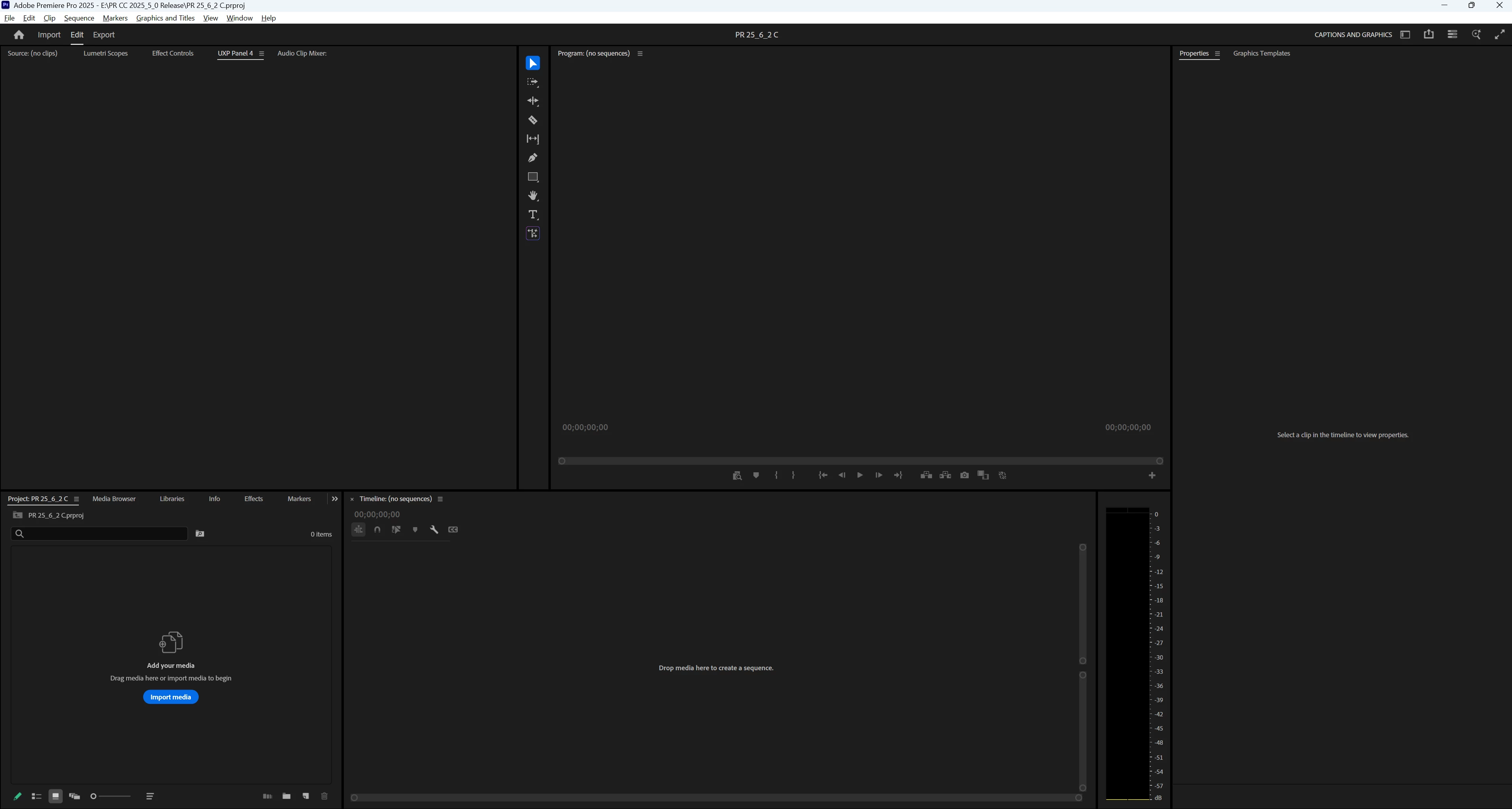
UI Captions Graphics 25_6_2.png


Bug Started
TOPICS
Editing and Playback , User experience or interface
10.8K
Translate
Report
Community guidelines
Be kind and respectful, give credit to the original source of content, and search for duplicates before posting. Learn more
community guidelines

correct answers 1 Correct answer

Adobe Employee , Dec 12, 2025 Dec 12, 2025

Hi all!

Thank you for sharing your experiences and for your patience while we investigated this issue.

We’ve isolated the cause and have rolled out a fix in the latest application version (v 25.6.3) that addresses the missing/empty panel behavior - this change does not require a Premiere Pro update.


What you need to do:

  • If you were affected, please ensure you are running the latest version of the application and restart Premiere Pro to confirm that panels are functioning normally.
  • If issues p
...
Translate
replies 228 Replies 228
228 Comments
Community Beginner ,
Sep 16, 2022 Sep 16, 2022

I have the upt to date version of PP and have loved using the import workflow.  But those three tabs have stopped repsonding.


Any fix?

Translate
Report
Community Expert ,
Sep 16, 2022 Sep 16, 2022

We need more details (system specs, operating system, graphics driver number..), and it would be better to post a screenshot or screen recording of the issue

Translate
Report
Community Beginner ,
Sep 18, 2022 Sep 18, 2022

Great.  Win 11, i7 12700H RTX 3060 32GB RAM, 4 drives (all nvme Samsung + WD) 


The issue has happened on older versions of PP as well.  I tried uninstalling and "remove" preferences, but my prefs were still there (cloud I guess).


Screen capture attached.


Thanks for the help, I'd love to get this feature back

Translate
Report
New Here ,
Mar 05, 2023 Mar 05, 2023

Hello...I have the same problem where on my editing workspace the import & export tabs in the upper left corner are unresponsive. They used to work. Just updated to PP v23.2 but import and export tabs were not working before.


System specs....

Device name DESKTOP-HGGH6LL
Processor Intel(R) Core(TM) i7-6700HQ CPU @ 2.60GHz 2.60 GHz
Installed RAM 32.0 GB (31.8 GB usable)
Device ID 33C1460C-2AE8-4080-B24E-39083D739406
Product ID 00325-95928-44956-AAOEM
System type 64-bit operating system, x64-based processor
Pen and touch Touch support with 10 touch points

Nvidia GeForce GTX 960M video card


Edition Windows 10 Home
Version 22H2
Installed on ‎11/‎30/‎2020
OS build 19045.2604
Experience Windows Feature Experience Pack 120.2212.4190.0


TIA for you support.

Translate
Report
Community Expert ,
Mar 05, 2023 Mar 05, 2023

Try uninstalling and reinstalling.

You may need to use the Cleaner Tool:

https://helpx.adobe.com/creative-cloud/kb/cc-cleaner-tool-installation-problems.html

Translate
Report
Explorer ,
May 30, 2024 May 30, 2024

Hey guys.


For years up to a week ago i had a template premiere project with all my SFX and VFX and always added to a project (about 170GB on SSD) and then i mported my footage and work normally.


Now if i add those VFX and SFX files premiere becomes so slow its impossible to work with. If i click on the "export" panel nothing happens, and maybe after 10-20 minutes while i'm working on the timeline an empty export panel pops up. 

And if that happens the "Text" Window becomes "UXP Panel" which is an empty window. 


Everything used to work just fine a week ago. I'm working on a brand new Macbook Pro M2 Max 32GB.


I tried uninstalling restalling, clearing cache, reset preferences but still nothing. I can still export with the media enoder. But in order to do captions i need to copy my timeline from one project to a new one and then the "text" window opens. Even if i do "remove unused" from the bin still nothing happens on the older, projects.


Any ideas would be helpful. Thanks

Translate
Report
Community Expert ,
May 30, 2024 May 30, 2024

What version of PR are you using?


If you create a new project and import the template, save as new template, does that help?


There have been a few users reporting the empty panels, which I think means the panel has crashed. But I don't think this has been identified as a bug.


If no one suggests a better option, I would assume that the template is corrupt, and I would create a new project and start building the template new. I would start with the most basic elements first and see if it works.


Stan


Translate
Report
Explorer ,
May 30, 2024 May 30, 2024

I'm using the latest version (24.4.1). I have created a new project, and the moment i import my SFX folder into premiere it just stop working normally.

Translate
Report
Explorer ,
May 30, 2024 May 30, 2024

Also i have tried installing previous Premiere versions where this didn't happen with my exact SFX folder, but it's still the same result.

Translate
Report
Adobe Employee ,
May 30, 2024 May 30, 2024

@Chris25201613u6it what third party extensions do you have installed that have panels? For example I see a panel called "AtomX" in your screenshots. My current suspicion is that something is going on there that is breaking our Export and Text panels...

Translate
Report
Explorer ,
May 30, 2024 May 30, 2024

yeah i have 2 3rd party extensions. AtomX and Watchtower. However i've had both for months and until now everything was working smoothly. 

Translate
Report
Adobe Employee ,
May 30, 2024 May 30, 2024

You say 'until now'; what changed about your system configuration, around the time this problem appeared? 

Also: Importing "all my SFX and VFX" into every project you work with, instead of importing only assets relevant to the given project, is guaranteed to eat resources and slow performance, while providing no perceptible advantage (other than convenience). Using PPro Productions may be a helpful alternative: https://helpx.adobe.com/premiere-pro/using/production-panel.html

Status Needs More Info
Translate
Report
Explorer ,
May 30, 2024 May 30, 2024

thanks for the productions tip, i'll definitely check it out.  i haven't changed anything. if i just have a few clips in the project the text window and export window works just fine. the moment i add my sfx files it "breaks". But a week ago that sfx folder was working normally.

Translate
Report
Adobe Employee ,
May 30, 2024 May 30, 2024

So, the behavior could have been there for a while, but you only recently encountered it...? First new project in a while, or something?  [Sorry if this line of questioning sounds pedantic, but determining what provoked/started the behavior can often be helpful, in resolving it...]

Could you looseley describe the contents of the SFX folder? Also, confirming:


  • Launch PPro, display Text panel, everything is great
  • import 'SFX' folder
  • Text panel contents disappear


???

Translate
Report
Explorer ,
May 30, 2024 May 30, 2024

No worries. Yeah exactly that.


So i've been doing the same thing over over 2 years. I've had a a "template" premiere pro project that had the SFX already inside, that way i didn't have to wait for the import each time i wanted to use it. Every week i start a new project i would "copy" that premiere file, rename it to my project, open it and import my footage. That way i did my editing and already had all my SFX working great. Everything was perfect. Then a week ago the export and text problem started happening. So i tried everything that i mentioned at the top. I also started a brand new project, and i realised that the new project everything works fine. But as soon as i import the SFX folder, the text panel becomes "UXP Panel" and "export" doesn't work any more. 


The SFX folder is approximately 100GB of .mp3s and .wav. 


Translate
Report
Explorer ,
Jul 03, 2024 Jul 03, 2024

@Chris25201613u6it 

I just want to chime in to say that I'm experienceing a very similar issue that happened in a similar time frame. My export and text pannels are affected in a very similar way. I just tried using the Creative Cloud Cleaner tool and deleted all Adobe application support files to no improvement. 

You can see my ticket here: https://community.adobe.com/t5/premiere-pro-bugs/text-pannel-missing-only-showing-uxp-pannel-1-or-2/...

Translate
Report
Explorer ,
Jul 03, 2024 Jul 03, 2024

thanks for writing. i still haven't found a fix. please let me know if you do, because this is really inconvenient.

Translate
Report
Adobe Employee ,
Aug 22, 2024 Aug 22, 2024

Hi @Chris25201613u6it and @Caleb34074613vo2m,

Are you still seeing this issue in 24.6? Let the community know. I hope you are clear of this bug now.


Cheers,
Kevin

Kevin Monahan - Sr. Community & Engagement Strategist – Pro Video and Audio
Translate
Report
Explorer ,
Aug 23, 2024 Aug 23, 2024

yes nothing has changed!

Translate
Report
Explorer ,
Aug 23, 2024 Aug 23, 2024

@Kevin-Monahan yes nothing has changed!

Translate
Report
Explorer ,
Aug 23, 2024 Aug 23, 2024

@Kevin-Monahan Same here. I updated to 24.6 today but the issues persist.

Translate
Report
Explorer ,
Oct 24, 2024 Oct 24, 2024

I have an encouraging update! It appears that PP 25.0 has resolved the bugs I was expeiericing with the text and export pannel. It also seems from my early impression that I'm having better performace all around. Which it's still early to know for sure, this has been the most progress I've seen so far with all my tests and troubleshooting.

Translate
Report
Explorer ,
Mar 07, 2025 Mar 07, 2025

Mate, did you solve it?

Here is might "cents, I think that is related to peak files. 100 gigs of audio need to spend some time creating both peak files and after, voice to text analysis, soooo, it might not let you do anything until finishes, sounds plausible?


Translate
Report
Explorer ,
Mar 07, 2025 Mar 07, 2025

no this was never solved. unfortunately creating the peak files isn't the answer either. even if the project is open for days it just never works.  i had some hope when i converted all the sfx files into the same format (.wav) with the same bit format. it worked for 5 minutes and then broke down again

Translate
Report
Explorer ,
Mar 10, 2025 Mar 10, 2025

Well, now I´m in the same spot. UXP panel 1 for the text panel.

It doesn´t even open unless I use the workspace for it.

New poject, imported sequence.

I tried unnistalling The uxp installer that I used for intalling som extensions, tought it might help. It didn´t.

Any idea?


Translate
Report