

tmksr
Inspiring
November 20, 2024

Clip "Informationen Fenster" zeigt falsche Framerate!

  • November 20, 2024
  • 9 replies
  • 474 views

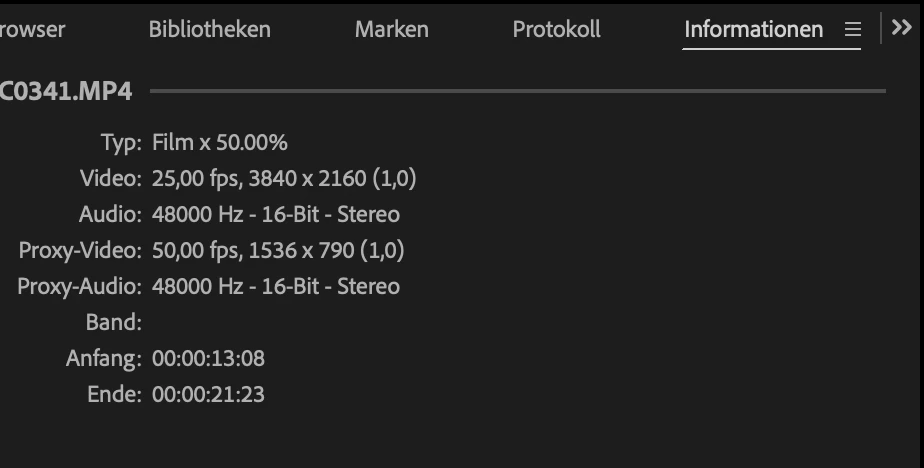
Das Fenster "Informationen" zeigt mir für einen ausgewählten .mp4 Videoclip u.a. die Werte


- - - - - - - - - - - - - - - - - - - - - - 
- Typ: Film x 50.00%

- Video: 25,00 fps

- Proxy-Video: 50,00 fps

...

- - - - - - - - - - - - - - - - - - - - - - 


Der Wert "Video" zeigt aber offensichtlich die Framerate der Sequenz, an in welcher der Clip sich befindet (25 fps) und NICHT die Framerate des ausgewählten original Clips (50 fps). Unter dem Wert "Proxy-Video", wird mir die korrekte Framerate (50 fps) des Proxy-Clips angezeigt. 

Desweiteren fehlt in Premiere 25.0.0 der Kontext-Menüpunkt "Eigenschaften". Wenn ich mit der Maus via rechtsklick auf einem Clip das Kontextmenü einblende gibt nur noch die Menüpunkte: "im Finder anzeigen" oder "im Projekt anzeigen".

D.h. die Funktion über den Rechtsklick, die mir bisher verbindlich angezeigt hat, was mein Clip z.B. für eine Framerate hat wurde entfernt und dafür zeigt mir das "Informationen Fenster" nun falsche Angaben.

Für mich stellt es im Workflow eine deutliche Verschlechterung dar.
 

9 replies

jamieclarke
Community Manager
Community Manager
June 12, 2025

Updating Status to Fixed in 25.3

Stan Jones
Community Expert
Community Expert
April 24, 2025

@jamieclarke,


I can confirm that this bug (sequence framerate is shown in Info panel, not clip framerate) is fixed in Beta 25.3.0.59.


But I see that this bug (a file with proxy has end timecode and duration cut off in Info panel) is not.

https://community.adobe.com/t5/premiere-pro-bugs/the-info-panel-not-showing-duration-when-proxy-is-used/idi-p/15257081


Stan


jamieclarke
Community Manager
Community Manager
April 24, 2025

Hi @tmksr -  This issue has been fixed in beta version 25.3.0 build 59 and later. The fix will be included in the next public release of Premiere Pro version 25.3.0.

tmksr
tmksrAuthor
Inspiring
November 20, 2024

Ok. I understand. Updated today from version 24something. Thanks for the shortcut, i'll try it out. But why should you remove that menu item - it doesn't bother anyone. But those who need it will search for it endlessly. 

jamieclarke
Community Manager
Community Manager
November 20, 2024

Hi @tmksr - I see you are trying to access the media file property for the clip in the sequence.  That has been removed since version 24.5. There is a keyboard shortcut, while you have the media file selected on the timeline use the keyboard shortcut for mac Command+Shift+H or, windows Control+Shift+H

tmksr
tmksrAuthor
Inspiring
November 20, 2024

jamieclarke
Community Manager
Community Manager
November 20, 2024

Hi @tmksr - Can you post a screenshot it should be right below "Modify" in the context menu.

tmksr
tmksrAuthor
Inspiring
November 20, 2024

1. thanks, hope you can fix it soon - the bug is also in the current beta.


2. maybe I'm blind or the menu has dynamic content but I also can't find the renamed menu item anywhere, when I right-click on a clip? I use PP in german.

jamieclarke
Community Manager
Community Manager
November 20, 2024

Hi @tmksr -  Thanks for submitting your bug report. 

I agree, the Info Panel should display the correct "FPS" of the selected media clip.  I will log this as a bug.


The “Properties” menu in the context menu has been renamed to “Media File Properties".


Sorry for the frustration.