
Participating Frequently
August 7, 2024

Initialize the GPU each time you open the Premier Pro project

  • August 7, 2024
  • 3 replies
  • 323 views

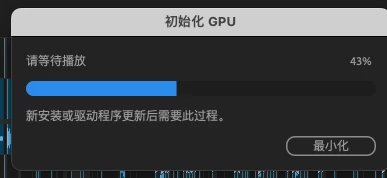
Every time I open Premier Pro recently to continue working on a project, this window pops up
Model name: Mac Studio  Model identifier: Mac13,2  Model: Z14K0005UCH/A  Chip: Apple M1 Ultra

This is my device information This window is very affecting my work efficiency, can you tell me what changes or actions I need to make to stop this situation

This topic has been closed for replies.

3 replies

Kevin-Monahan
Community Manager
Community Manager
September 10, 2024

Hello @子恒38234715gzbg,

Can you report back after updating macOS and Premiere Pro? Let us know.


Thanks,

Kevin

Kevin Monahan - Sr. Community and Engagement Strategist – Adobe Pro Video and Audio
Participating Frequently
August 11, 2024

macOS 13

Kevin-Monahan
Community Manager
Community Manager
August 7, 2024

Dear @子恒38234715gzbg,

Thanks for writing your bug report. The team may need more details, like which version of macOS you are using. See, How do I write a bug report?


I hope the team can help you as soon as possible. Sorry for the problem.


Thanks,
Kevin

Kevin Monahan - Sr. Community and Engagement Strategist – Adobe Pro Video and Audio