



arcadiadb
Participating Frequently
October 31, 2022

MXF File read error after updating to Premiere Pro 2023

  • October 31, 2022
  • 18 replies
  • 9184 views

Hello,


I just opened my projects after updating to the latest version of Premiere and all my MXF files are showing up squished with half the frame green.  I have no idea what happened.  When I open the files from Finder they look fine, and everything was working perfectly before the upgrade.  See attached image.  Same problem when viewing clips in After Effects as well.  HELP!  I'm on deadline and not sure what to do.  May try downgrading to the last version to see if that fixes it for the immediate project.
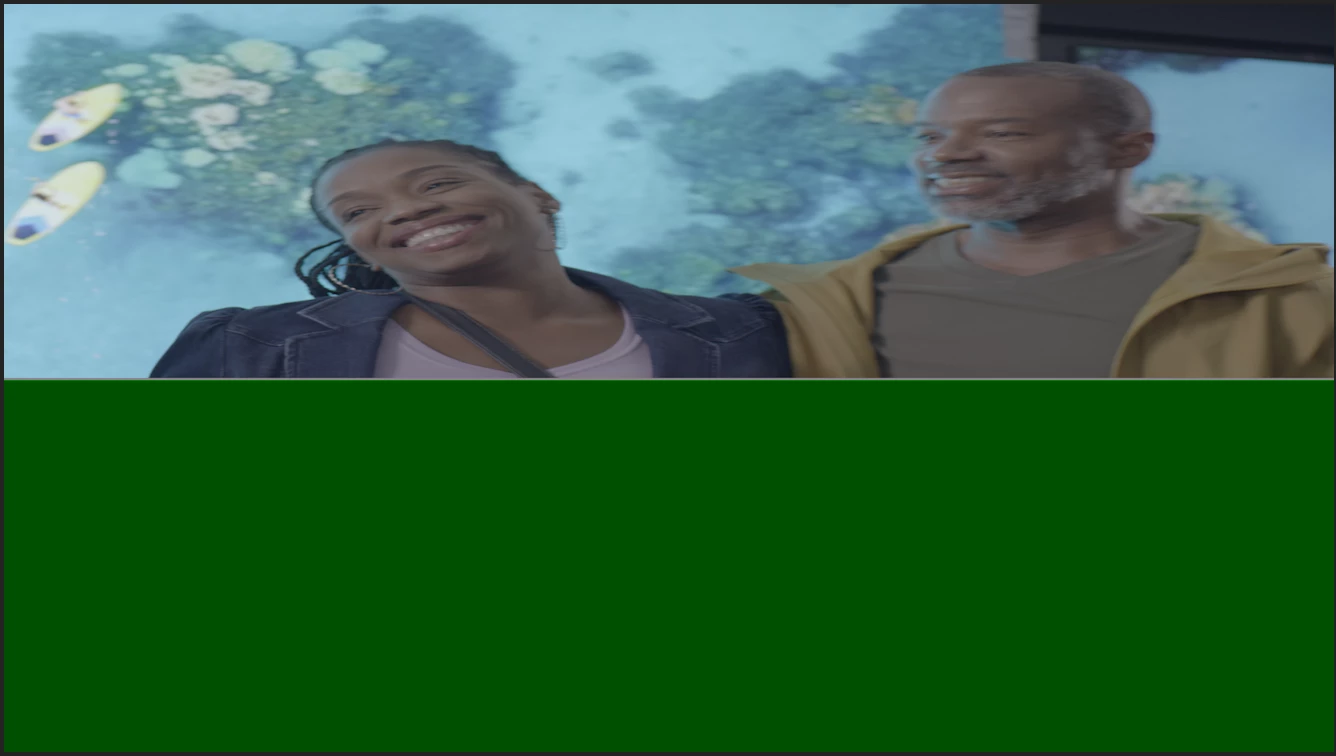
 

This topic has been closed for replies.

18 replies

jamieclarke
Community Manager
Community Manager
October 24, 2024

updating status as fixed in 23.6

himynameismatt22
Participant
July 7, 2023

Hello. 


There is a similar issue with Premiere 2023 today. 2 different computers are having the same problem with the same large project containing MXF files. The Program monitor will not show a frame or playback video whatsoever. Audio will playback, but no video. We've tried clearing the cache, changing the render settings, and unlinking and relinking media, but it just won't work. The only way to get the video to work in the Program is to use the F shortcut key and drag the video back down into the sequence. THEN it will show in Program. 


Any other ideas besides what I listed? This is a 10 min doc with 2 cams and I don't want to have to drag and drop each in/out point in again from Source. 

Hecubus114
Inspiring
July 5, 2023

It is *somewhat* fixed for me - I am able to use the denoise plugin, but rendering is still extremely slow on 3840 x 2160 MXF clips. Also, I am still constantly (like, literally every couple seconds) getting the "error retrieving frame..." error. However, no crashing on this attempt of using it. Still slow and frustrating though.

arcadiadb
arcadiadbAuthor
Participating Frequently
July 5, 2023

Yeah!  It's working on my end.  THANK YOU!!!!

Participant
July 3, 2023

Thanks for looking into this Mayjain


I have downloaded the latest beta version and tested out the problematic files I have but unfortunately, I'm still getting the same issue with the 4096 x 2160p MXF file.
The screenshot attached is what happens with the files when opening them in Premiere.


The problem exists in Media Encoder as well and I'm unable to encode them into other formats.

I have been able to encode the files using a Free video encoder called Handbrake but it's not ideal.


No issues with 1920 x 1080p or 3840 x 2160p files, only 4096 x 2160p

Here's a link to the three files - https://we.tl/t-JIW25FmHTZ


Any help would be hugely appreciated


Thanks,

Adam

Community Manager
July 3, 2023

Hi All,
Sorry for this issue again. We have fixed it in the latest beta build(starting Beta 23.6.38). You should no longer see this half green frame with any of your MXF media files.

Please check out the latest beta build version from the creative cloud and let us know how it goes there.

You can download the latest Beta builds from Creative Cloud --> Beta apps --> Premiere Pro (Beta)/Media Encoder (Beta)
https://helpx.adobe.com/x-productkb/global/creative-cloud-public-beta.html


If you still face this issue, please share your media files here https://helpx.adobe.com/creative-cloud/help/share.html and we will check on our end.


 Thanks, Mayjain 

Community Manager
June 19, 2023

Hi @Adam3046455195kv ,

Sorry for the problem. Can you please metion system/OS details and Premiere Pro version?
I see the file shared by you works fine with Premiere Pro 23.4 on M1 MacBook Air/macOS 12.5.1.
Any specific details which can help me reproduce this issue at my end?

Thanks,
Mayjain


arcadiadb
arcadiadbAuthor
Participating Frequently
June 13, 2023

Nope no solution yet.  Please private message @mayjain7130546 to keep it on his radar and make it a priority.  I'm stuck not updating, because I have an ongoing project that uses Varicam footage that still isn't supported in the new version! 

Participant
June 13, 2023

Hi there, 


Did you ever get to the bottom of this issue? I'm having similar issues where my MXF files just won't open in premiere and it completely crashes my machine. So frustrating.


I'm using Premiere 2023 on a Mac

Participant
March 30, 2023

Hi! Having an mxf error very much like those here: on M1 Mac laptop, version PPro 22.6. Get this error after playing the sequence (eventually) meaning it doesn't always happen, and it's randomly picking mxf files - meaning it doesn't give me an error on all of them. It's pretty random, and gets worse as I play it. Also seems to add more errors to other mxf files, the more I play the sequence, and maybe once I convert the file to another format and replace it, it moves on to another mxf file - almost like a virus...... I use mxf files A LOT - it's house format too, so this really is not good. The worst part: it drops in black frames on the export of the sequence. I have had to transcode clips that give me an issue in the past, but do not want to do that! Please tell me 2023 has fixed this issue.....???? Or some solution please? I'm about to start a 6 month longform show project and cannot have this keep happening. Thank you....Leslie from a cable network