Participant
December 10, 2024

P: 25.1 - Copy and Paste of Audio Volume Clip Level Duplicates Volume Effect Bug

  • December 10, 2024
  • 返信数 12.
  • 1112 ビュー

Issue -

When copying volume information from one clip to another rather than just copy the dB settings of volume of the clip, a duplicate volume 'effect' is created making it cumbersome to match audio of multiple clips and readjust later


Adobe Premiere Pro version number: 25.1.0

Operating system - Windows 11


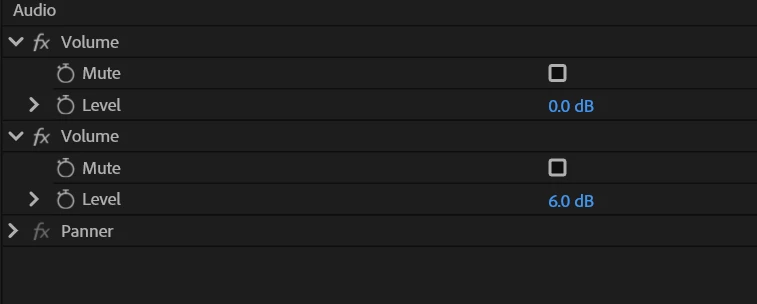
See image attached for result of pasting volume information to a new clip.

Copying 6db setting to new clip creates two instances of 'volume' with 0db and 6db when it should just be one instance of 6db after pasting.


Moderator note: Thread title changed for easy tracking.

返信数 12

Participant
February 26, 2025

No solutions yet?

Community Manager
February 3, 2025

This should be fixed in the latest Beta 25.2

Participant
January 25, 2025

Hello, I am also experiencing the same glitch. Any solution?

I’m encountering the same issue on Premiere Pro v25.1 running on Windows 11 (Alienware Aurora R15).

When copying and pasting (Ctrl-C/Ctrl-V on the keyboard) the Volume effect from a source clip in the Effect Controls panel and then pasting it onto another clip—either directly in the timeline or by selecting the Effect Controls panel with the destination clip active—it results in a duplicate Volume effect in the stack.

This behavior occurs when pasting into a single clip or onto multiple selected clips in the timeline.

Participant
January 21, 2025

Hello, I am also experiencing the same glitch. Any solution?

Participant
December 16, 2024

Experiencing the same issue on Premiere Pro v25.1.0 (Build 73) in Windows 10, as well as the same build on MacOS Sequoia v15.2.


  • Copying and pasting (Ctrl-C/Ctrl-V on the keyboard) the Volume effect from a source clip in the Effect Controls panel, and then pasting it onto another clip, either directly in the timeline or by selecting the Effect Controls panel with the destination clip active, results in a duplicate Volume effect in the stack. 
  • Additionally, the Channel Volume effect disappears from the stack once the new Volume effect is pasted into the destination clip.
  • Attempting to delete either of the duplicated Volume effects does not work. 
  • Both Volume effects will control actual output from the master buss, apparently summing the values from both effects in the stack to control the actual output value.
  • Automation values appearing on the clip in the timeline only reflect the value in the first Volume effect in the stack (not the one that was pasted).
  • Pasting the Volume effect again into the panel will overwrite the second instance of the Volume (the one that appeared on the first paste) with the new value. Additional Volume effect instances do not appear.
  • This behavior happens when pasting into a single clip, or onto multiple selected clips in the Timeline.
Community Manager
December 16, 2024

Thanks for the extra info and those images. That helps a lot. I am able to reproduce this. It looks like it's pasting over the Channel Volume or the Parametric Equalizer. Is that what you're seeing?

theimpeh作成者
Participant
December 12, 2024

@Rach McIntire - this bug occurs if doing just one clip to another, or pasting multiple clips at the same time.


As highlighted by @@Criaditor - which is evidently the same bug - this also causes confusion in the timeline as the volume slider / automation on the clip itself is not affected by changes in volume data, hence the irriation of this bug which requires manual resetting of every audio clip.


Method is a tradtional ctrl+c + ctrl+v of the volume effect. It occurs weather the 'Volume' effect itself is copied, or just the 'Level' setting - in both cases a duplicate volume 'effect' is created and the clip volume level adjustment in the timeline remains as it once was.

Participant
December 12, 2024

Quando você copia o parâmetro de volume de um corte e cola em outro ao invês dele alterar o level no parâmetro de volume ele cria um outro efeito chamado volume com level ajustado, porém isso implica que no canal do áudio a linha de gráfico de volume não se altera, o que fica parecendo que não alterou o volume, isso acaba confundindo na hora da edição 


Community Manager
December 12, 2024

Hi @theimpeh ,
Sorry for the frustration. That's an interesting bug. I'm curious what method of copy-and-paste you're using.  


Also, are you pasting to multiple clips at one time or just one at a time?  

Hopefully we can figure this out quickly for you.

theimpeh作成者
Participant
December 11, 2024

Additional info posted as per bug report guidelines.