
Participating Frequently
February 1, 2024

P: Unable to select text or add new text with Type Tool

  • February 1, 2024
  • 75 replies
  • 20594 views

Unable to select or edit the existing text using the Type Tool. The selection gets instantly reverted. This also happens while adding new texts. Restarting the app is the only workaround. Here's a screen recording of the issue:
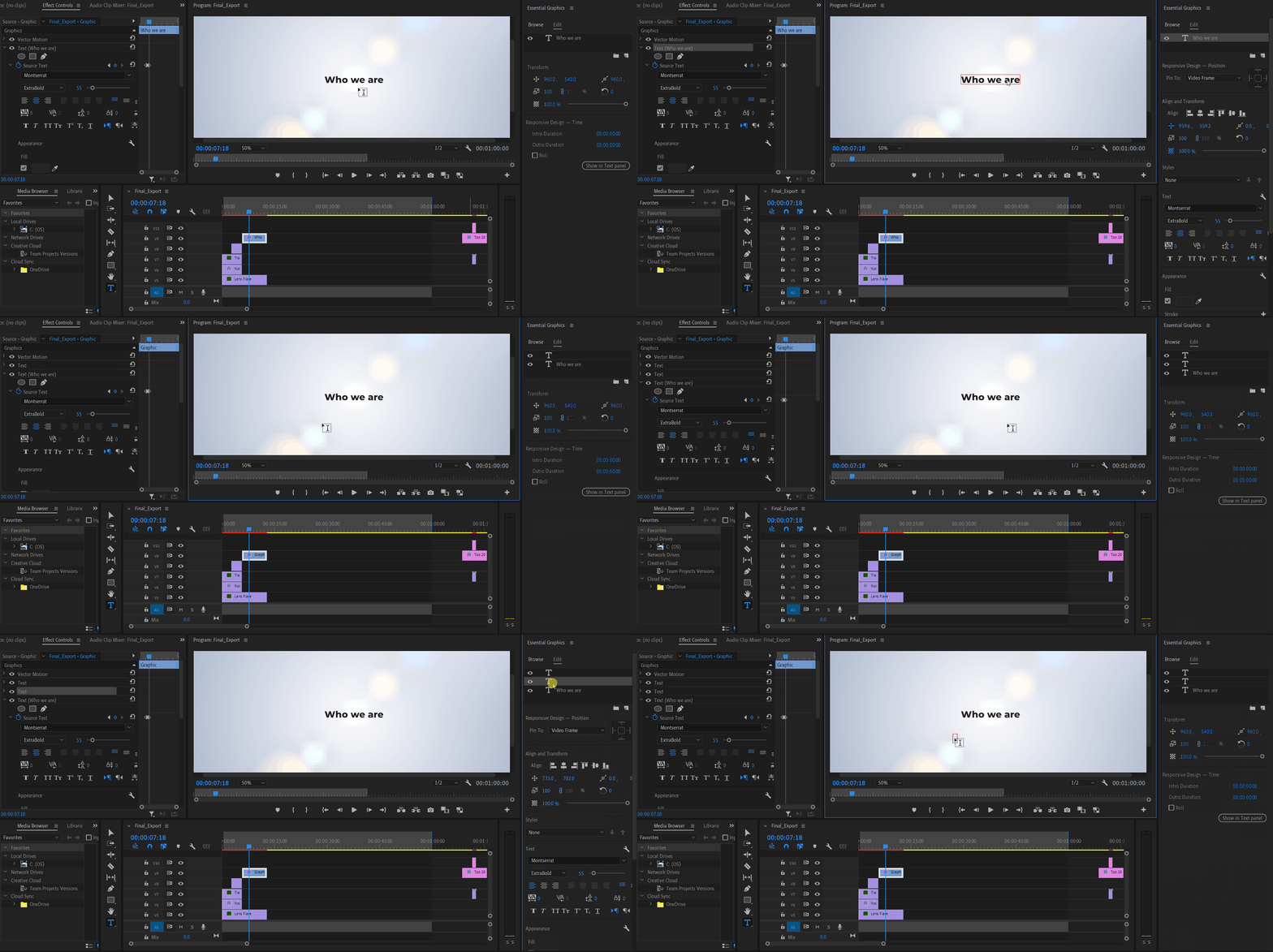


Premiere Pro Version: 24.2.1 (Build 2)

OS: Win 11 Home

Laptop: Asus Vivobook Pro 15

Processor: AMD Ryzen 5 5600H

Graphics Card: Nvidia RTX 3050

75 replies

Participant
April 5, 2024

This work around does the job - from an Adobe employee:

Hi! Thanks for reporting this issue. Our team is investigating the bug. Looks like this is happening every time you delete an effect that allows Direct Manipulation in the Program Monitor (like a mask or the crop effect).

As bad as this is, at least we found a workaround that will hopefully get you editing somewhat smoothly again. If you enter any kind of Direct Manipulation before editing the text, it should work again. For example, click on "Motion" or "Vector Motion" in the Effect Controls panel. Then text editing works.

Sorry for this. We hope to have this resolved soon!  

Stan Jones
Community Expert
Community Expert
April 5, 2024

@morphinapg,


Thanks for reporting back. A screen recording might help. Does it immediately start working again when you again select the text?


@AnnikaKoenig Might this be related?


Stan


morphinapg
Inspiring
April 4, 2024

@Kevin-Monahan 


While it wouldn't surprise me if there's a connection, the actual behavior described in this bug is not the same as what I'm experiencing. I never have any issue clicking or selecting subtitles. The issue I have is that once or twice an hour or so, in the middle of typing a line, the cursor appears to lose focus and so any further keystrokes start activating keyboard shortcuts. I never have any issue making a selection in the first place.

It does appear to still be happening in 24.3. I've only been using it for a couple hours now though, but it's happened 2 or 3 times already.

Kevin-Monahan
Community Manager
Community Manager
April 4, 2024

Hey @Stan Jones,

I hope you are well today, friend. I read that the bug might still be hitting users in a particular workflow in 24.3. FYI, check out this bug report here.


Thanks,
Kevin

Kevin Monahan - Sr. Community and Engagement Strategist – Adobe Pro Video and Audio
Kevin-Monahan
Community Manager
Community Manager
April 4, 2024

You say that the bug does not sound like this issue, @morphinapg? I apologize if I moved your post to this bug report hastily. I can move it back for you to its own bug anytime. It does seem oddly similar, however. Let us know what happens with the new build.


Thanks,
Kevin

Kevin Monahan - Sr. Community and Engagement Strategist – Adobe Pro Video and Audio
Stan Jones
Community Expert
Community Expert
March 29, 2024

This is fixed in PR Release 24.3.0. I tested only a single example of adding and deleting a text mask. But that always triggered the bug when it was present.


Stan


Participating Frequently
March 29, 2024

When I click on the Program Monitor and start typing my desired text, I'll end up hitting a key that relates to some keyboard shortcut in my settings. For instance, whenever I hit the letter I or O, it sets my In and Out points on my timeline. Or the spacebar starts playing my video. Obviously I sometimes need to use I, O, or space when creating my title.


I am experiencing the same issue that was reported here, in 2018: https://community.adobe.com/t5/premiere-pro-discussions/type-tool-interferes-with-keyboard-shortcuts/m-p/9836916


It was not really addressed, and the 'correct' answer chosen was an answer to someone else's side-question unrelated to the original issue.


OS version: Windows 11

Premiere version: Version 24.2.1

RAM: 32 GB

More specs:
Nvidia 4080

Intel(R) Core(TM) i7-14700KF 3.40 GHz

AE Ultrawide Monitor with GSync, HDR, 144hz


How can we get the Premiere team to acknowledge this issue and investigate? Is there anything else you need from me?

Participating Frequently
March 29, 2024

Can't embed a video unless it's uploaded to YouTube, weird. But here's a video showing off the frustrating attempts at typing the letter 'A'

Known Participant
March 22, 2024


Normally if I click on text layer and click on screen while using text tool,

it just makes them click on them and edit. 

Right now I can't type in text layer in premiere while working on project.

If I click on text layer, it keeps not letting me edit and seems like blocking me from writing it.

This is driving nuts can someone help me? or Does someone had or has issue like me?


1.  when I open premiere or restart premiere its fine for while

2. It happens Intermittent and I have to restart premiere to fix the text layer.


Premiere ver 24.2.1 (build 2)


Stan Jones
Community Expert
Community Expert
March 22, 2024

See this bug:

https://community.adobe.com/t5/premiere-pro-bugs/unable-to-select-text-or-add-new-text-with-type-tool/idc-p/14481922#M22488


Fixed in Beta (I tested 24.4.0 Build 25), but not in the Release 24.2.1.


Till fixed, 1) try to avoid deleting any of those effects while editing text and 2) if you do, use Annika's recommended workaround (click on motion or vector motion and then click away). You can also edit text in the Text panel - Graphics or Captions tab as appropriate.


Stan


WIGTV
Inspiring
March 22, 2024

YAY! That would be awesome!

Community Expert
March 22, 2024

I can't replicate the bug using 24.4.0 B25, looks like it's fixed as Stan said.