
felix r.b66368205
Participant
October 18, 2023

Premiere doesn't stop generating peak files over and over again

  • October 18, 2023
  • 13 replies
  • 4450 views

Dear Community,

I work with Permiere Pro 2024 on a MacBook Pro 2021 with an M1 Max Chip and 64 GB RAM.

For a few days now Premiere wont stop generating peak files over and over again in old and new projects. It generates peak files for the same video files over and over again and therefore renders itself useless since it completely slows itself down doing this.

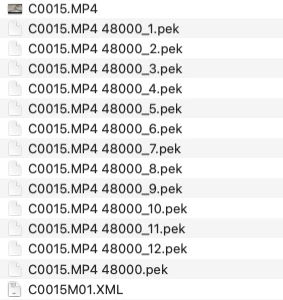
In the Folder where the files are stored I now see up to 12 .pek-Files (as shown on the screenshot) and the number is still increasing. Did anyone have the same problem or is this the final sign to jump ship and start using Davici 😄
13 replies

Participant
October 10, 2024

You can go to Settings, then AUDIO, then like on the 5th option unclick the "generate automatic waves for sound" that eternal task. 

I been a couple of hours with some customer service, had to downgrade 2 versions, delete plugins, delete Commons as cache folder ( even though after deleting from settings ) and few other things can´t remember,

Computer worked fine that day. 

Now kind of slaggy again, bufff... 

Or buying a PC instead of MAC, or learning Da Vinci from scratch and migrating it all 😕😕 

Inspiring
October 7, 2024

I've seen the Catalyst Plugin mentioned on other forums. But I don't have that installed. It's not that.

felix r.b66368205
Participant
October 7, 2024

@36104460 I think I solved it: I had the sony catalyst plugin installed. Deleting that from the plugins folder completely solved the issue! I hope this works for you guys too! 

Inspiring
October 7, 2024

Same issue. Working with audio enbedded in Sony FX6 MXF files. Never ending peak file generation, I can see the files constantly being built in Mac finder, have tried all the workarounds, but nothing works. It means that "Enhance Speach" (which is great) also keeps re-encoding. VERY annoying as it is delaying me exporting my final film.


As below, I've spent maybe £5K over the decades on Adobe subscription, and am SO SO close to leavning for good. Unacceptable.


Rodrigo C. C.
Participant
September 23, 2024

Tengo exactamente el mimso problema! 😞 No puedo trabajar asi... Cuándo daran solución los de ADOBE?

Inspiring
August 28, 2024

Same issue.

santy_007515671
Participant
August 27, 2024

I am quite fed up with Adobe, sorry, not buying a software but renting it , a trillion dollar company hugely full of bugs that make me loose projects and clients, 

On internal forums, with Cinema people of USA i only see peple saying the same, migrating to other editors such as Ressolve. 

What´s going om ? got the billion, the trillions... not even an adequate customer service, but have to find my own answers or screw. 


Participant
August 27, 2024

Uso Windows 11. Nvidia gtx 2060. Intel i5 12 generacion 12 GB . Memoria 16 GB de ram. Disco solido

Participant
August 27, 2024

HOla tengo un problema con premiere pro 2023 y 2024 durante la edicion de un proyecto se generan los repetitivamente los picos de archivos lo vuelve a hacer una y otra vez a cada rato en forma repetitiva.

no se cual seria el problema es como que no los graba y los vuelve a generar

Uso Windows 11 versión 24.6 premiere. Intel i5 12 generación. Video nvidia gtx 2060. 16 GB de ram 

Kevin-Monahan
Community Manager
Community Manager
August 26, 2024

Hello @felix r.b66368205@santy_007515671@Manik33780666aygh@WalterTN,

Are you still seeing this issue? Please provide the team with more information. See, How do I write a bug report?


I hope the issue is resolved. If not, please reply.


Thanks,
Kevin

Kevin Monahan - Sr. Community and Engagement Strategist – Adobe Pro Video and Audio