
Participant
August 19, 2024

Select menu drop downs not expanding inside of Premiere Plugin SDK

  • August 19, 2024
  • 7 replies
  • 1007 views

I am using a Select input element in my Premiere Plugin.  For some reason, when I click on the select input, it doesn't open up. I have tried it in two separate ways, using ShadCN, and using react-spectrum components. In both cases, I saw the same behavior.

Have you seen anything like this before?

Details:

In ShadCN, and the code looks something like this:


                <Select {...register("image_size")}>
                    <SelectTrigger>
                        <SelectValue placeholder="Landscape 4:3" />
                    </SelectTrigger>
                    <SelectContent>
                        <SelectItem value="landscape_4_3">Landscape 4:3</SelectItem>
                        <SelectItem value="landscape_16_9">Landscape 16:9</SelectItem>
                        <SelectItem value="portrait_3_4">Portrait 3:4</SelectItem>
                        <SelectItem value="square_1_1">Square 1:1</SelectItem>
                    </SelectContent>
                </Select>


When I tried it with react-spectrum, I just copied code directly from the docs.


<Picker label="Choose frequency">
  <Item key="rarely">Rarely</Item>
  <Item key="sometimes">Sometimes</Item>
  <Item key="always">Always</Item>
</Picker>


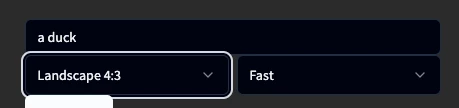
This is how my shadcn code looked, inside of the Premiere plugin.  When I click on the "Landscape 4:3", nothing happens

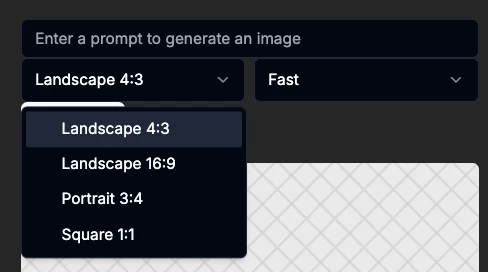
When I run the same code in a browser, it opens up fine.
7 replies

Justin Taylor-Hyper Brew
Community Expert
Community Expert
April 5, 2025

This is a pretty unfotunate one for Mac. Building a custom select component is really the best alternative.

Bruce Bullis
Community Manager
Community Manager
January 21, 2025

The CEP team has acknowledged the issue; there is no schedule for a fix. 

Longer term: CEP has been deprecated in favor of UXP extensibility, in PPro. 

Participating Frequently
January 19, 2025

Hi Bruce and team - hope you're doing well and thanks for tracking and responding to this bug report.


Do you know if we have an expected timeline on a fix for this bug yet?


Depending on the user's panel size/orientation, we've found users struggling even with very small dropdowns (of say 3 options). So if we expect this is a long-term thing, we will need to move away from using <select> elements in our plugin – would be helpful to know!


Thanks

Community Manager
December 26, 2024

Updating the status of this bug

Bruce Bullis
Community Manager
Community Manager
November 6, 2024

Tracking as CEP-2870; we'll keep you informed.

Known Participant
November 6, 2024

Hello,

In CEP12 <select> element doesn't show dropdown content if the panel size is too small to display the content fully. It worked in CEP11

Community Manager
November 6, 2024

Hi @Leyero  ,

Welcome to the Premiere Pro forums! We are glad to see you here. We need a few more details to try to help with the issue. Please see, How do I write a bug report?

Thanks for submitting your bug report. I hope we can help you soon. Sorry for the frustration! 

Thanks,
Rach

Bruce Bullis
Community Manager
Community Manager
August 19, 2024

[Sounds like you've written a CEP extension, instead of a C++ plugin...]

We haven't had any reports of that; I'll check with CEP sources. 

Participating Frequently
November 5, 2024

This is currently broken for me as well in Premiere Pro 25.0.0 on MacOS. Could not reproduce on Windows.


We have 10 <select> dropdowns we can easily test in our CEP panel. Of these 10 dropdowns, 5 dropdowns work fine. For the other 5:

- Clicking doesn't open the options list

- The element CAN be focused with a click, so using keyboard up/down arrows changes values successfully

- Sometimes resizing the panel or moving Premiere Pro into a different Mac desktop (Ctrl + right/left arrows) can fix the broken dropdowns but not always

- Recreating the select (by copying the HTML into a string and then doing a $(element).replaceWith(tmp_html) to replace the original element in the DOM with a new one) doesn't fix the issue

- As far as we can tell, there is nothing special about these 5 broken dropdowns. They are all dynamically populated in the plugin, but so are some of the working dropdowns so this alone doesn't explain it.


The exact same panel (same code, same folder, save device, etc.) works fine on Premiere Pro 2024 (24.5.0).


@Bruce Bullis -- I've just sent over the plugin codebase if you'd like to test.

Participating Frequently
November 5, 2024

Just to add: the panel's HEIGHT seems to be the closest correlated factor. Increasing it above a certain point allows the select dropdown to show. Decreasing it below results in the issue.