Participant
April 8, 2025

The Info panel not showing Duration when proxy is used

  • April 8, 2025
  • 8 replies
  • 559 views

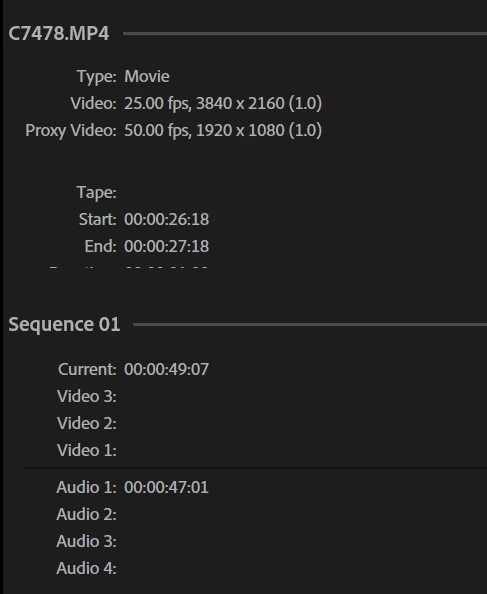
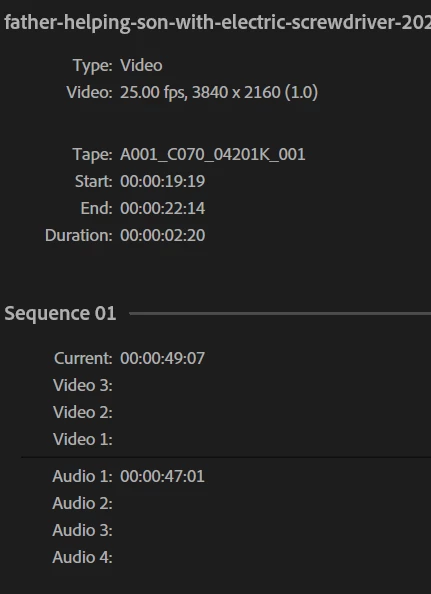
For the clips with proxies, you can't view the Duration in Info panel. See the pictures. Premiere Pro v. 25.2.1

8 replies

Stan Jones
Community Expert
Community Expert
September 4, 2025

I did not check until 25.4.1, but I confirm it is fixed there.


Stan


Community Manager
September 2, 2025

Updating Status: Fixed (25.4)

Stan Jones
Community Expert
Community Expert
July 21, 2025

Someone asked about this in another thread. It was not fixed in release 25.3.0.


It is fixed in Beta 25.4.0 Build 83, probably earlier. Hopefuly it will be in the next release.


Stan


Participant
July 21, 2025

Hi, I'm using Premiere 25.3.0 and I have a problem with the Info tab, I just want to see the duration of any clip in my timeline and the Info tab doesn't show all the info, it crops in the End line and ther is no slider to see more info. Any suggestion tu fix that?

jamieclarke
Community Manager
Community Manager
July 21, 2025

Hi @ned.floresc -   Thanks for submitting your bug report. We need a few more details to try to help with the issue.  Please see, How to Report a Problem.


Can you try and hold down "SHIFT" while launching Premiere and check the boxes
"Reset app preferences" (Backup Preferences first)

Community Manager
April 9, 2025

Thank you @Атанас38267856lpkx and @Stan Jones. I am seeing this issue as well and have reported it.

Participant
April 9, 2025

Hi,

Yes, changing the panel size or location is not making a difference.

My specs:

Intel Core i7-6700, 40GB RAM, GTX 1660 SUPER, Windows 10 Pro

Stan Jones
Community Expert
Community Expert
April 8, 2025

@Атанас38267856lpkx @Dani_V.,


I just tested and also see the problem. If you look at clips with video and audio, the cut off stats in the time out/end time line. It looks like there is a limited of 7 lines, and proxy clips, at least, have more.


The entire panel/box can be resized, but the amount of space allocated to the clip (top) vs sequence (bottom) cannot be.


Tested on Win 10, 25.2.1 and Beta 25.3.0.44.


Stan


Community Manager
April 8, 2025

Hi @Атанас38267856lpkx,


Thanks for submitting your bug report. I think I see the issue. Just to confirm, you mean the "Duration: 00:00:00:00" section itself within the UI/panel is getting cut off? And changing the panel size or location is not making a difference on whether you can see it or not?

Can you share your operarting system and hardware specs as well?

Sorry for the frustration,
Dani