Averdahl
Community Expert
Community Expert
Jun 22, 2024 6:23 PM UTC
Needs More Info

Wrong date in Explorer when exporting ProRes

Issue:

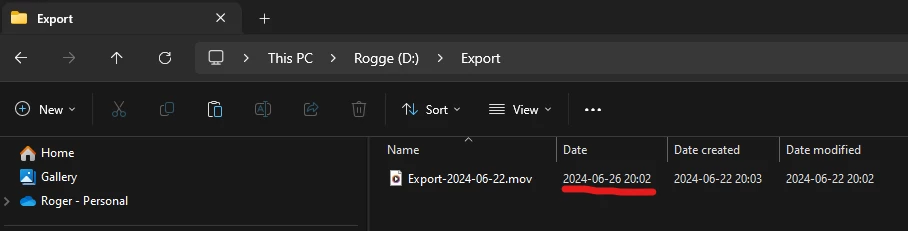
If i export to Apple ProRes the Date in Windows Explorer shows the wrong Date. I did a test export now 2024-06-22 and the Date shown in Windows Explorer is 2024-06-26.


How to reproduce:

1. Export anything to Apple ProRes. (any flavour)

2. Open Explorer, set View to Details.


Actual result:

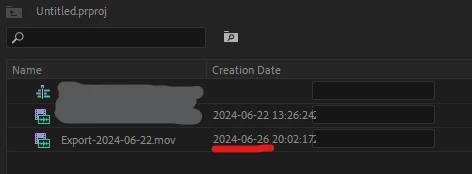
The Date tab will show a date four days ahead instaed of the date the file were exported. I exported 2024-06-22 and i got the Date 2024-06-26. Wrong Creation Date inside Premiere Pro as well when i import the exported file. (See the attached images)


Expected result:

If i export 2024-06-22 i expect the Date in Explorer being 2024-06-22.


Additional info:

I see the correct Date in the file browser Directory Opus so it seems that this is a Windows issue, but something in the ProRes files metadata can also be the thing that confuses Explorer. I have seen this for long time, so it´s not tied to any specific version/build of Pr.


Premiere Pro version:

24.5.0 (B 57)


Windows Version:

Windows 11 Pro for Workstations/23H2/22631.3737


This topic is closed to new replies. Start a new post to keep the conversation going.

14 replies

Averdahl
Community Expert
AverdahlCommunity ExpertAuthor
Community Expert
Aug 29, 2024 8:31 AM UTC

This has been fixed in the beta version of Media Encoder since 25.0.0.30.


I have not yet tested in Premiere Pro 25 and After Effects 25, but it looks good. 🙂

Solved: Re: AME 14.3 stamps incorrect media created date t... - Adobe Community - 11256340

Translate
kjricker
Known Participant
Aug 28, 2024 11:07 PM UTC

FYI, I also see this when rendering to ProRes from After Effects. Currently, every file has been created 6 days in the future. Too bad it isn't the past and the files were created before I even had to do the work!

Translate
R Neil Haugen
Legend
Jul 22, 2024 9:03 PM UTC

Thanks, Bruce! That's all we can ask as us user's don't know who is on what team ... 😉

Translate
Everyone's mileage always varies ...
Bruce Bullis
Legend
Jul 22, 2024 8:29 PM UTC

We direct issues by team, not human; I've asked the Formats team to respond.

Translate
R Neil Haugen
Legend
Jul 22, 2024 8:02 PM UTC

Bruce,


It's the date thing that's the puzzler here. Why the differences? Do you know a staffer who'd be able to give direct help?

Translate
Everyone's mileage always varies ...
Bruce Bullis
Legend
Jul 22, 2024 5:36 PM UTC

Thoughts = none, though I rarely become involved in format-specific issues...

Translate
Kevin J. Monahan Jr.
Legend
Jul 22, 2024 4:30 PM UTC

The status of this bug report has been updated.

Translate
Kevin Monahan - Sr. Community and Engagement Strategist – Adobe Pro Video and Audio
R Neil Haugen
Legend
Jul 22, 2024 4:20 PM UTC

@Bruce Bullis  ...any thoughts?

Translate
Everyone's mileage always varies ...
Participant
Jul 22, 2024 3:36 PM UTC

I've noticed the same issue on my end, MOV files out of Premiere Pro.  Not such a big deal, having a future date, but this could be an issue in the future.  For my workflow, I typically export ProRes MOV first then encode into MP4 for fast upload/approvals.  The MP4 files, correct date.  It's those MOV files that have a date that seem to be a few days in the future.  I'm not thrilled about it, but things are working, so hopefully this isn't a long term problem and it'll sort itself out before it becomes a problem.  I'm just here to let you know that I'm having the same problem on my end.

Translate
Averdahl
Community Expert
AverdahlCommunity ExpertAuthor
Community Expert
Jun 23, 2024 6:19 PM UTC
quote

Yes, it is a Windows issue. Which of those three dates do you want PP to use?


By @MyerPj 


I am not sure that it´s a Windows issue-only. On the second screen dump taken from the Project panel in Premiere Pro i get the same, iow that a file rendered out 2024-06-22 gets the Creation Date inside Premiere Pro as 2024-06-26.


I exported the file named "Export-2024-06-22.mov" that date, iow 2024-06-22. 🙂


Using workarounds in Explorer should not be the way around this since let´s say .mp4 files created by Premiere Pro dont show the same issue in Explorer, nor inside Premiere Pro.


UPDATE: I see the same when i render out to CineForm or H.264 in a .mov wrapper.

Translate