20 milliseconds delay

Copy link to clipboard
Copied
Hi, friends. I use Premiere to synchronize audio and video (.avi) and I love this software, but there's a thing bothering me. I noted the sometimes a frame suffers a time variation of 20 milliseconds. The difference is always 20 milliseconds! For example: Before to repair the audio synchronization, I select a frame that begins at 00:03:11:43200. After I synchronize that and several others parts, I return to "frame 00:03:11:43200" in order to see it again, but, now, the same frame begins at 00:03:11:41200! I would like to know why it happens and if is there a way to avoid that variation, since it destroys the confidence on lipsync. Should I use mp4 intead avi?
[url=https://ibb.co/3fR3hyL][img]https://i.ibb.co/3fR3hyL/Adobe-Premiere-Sy.jpg[/img][/url]
Thank you very much in advance.


 42
Replies
42
42
Replies
42



Copy link to clipboard
Copied
Go to the prefs, the audio hardware settings.
Neil
Copy link to clipboard
Copied
And?
Copy link to clipboard
Copied
Copy link to clipboard
Copied
You can change the latency setting, and see if that corrects things.
And to check, it's good to say export a file, then play it on another device to see if it looks/sounds correct. It took me a bit of messing with it to get my system setup so what I 'hear' in Premiere is what I get outside it.
Copy link to clipboard
Copied
Neil, I have no problem with other devices. It' looks the same thing I "see" in Premiere. My problem is the Adobe Premiere alteration. It defies common sense. I just wanna be sure the time never will change in Adobe Premiere. If mouth opens at 00:21:46:42668/00:21:46.888/00:21:45:14, I wanna be sure that when I return to this scene mouth will open at 00:21:46:42668/00:21:46.888/00:21:45:14. Watching the videos I edited on my device, I didn't note difference. Do you will think I should change latency from 200 to minimum 30 in order to guarantee the time won't change in Premiere?


Copy link to clipboard
Copied
I would set the timecode type to match the timecode in the sequence settings.

To check audio sync in your system add one frame of the built in bars and tone effect

and repeat it every second, play the timeline and see if the sync look right,

Copy link to clipboard
Copied
Also what is the source of your footage, is it variable frame rate?
Copy link to clipboard
Copied
Frame rate mode : Constant
Frame rate : 23.976 (24000/1001) FPS
Copy link to clipboard
Copied
Well, I think the problem continues even when I tried bars and tone effect. I disabled audio units and used frames.
For example, a certain frame begins at frame 209. Almost ever I move to 209, I can hear the sound. but, after I did it 8 times, when I move to 209, it did not whistle. The sound came out at frame 210. After repeat it, sound appeared at frame 209 again. I really have no idea. I installed the Premiere 2023, but this variation continued. Maybe I shoulnd uninstall Premiere 2020 and install Premiere 2023 from from scratch...
Copy link to clipboard
Copied
What is your sequence framerate? Try changing it to 24fps, the fractional framerate may be the issue.
Copy link to clipboard
Copied
How? After place the video and audio? Could you explain me how to do it? Thank you very much for everything you taught me.
Copy link to clipboard
Copied
When I open Sequence Settings, there are 3 options in Timebase: "23,976 frames, 25,00 frames and 29,97 frames". Should I set "25 frames"? Thank you very much in advance.
Copy link to clipboard
Copied
Go to your project, right click on the clip and select Modify. Set the assume framerate to 24.

Right click on the clip again and select 'new sequence from clip. You should now have these sequence settings:

See how that goes.
Copy link to clipboard
Copied
Thank you very much, my friend. I am testing right now. Now all frames begins with a pair number. Do you think this little alteration is able to cause distortion in real sync when I mux the synchronized audio (made with 24 fps) with raw video (MKV 23,976fps) ? Or is it contemptible? Thank you very much, Richard.
Copy link to clipboard
Copied
The audio may drift out of sync you can use the rate stretch tool, Keyboard 'R', to stretch or shrink the audio to fit. Sync the start of the track and then rate stretch the end to match sync.
Copy link to clipboard
Copied
Thank you very much, my friend.
Copy link to clipboard
Copied
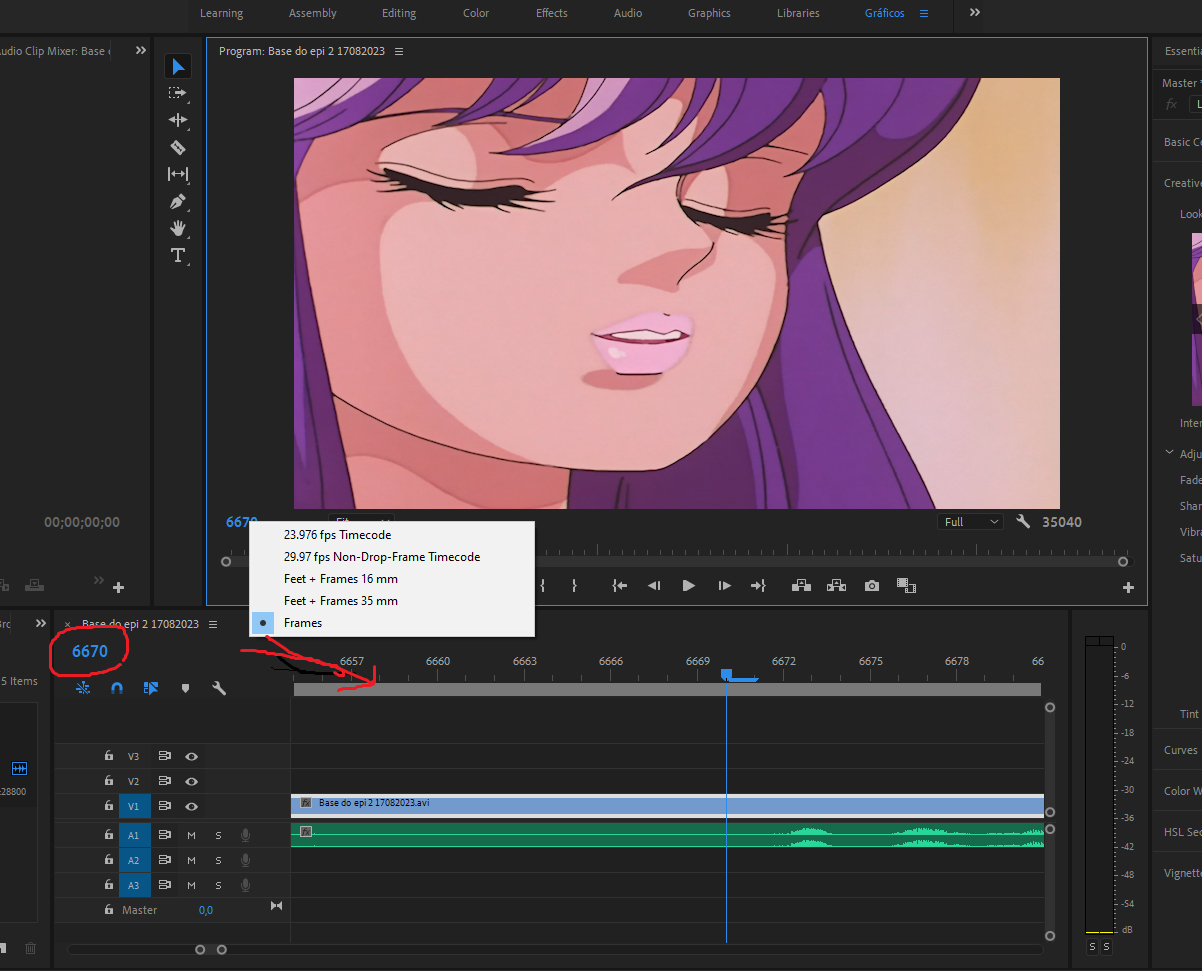
Please, look at this image I posted
Should I set just "frames"? And about "23.976fps Timecode" ant other option?
Since you are experiencied pro, I would like to solve another doubt: where exactly speech audio begins? Dos it begins at audio wave begins? Or does audio begins at the noise that radiates from subsequent audio wave (since, using audio units, whe can hear a noise that precedes the audio wave?
Thank you very much.
Copy link to clipboard
Copied
Richard, please, look at the pic. https://ibb.co/FgQYWSr
Should I just select the option "frames" and forget about 23.976fps Timecode and the other 3 options below? Selecting "frames", seems the work will be faster, because its less sensetive. The speech comes out in the second frame after the frame mouth opens. Since you are an experiencied pro, I would like to ask "where does the speech audio begin"? Travelling in time unit it's more visible, but before the speech sound wave, we can hear the "radiation noise" from the subsequent audio wave. If you are editing, and you can hear this noise 1 frame after mouth opens and the speech in the second frame after mouth opens, do you repair it or is it correct? Do you count the noise as speech's beginning? Thank you very much.
I tested "frames" without audio units. And I think the same latency is happening. Sometimes, speech begins 1 frame after mouth opens and sometimes, speech begins 2 frames after the same frame where mouth opens. As Neil said, maybe there's a problem in my configurations. And I would like your suggestions too. Thank you very much.

-
- 1
- 2

Get ready! An upgraded Adobe Community experience is coming in January.
Learn more
 AdChoices