Exit
  • Global community
    • Language:
      • Deutsch
      • English
      • Español
      • Français
      • Português
  • 日本語コミュニティ
  • 한국 커뮤니티
0

4K 60fps footage becomes 30fps when I export it

New Here ,
Mar 07, 2021 Mar 07, 2021

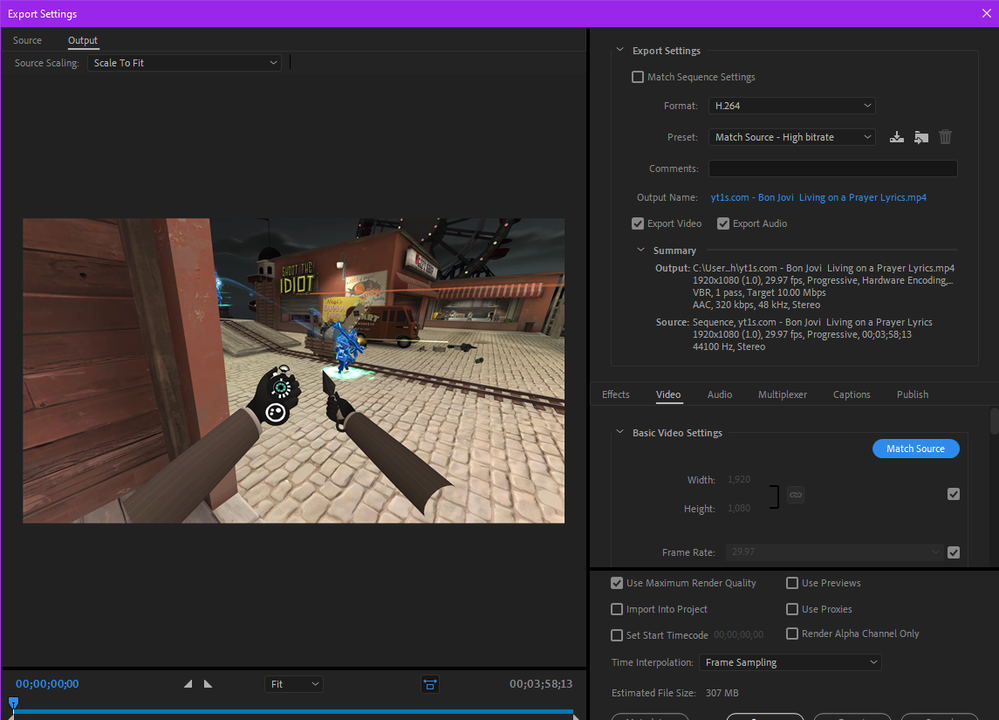
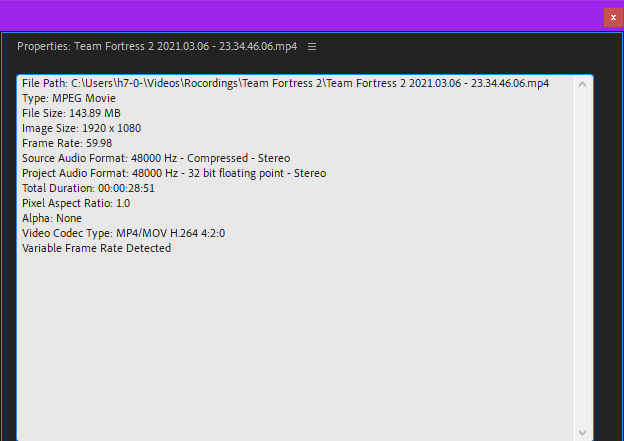
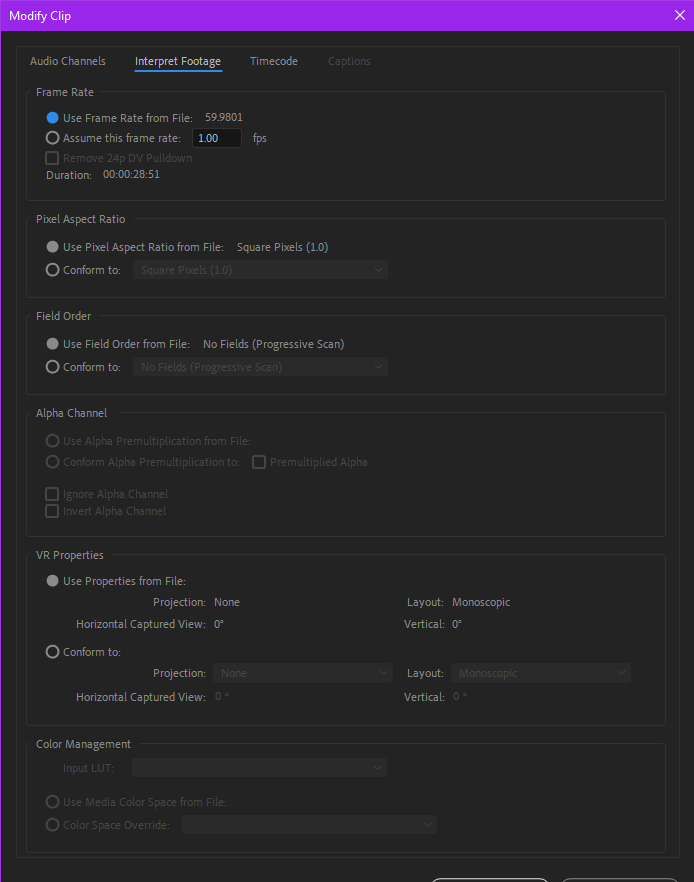
I've been using premiere pro for a while now and recently started with new 4K 60fps footage instead of 1080p 30 fps, today for whatever reason when I put my footage into my sequence it becomes 30fps, and even tho when pre-loaded it's 60 and says it's 60 when I got into the [modify clip/interpret footage/frame rate] but as soon as it's in the sequence or I go to export it shows up as 30 and says the source footage is 30 which it isn't.

Adobe Premiere Pro 2020 - D__Adobe editing_Tf2 editing_Choco frags_Living on a knife _ 7_03_2021 9_44_16 PM.pngAdobe Premiere Pro 2020 - D__Adobe editing_Tf2 editing_Choco frags_Living on a knife _ 7_03_2021 9_46_30 PM.pngAdobe Premiere Pro 2020 - D__Adobe editing_Tf2 editing_Choco frags_Living on a knife _ 7_03_2021 9_49_16 PM.png

TOPICS
Editing , Export
3.9K
Translate
Report
Community guidelines
Be kind and respectful, give credit to the original source of content, and search for duplicates before posting. Learn more
community guidelines

correct answers 1 Correct answer

Community Expert , Mar 07, 2021 Mar 07, 2021

Your screenshot does show 29,97.

Post screenshot sequence settings and

Please post screenshot of clip in MediaInfo in treeview.


You can go into the sequence settings and change the framerate.


Translate
Community Expert ,
Mar 07, 2021 Mar 07, 2021

Your screenshot does show 29,97.

Post screenshot sequence settings and

Please post screenshot of clip in MediaInfo in treeview.


You can go into the sequence settings and change the framerate.


Translate
Report
Community guidelines
Be kind and respectful, give credit to the original source of content, and search for duplicates before posting. Learn more
community guidelines
New Here ,
Mar 07, 2021 Mar 07, 2021

Haha nvm I just figured it out, my sequence had magically become 30fps instead of 60fps so it's all good now

Translate
Report
Community guidelines
Be kind and respectful, give credit to the original source of content, and search for duplicates before posting. Learn more
community guidelines
Community Expert ,
Mar 07, 2021 Mar 07, 2021
LATEST

unless your end use is on a platform that supports 60fps, you might be smarter to just set your sequence settings to 30fps.


Translate
Report
Community guidelines
Be kind and respectful, give credit to the original source of content, and search for duplicates before posting. Learn more
community guidelines