jamesc11104880
New Participant
February 15, 2017
Answered

Adding gradual colour gradient in Premiere Pro

  • February 15, 2017
  • 1 reply
  • 4063 views

Dear Forum,

I have a black and white clip in premiere pro that runs for about 10 minutes. I am trying to make the clip fade from its natural black and white state to a 'coloured' version by the time the clip ends. It will be a very slow transition accross 10 minutes. For the final 2 minutes of the clip i am also fading it out to black, so over this section there shall be an overlay of a fade out on top of the continuing gradual saturation of the image.

Please could somebody advise me on the best way to achieve this result?

I am further interested to know if it is possible to bracket the black and white clip so that the saturation only applies to areas lighter/above a certain tone.

Many thanks

JC
    This topic has been closed for replies.
    Correct answer DigitalSpatula

    Hi JC

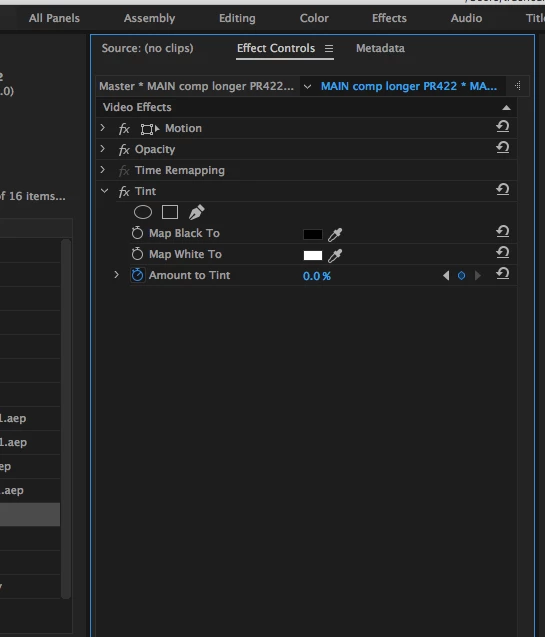
    You could easily do this by applying the tint effect to make your footage black and white. Then keyframing the "amount to tint" value from 100% to 0% (see attached)

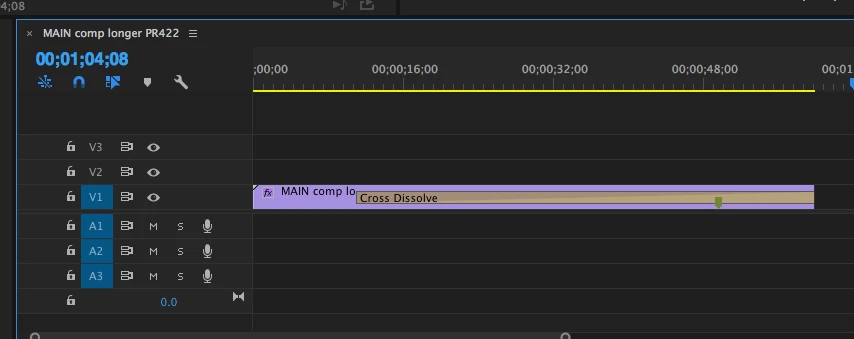
    For the fade out, just apply the cross dissolve effect and drag it out to what ever length you'd like.

    Hope this helps.

    Steve

    1 reply

    DigitalSpatula
    DigitalSpatulaCorrect answer
    Inspiring
    February 15, 2017

    Hi JC

    You could easily do this by applying the tint effect to make your footage black and white. Then keyframing the "amount to tint" value from 100% to 0% (see attached)

    For the fade out, just apply the cross dissolve effect and drag it out to what ever length you'd like.

    Hope this helps.

    Steve

    jamesc11104880
    New Participant
    February 16, 2017

    Hi Steve,

    Yes that helped me immensely, thank you for taking the time to respond.

    James