


Known Participant
March 5, 2014
Question

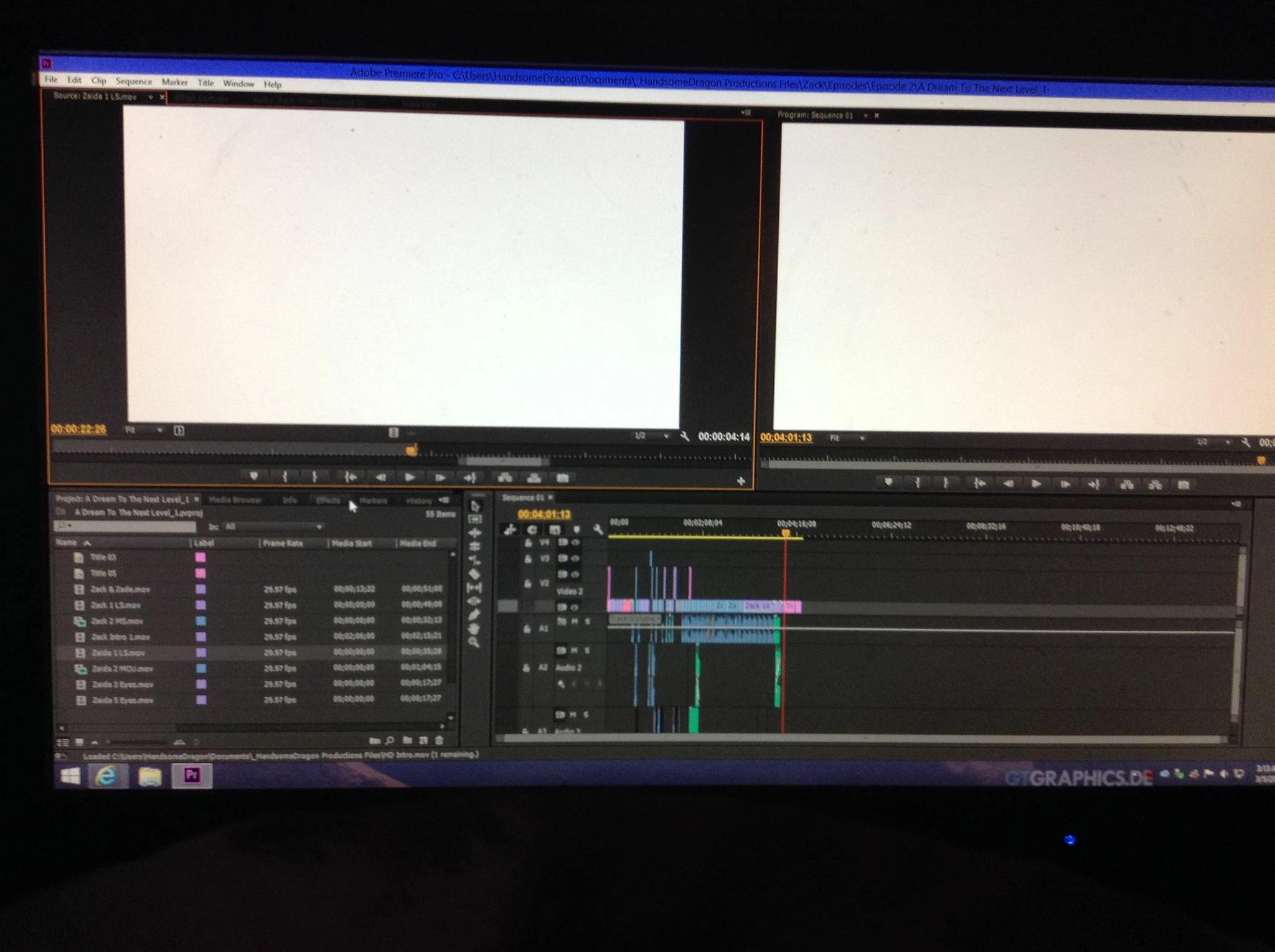
Adobe Premier Pro CC showing White Screen

  • March 5, 2014
  • 29 replies
  • 49204 views

So when I scrub or play through any clip, its's white. However when I export the video, the video is clear. It's just the viewers. This is happening to every single one of my projects with Adobe Premier Pro CC, even projects way before this

problem ever occured. I even used it last week. The only thing that changed between last week and now, was that I updated my Windows PC from 8 to 8.1. I was forced to there were certain things I could use without 8.1.

I tried reinstalling it, updated the software, nothing has worked. Also a side not, sometimes when I scrub through it, big blocks of random texs with a black background appear, its really weird.

Adobe Premiere Pro cs6 is working just fine though, its just the stupid CC.
This topic has been closed for replies.

29 replies

New Participant
November 10, 2014

Has a solution ever been found. New machine arrived yesterday. And loaded up my project in Premiere Pro CC2014 to find a white screen in the program monitor as described above. I do have an install of CS6 too so sounds like I should go back to that for now... but would be great to find a solution. Windows 7 machine with i7 quad core, 16GB RAM, and two AMD R5 240 (oem) 1GB cards installed.

Cheers,

Don

Vinay Dwivedi
Adobe Employee
Adobe Employee
November 10, 2014

Hi,

Please try the suggestion in the below forum link and check if it works.

https://forums.adobe.com/thread/1628643

Regards,

Vinay

New Participant
November 10, 2014

Thanks for the reply, but doesn't that mean my graphics cards are adding nothing to the equation? If it is software only am I missing out on the benefits of the GPU?

October 13, 2014

Hi I'm still having this problem, I updated my CC about a week ago.

Windows 8.1 Pro N

Footage from a Canon 600D

Intel Core 2 Quad Q8200 2.33Ghz

8GB RAM

AMD Radeon HD 5850

Never had a problem before now.

Like for the others it shows white screens for previews, but outputs OK.

New Participant
October 8, 2014

I am having the same issue:

I have fallen back to using Premiere Pro CS6 so I could continue my work.  I'm glad I decided not to uninstall it or I would be out of luck today.

It is very frustrating.

Here's the info for this workstation in case it can help someone:

1) Machine: Hewlett-Packard

2) Model: h8-1287c

3) Processor: Intel(R) Core(TM) i7-3770 CPU @ 3.40 GHz

4) RAM: 24 Gig

5) Display Driver: AMD Radeon HD 7450 (Driver is up to date)

I have to get some work done.  I am confident this will be fixed.  Adobe is a very solid company

Thanks

Joe

New Participant
October 8, 2014

Just adding Windows 7 Pro 64 bit

Thanks

New Participant
September 12, 2014

I am still having this issue.

Specs:

AMD Radeon HD-7870 2gb

8gb RAM 1600mHz

ASRock 970Extreme3

FX-6300 3.5 gHz

500gb WD Blue HDD

Windows 7 64 bit

I'm having this issue after just updating Premiere after not using it for a month plus.

Has anybody found a fix to this issue?

Can i add any info to help?


Thanks,

Mac

PS. All drivers are up to date. BIOS was flashed only a few days ago. Shouldn't be any issues from my end.

kyleid
New Participant
August 22, 2014

Hi I have just experienced a similar issue with an AMD processor. Here is a workaround for people to try. Go to Project Settings > Change the Rendering and Playback to 'Software only'.

New Participant
September 15, 2016

Thank you for your suggestion!! It worked. I am using Premiere Pro CC 2015.4 and have not been able to use it for several updates now because I had the white screen. I changed the Project Settings to Mercury Playback Engine Software Only instead of the default which was Mercury Playback Engline GPU Acceleration (OpenCL)--it asked me if I wanted to delete or keep my previews. I chose delete and it works beautifully now. I cannot thank you enough!!! I am using Windows 10 and a AMD Radeon R7 250 video card. (Updating the drivers never worked.)

A_Kubba
Community Manager
Community Manager
August 20, 2014

Hi,

Can you switch over your graphics card to standard VGA and check if you are still getting the white screen or not.

Thank You

Arjun

mandurphy
New Participant
July 31, 2014

Hi Premiere people

I'm having a similar issue with Premiere on my MacBook Pro and since updating to CC 2014, I've had a bunch of other problems too. The early adopter curse I guess.

I was getting multiple crashes dealing with 5K ProRes files, videos which I had no problems with under Premiere Pro CS6. I was dragging the video file into the project window, double click it to trim it and then Premiere would give a Serious Error warning and crash. I solved that issue by switching from Mercury Open CL to Mercury CUDA and the crashes stopped happening. Is there maybe something broken with Open CL in the new release?

And just today, I started getting this white screen issue. I'll open the project I'm working on, cut for maybe 10-15 minutes and then the playback window will turn white. Nothing I do while in Premiere seems to change this. I hit play in the timeline and I can hear the audio playing, but just getting a white screen in the playback. If I try a different Workspace layout, I get corrupted fragments of the other Premiere panels rather than the white. If I shut Premiere down and reopen it, the white screen isn't there but comes back after another 10-15 of cutting.

As you can imagine, this is a pain and I'd like to get it fixed. What more info do you need? I'm running a mid-2012 MBP, 16GB of ram, 650M 1GB GFX, and on 10.8.5

Cheers

Dan Murphy

mandurphy.net

Kevin-Monahan
Community Manager
Community Manager
July 31, 2014

Hi Dan,

Looks like we have some info, but could you answer the questions on this FAQ? FAQ: What information should I provide when asking a question on this forum?

Thanks in advance,

Kevin

Kevin Monahan - Sr. Community & Engagement Strategist – Pro Video and Audio
New Participant
August 20, 2014

I'm currently having this issue and I really need to get back to work. Is there a fix for it or not?

New Participant
April 24, 2014

I'm having this exact same problem. Were you ever able to find an answer?

New Participant
July 27, 2014

Did anyone find a solution!? I'm having the same issue...

Known Participant
July 27, 2014

Yeah. Basically, you can't fix it. I called Adobe multiple times. First two time they said they would call back, never did. Third time I finally kept one on the line and refused to end the

session. Finally he said that there is no fix because AMD hasn't released an update that's compatible. SO they blamed AMD. SO I called AMD...and guess what...they said to blame Adobe.

However this never use to happen, until Creative Cloud had an update several months ago when this all started.

When you open After Effects CC 2014 now, it says that GPU Acceleration for ray tracing won't work with AMD (They need to advertise that!).

So for everyone that has CC and has an AMD needs to be careful, cause they will get *********** (edit: please don't use language like this). I have all of these great CC products, but I can't even use them properly, especially not Premiere Pro, cause it shows the white screen.

I use CS6, which works great, but doesn't have all of the awesome features.

For someone who needs to keep up with todays tech for their job, it really hurts me that Adobe would do this: ***************** (edit: again don't use language like this).

John T Smith
Community Expert
March 5, 2014

What is your exact brand/model graphics adapter (ATI or nVidia or ???)

What is your exact graphics adapter driver version?

Have you gone to the vendor web site to check for a newer driver?

For Windows, do NOT rely on Windows Update to have current driver information

-you need to go direct to the vendor web site and check updates for yourself

ATI Driver Autodetect http://support.amd.com/en-us/download/auto-detect-tool

nVidia Driver Downloads http://www.nvidia.com/Download/index.aspx?lang=en-us

Known Participant
March 5, 2014

I know I did all of those things. My graphics card is a AMD Radeon HD 7870. I updated it again and still no change. Never hadd any problems with it, everything is running smoothly, its just the CC version of Adobe Premiere Pro. It's so weird. But here are the software specs for my praphics card.

Driver Packaging Version 13.251-131206a-166389C-ATI

Catalyst Version 13.12

Provider Advanced Micro Devices, Inc.

2D Driver Version 8.01.01.1360

2D Driver File Path /REGISTRY/MACHINE/SYSTEM/ControlSet001/Control/Class/{4d36e968-e325-11ce-bfc1-08002be10318}/0000

Direct3D Version 9.14.10.01001

OpenGL Version 6.14.10.12618

AMD Catalyst Control Center Version 2013.1206.1603.28764

AMD Audio Driver Version 9.0.0.9903

ANd thank you for getting back to me.

Brainiac
March 5, 2014

Looks like you're using an older driver.  Try updating from the AMD web site.