


Participating Frequently
June 18, 2013
Answered

Adobe Premiere Pro CC has stopped working

  • June 18, 2013
  • 17 replies
  • 146639 views

I get the following error when I try to run Adobe Premiere Pro CC:
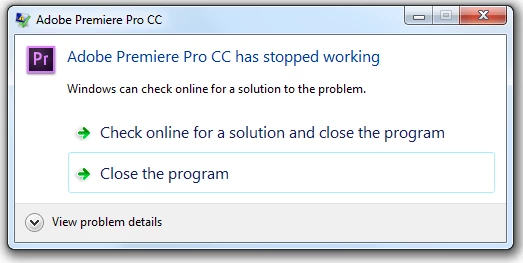
Adobe Premiere Pro CS6 still works well.  The other CC software I tried also work well (Photoshop, After Effects, Audition, etc)

I tried running it from the start menu or from the .exe

I tried running it normally or as an administrator

I tried updating my ATI video card driver, and quicktime just in case, didn't change anything.

I tried uninstalling it, rebooting, reinstalling it, rebooting, and it still doesn't work.

Here's the details:

Problem signature:

  Problem Event Name:    APPCRASH

  Application Name:    Adobe Premiere Pro.exe

  Application Version:    7.0.0.342

  Application Timestamp:    5176598d

  Fault Module Name:    StackHash_bd21

  Fault Module Version:    6.1.7601.17725

  Fault Module Timestamp:    4ec4aa8e

  Exception Code:    c0000374

  Exception Offset:    00000000000c40f2

  OS Version:    6.1.7601.2.1.0.256.1

  Locale ID:    1033

  Additional Information 1:    bd21

  Additional Information 2:    bd21f5c92378aee156f149a6ba7e9ffe

  Additional Information 3:    e8df

  Additional Information 4:    e8df4a89e00e0b1300dafab9669ace56

Read our privacy statement online:

  http://go.microsoft.com/fwlink/?linkid=104288&clcid=0x0409

If the online privacy statement is not available, please read our privacy statement offline:

  C:\Windows\system32\en-US\erofflps.txt

This topic has been closed for replies.
Correct answer Harm_Millaard

Hi Chad,  I don't know if that's good news or bad news, but I uninstalled the vid card driver and now it works.  Do you have a 2nd step to hopefully get both the driver + premiere to work at the same time?


Did you try the 13.06 driver?

17 replies

exoframe7
New Participant
August 31, 2014

Having the same issue of crashing on launch.

Windows 7 Pro 64-bit

Intel i7 4820k cpu 3.70Ghz

8 GB DDR3 1333Mhz RAM

Nvidia GeForce GTX 760 Graphics card with the latest driver 9.18.13.4052.

I've tried uninstalling the graphics card driver and Premiere, then reinstalling both with no luck.

Next I'm trying to roll back to a previous graphics driver, but I'm pretty sure I've had it launch before with the current drivers.

Mark Mapes
Community Manager
Community Manager
August 31, 2014

@ exoframe7: Crashing on launch is a generic end result. Are you getting exactly the same crash data as the original poster (in this thread that's over a year old)?  The key points:

  • Fault Module Name:    StackHash_bd21
  • Exception Code:    c0000374

If not, then you're most likely hitting a completely different root problem, which will require a different fix. Here's a partial list of known causes:

  1. a problem with the Preferences, or some other pref-related file in the Profile-<USERNAME> bin.
  2. the graphics driver
  3. third-party plug-ins
  4. a problem with the cache files.
  5. a problem with the project file (if you're loading a project...)
  6. the Preferences files are set to read-only
  7. the user does not have administrator rights
  8. a conflict/incompatibility with some OS setting
  9. a problem on the licensing/authentication side.

I'd start by searching the forum for the words crash & launch (click the Content tab and enter those words in the field where it says "Type to filter by text"). If none of those threads lead to a solution, then start a new thread with as much specific detail as possible. This page lists useful info to include: FAQ: What information should I provide when asking a question on this forum?

New Participant
September 15, 2014

Hi.

When I attempt to open an existed Premiere Pro porject it crashes. The error message is "Adobe Premiere Pro has stopped working" I

searched on the internet about this issue and found this thread.

I did every suggestion you guys told but it's still the same. I updated my intel graphic card and AMD graphic card. I signed in and ou

t creative cloud but the issue is not solved.


I contact with customer care and he told me try to import your project. When he said it was opening and everything was fine. But the same issue is happening now again!

My system specs are:

Intel Core i7-3770 CPU

16 GB Ram

Windows 7 64-bit

AMD Radeon HD 7800 Series

Intel HD graphics 4000

Participating Frequently
October 27, 2013

I was having the same problem, I wanted to reinstall Premiere CS6 (because it was having trouble processing my Canon C100 footage), but unfortunately upon the reinstall I was left with the CC version,

I spent a while trying to make it work... I'm running a Lenovo W530 setup (Quadro K200m 2gig), Tried nVidia drivers - nothing, intel chipset - nothing... signing out and in from cloud - nothing..

Eventually one of the older versions of the Intel HD4000 graphics drivers seemed to do the job (not the most recent one)... So would recommend trying this approach...

But yeah, it was an unpleasant surprise having to deal with this upon updating the versions of Premiere Pro...

Update: The drivers for Intel HD4000 still seem to be working well, definitely recommend trying this solution (some of the drivers claim they are incompaible with the hardware, I just tried a couple from the Intel website, one of the older versions worked)

Update 2: Premiere Pro CC seems to be better at Editing the native AVCHD Canon C100 footage...

New Participant
December 30, 2013

Has anyone come up with a solution for this?

My premiere pro cc keeps crashing.

I have read this thread but don't really understand it.

Why does it keep crashing?

Participating Frequently
December 30, 2013

I think that Adobe has rectified this bug with the latest updates and that is probably why you aren't hearing many more related complaints.

I recently had to reinstall Windows 7 and all the Adobe Creative Cloud programs. Initially Premiere Pro played up again with the same errors as described in this link. I then installed the latest Adobe Application Manager, followed by the latest updates to  Premiere Pro and haven't had any problems since. It seems to me that Adobe has fixed this problem with its latest updates.

I am sorry that I cannot tell you all the steps I took, but it has been great so far. It wouldn't hurt to make sure that you have the latest NVIDIA drivers as well.

So hopefully you will not have to do anything very tricky, just install all the latest stuff.

New Participant
July 23, 2013

I have tired all this but still it crashes. I tired updating my Nvidia GeRorce GTX 660 drivers... Still no help. Did the same for my i5-2320 processes... Still no fix. Reinstalled it... No help. Did a recovery of when it did work.. Still crashing. Anytime I try and watch stuff that I have put in the timeline and or try to render, it crashes. My computer spec are.... i5-2320 @3.00GHz, 8GB ram, GTX 660 SC, 1TB Hard Drive and everything is running on Windows 7 64-bit.

Mark Mapes
Community Manager
Community Manager
July 24, 2013

Computerma1: Are you creating a new sequence or opening an existing one? If the latter, then a) try the former, and b) did you create the new project in CC, or does it date back to an earlier version?

Do you get any error message when it crashes. If you get the same "Premiere Pro CC has stopped working" dialog that's shown in the OP, what do you get when you click "View problem details"?

New Participant
July 24, 2013

Just a heads up I'm new to Premiere. I make a new sequence for one clip then I just drag other clips into that same sequence. I'm opening projects that I saved from Premiere CC. All editing was done on the same version.

New Participant
June 28, 2013

Me too, i hate the CC version. The Premiere CS6 before this Version is very good and Stable. And the interface is beauty too ^^

Participating Frequently
June 19, 2013

I am suffering from the same problem, but with a nVidia GT 650M. Therefore the solution for the amd drivers cant work for me. I've tried reinstalling and resigning into cloud. I've tried compatibility mode for windows 7 and running as admin. Nothing is working so far.

Chad Baker
Adobe Employee
Adobe Employee
June 19, 2013

Did you try uninstalling the nvidia driver completely and launching in VGA? That would at least narrow down whether the root cause has anything to do with your graphics hardware.

Participating Frequently
August 4, 2013

Hi ThePetal,

Which card do you have?

Thanks!

Peter Garaway

Adobe

Premiere Pro


Hi Peter,

I am very sorry for my earlier misleading comments, but I just realized that my card was listed after all, just out of order. How odd that after I changed my Cuda txt file, I was able to open Premiere Pro CC?

However, today it would not open and I got the message "'Adobe Premiere Pro could not find any capable video.........." again.

I have tried most of the suggestions on this and the other related threads.

Finally, after repeated failures, I have had success.

Here is what I did -

My computer is pretty much identical to that of chrisispacman.

1 -  I completely signed out of Creative Cloud through the preferences in Adobe Application Manager.

2 - Then I signed  in afresh etc...Don't remember all the things that I did.

3 - I then uninstalled Prem Pro CC through the Windows Control Panel - Programs and Features

4 - I then restarted the computer and opened the Adobe Application Manager and installed PPCC.

5 - Then, finally, launched the Premiere Pro CC.

It  is working for now, but I do still have my fingers crossed.

Kevin-Monahan
Community Manager
Community Manager
June 18, 2013

Hi studiojpic,

Although it's for Photoshop, you also might try what is suggested in this knowledge base doc: http://helpx.adobe.com/photoshop/kb/cc-applications-crash-immediately-launch.html

Let us know if that works for you. If not, I'll do my best to get to the bottom of this.

I really like your videos, by the way!

Thanks,

Kevin

Kevin Monahan - Sr. Community &amp; Engagement Strategist – Pro Video and Audio
Participating Frequently
June 18, 2013

Thanks for the reply both of you.  I tried by signing off from CC first, and it didn't work.  I gave the Windows 7 compatibility mode a try, and it also didn't work.

And thanks for the comment about the videos

Chad Baker
Adobe Employee
Adobe Employee
June 18, 2013

Try uninstalling the ATI driver and see if you can launch with the built in VGA driver.

Participating Frequently
June 18, 2013

I had the same problem with mine. It was solved by running the software in windows 7 compatibility mode. After that it started up and ran fine.