


Participant
September 26, 2019
Question

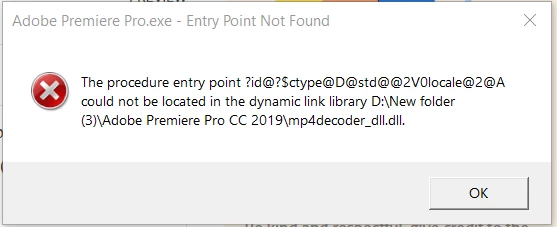
Adobe premiere pro.exe - Entry Point Not Found - CC 2019 Help me please
  • September 26, 2019
  • 2 replies
  • 4718 views

I just installed premiere pro cc2019. waiting 3 seconds that have a message's " Entry Point Not Found, The procedure entry point ?id@?$ctype@D@std@@2V0locale@2@A could not be located in the dynamic link library D:/New folder(3)/Adobe Premiere Pro CC 2019/mp4decoder_dll_dll. " 


I opened folder of Premiere pro CC 2019 that I have seen this file, mp4decoder_dll_dll. , already. But why program can not lunch working program because the program have that file. Everyone have a problem like me. Please suggest me how can i solve this problem. 

This topic has been closed for replies.

2 replies

MyerPj
Community Expert
Community Expert
September 26, 2019

If you could, please us the big Blue Reply button at that top, rather than the little Reply next to the messages.


You're better off sticking to the default installation folders, for performancde and reliability. It's the "New Folder(3)" that has me questioning the install. Plus it being on the d:drive.


You should get a new SSD for your c: drive and use the current one for another data disk. Video editing requires disk space and no doubt your performace is going to be sub-par with you current setup.


With that said, uninstall the program and then run the Adobe Cleaner, before rebooting and reinstalling:

https://helpx.adobe.com/creative-cloud/kb/cc-cleaner-tool-installation-problems.html


MyerPj
Community Expert
Community Expert
September 26, 2019

How did you install this version of Premiere Pro? There's a couple of items going on there which don't look standard.

Participant
September 26, 2019
I had installed normally but I have changed location folder file to Drive D not C because Drive C don't have enough space. Moreover, It computer lunched normally don't have any problem show as installing or after install.