


Inspiring
March 1, 2017
Question

anyone know how to fix the opencl problem?

  • March 1, 2017
  • 10 replies
  • 20742 views

I'm using denoicer 3 on premiere pro 2017
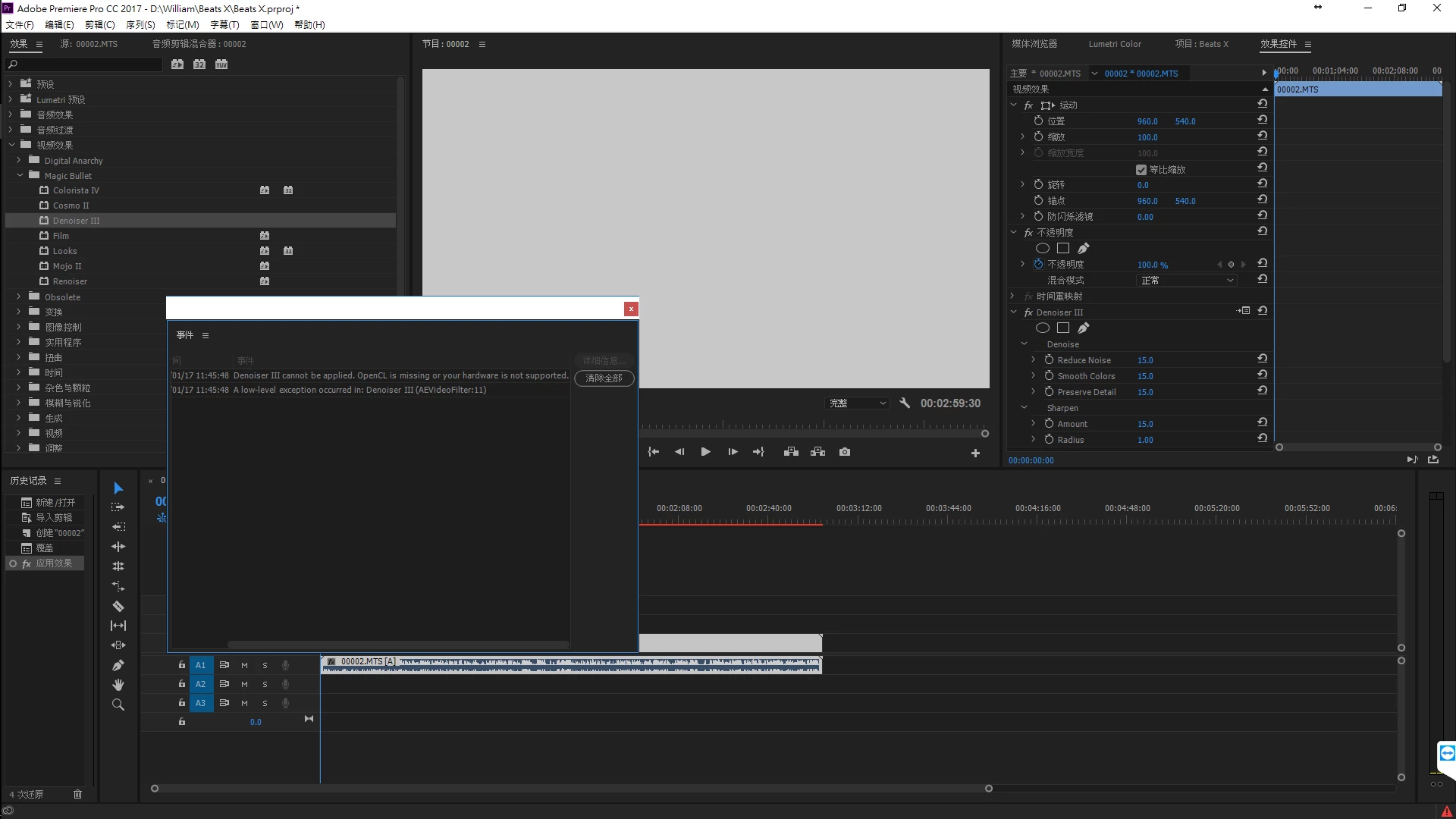
my set is 6700K/GTX1070/256SSD+1TB SSHD

please help me to fix the problem thanks

[Moved from non-technical Forum Lounge to specific Program forum... Mod]

[Here is the list of all Adobe forums... https://forums.adobe.com/welcome]

    This topic has been closed for replies.

    10 replies

    Participating Frequently
    August 12, 2019

    The whole point is that the error says that the OpenCL is missing from your hardware in CC2019, but magically it is not missing from your hardware if you use CC2018.

    Now I know that it doesn't take too many brain cells to figure out from that, that the problem is in the latest adobe builds being able to read or recognize OpenCL on our graphics cards. The error is not with peoples hardware or graphics cards. The error is in the latest build of After Effects 2019.

    It should be obvious but getting Adobe to admit that there is problem with their build is like trying to teach a retard rocket Science.

    I;m sorry to be so brash, but I just went through the same thing with InDesign when Adobe screwed up the ability for text frames to automatically readjust to the margins of different Master pages. It took me three days and 8 hours to persuade them the problem was on their end and they still have not resolved it. They only think it is resolved with settings but the settings never work.

    ADOBE: Quit wasting peoples precious work hours and just fix your software and give us yet another update. Better yet why don't you download the red giant plugin, and try it your self on your own machines. Maybe then you will have a notion of what we end users have to put up with.

    -Cyrus

    August 12, 2019

    I'm tempted to report your comment as spam. If you're not willing to entertain the troubleshooting process, why are you asking us for advice?

    Participating Frequently
    August 12, 2019

    Yup I'm having the exact same problem too. Only I'm using Adobe After Effects. And the funny thing is in After Effects 2018 it works fine. So it's definitely a bug with After Effects 2019. I find it rich that Adobe doesn't even respond with an inclining of a notion that its on their end. Like Luir's Original Post I too have GTX 1070, my project settings and as suggested and the Driver is up to date. When I go onto AE 2018 it works fine. But there are several plugins such as Andrew Kramer's new ORB plugin that give the exact same error message. ADOBE fix your damned software. And quit blaming the user. I am so fed up with these guys.

    August 12, 2019

    What version numbers of After Effects and Nvidia drivers exactly?

    Participating Frequently
    August 12, 2019

    That is a ridiculous question after All I have said. Did I not say that i have the latest version of the Nvidia driver? And did I not say that the error only pops up on AE CC2019, but yet works fine on AE CC2018?

    CAN YOU READ?

    Nvidia Driver:

    Version431.70
    Release DateMon Jul 29, 2019
    Operating SystemWindows 10 64-bit
    LanguageEnglish (US)
    File Size542.84 MB

    Open CL works on AE version : CC2018.3 Version 15.1.2 (Build 69)

    Open CL does not work on version CC2019 version 16.1.2 (Build SS)

    This better be a solution because I'm getting really fed up with Adobe screwing around with the product every few months. Something is not working right for CC2019 that should be evident from all the comments on this forum. EVERYONE is having the problem and the typical answers do not work.

    -Cyrus

    TheYeager
    Inspiring
    December 18, 2018

    I am also having open CL error issues in After Effects with 3rd Party Plugins. I have done all the suggested fixes here (mainly, update drivers) yet the problem is still there. As another user suggested, I fear it has something to do with the latest Windows 10 Creator Update...

    Fl4voredLif3
    Known Participant
    December 18, 2018

    I concluded it wasn't an issue with the update. It may have been an issue with the update if your hardware isn't up to spec for Adobe programs (pre Pro)

    I ended up just going out and buying a desktop pc. Much better graphics card and processors. Guess what....I have Zero issues with any of the programs. All you need to do is drop $$$ on a new pc...Thanks Adobe!..............................

    TheYeager
    Inspiring
    December 18, 2018

    Well, hopefully I don't have to go out and buy a new machine in order to get rid of this error. I'm getting the error with a 12GB Titan X graphics card.  

    Fl4voredLif3
    Known Participant
    December 13, 2018

    I am having the same issue with my graphics card not playing well with adobe anymore. I want to say it's from the recent windows 10 creators update but can't be sure. Has anyone tried rolling back your version of windows?

    Latest version being 1809

    Previous version being 1804 (I believe)

    R Neil Haugen
    Brainiac
    December 13, 2018

    What's the card?

    The 2019/13.x release does need newer gear than the older 2018/earlier versions of PrPro. And even for say the Nvidia 900 cards that still work (IF you have 4GB of vRAM or more) ... they need the drivers from the newer driver series released by Nvidia.

    Neil

    Everyone's mileage always varies ...
    Fl4voredLif3
    Known Participant
    December 14, 2018

    I am aware of the 2019 version needing an updated card which is why i am still on 2018(even 2017 version gives me problems and never used too) This makes me think it may be a windows update that is causing the issue which is why im curious if anyone has tried rolling back windows as a workaround.

    Nicolas.F
    Participating Frequently
    May 25, 2018

    Hi There,

    Same problem with Denoiser III ( win10, adobe CC, denoiser 3.0.2 with everything fully up to date )

    Downloaded the latest version of the driver of my GTX 1080 fixed the issue perfectly (error just started after a big win10 update).

    Thanks for the tips.

    jeromew25529914
    New Participant
    December 22, 2017

    I had exactly the same problem,

    All plugins were fine, but denoiser 3 didn't work, every time i tried to apply it on a sequence I had the same message as you, on premiere and on after effect.

    It looks like its related to the graphic card, I managed to make it work simply by updating my graphic card driver, I went into the Geforce experience software, logged in, went to the pilote tab (driver tab) and installed the latest version of the GeForce game ready driver.

    After installing the latest version of that driver, it looks like it corrected the issue with the graphic card... and now everything works perfectly.

    January 17, 2018

    exact same problem. updated driver. still not working (crashing premiere). premiere task has to be ended after exiting because it is still running but not responding.

    i suspect the problem might have begun when the project was opened on another machine that has an ATI graphics card.

    New Participant
    November 28, 2017

    Double Bump. I'm having the same issue. I've updated drivers (Nvidia Quadro M4000) and have Mercury Playback Engine GPU Acceleration (CUDA) selected.

    R Neil Haugen
    Brainiac
    November 29, 2017

    OS/CPU? And by "same problem", the thread was started having troubles with DeNoiser working ... is that your problem?

    Neil

    Everyone's mileage always varies ...
    jeromew25529914
    New Participant
    December 22, 2017

    I had exactly the same problem,

    All plugins were fine, but denoiser didn't work, every time i tried to apply it on a sequence I had the same message as you, on premiere and on after effect.

    It looks like its related to the graphic card, I managed to make it work simply by updating my graphic card driver, I went into the Geforce experience software, logged in, went to the pilote tab (driver tab) and installed the latest version of the GeForce game ready driver.

    http://warpo.ch/Sans-titre-1.jpg

    After installing the latest version of that driver, it looks like it corrected the issue with the graphic card... and now everything works perfectly.

    Vidya Sagar
    Community Manager
    Community Manager
    March 2, 2017

    Hi Liur,

    Update the GPU drivers to latest version & check the issue.

    Update the graphics driver | Windows 8, 7, Vista

    Thanks,

    Vidya Sagar.

    Inspiring
    March 2, 2017

    it's the newest version but the problem still there

    R Neil Haugen
    Brainiac
    March 1, 2017

    That would be RedGiant's Denoiser III, and why it's demanding to work with OpenCL when you've got an Nvidia 1070 puzzles me. Do you have Mercury Acceleration turned on and set to CUDA in your Project Settings/General tab? As here?

    Neil

    Everyone's mileage always varies ...
    Inspiring
    March 2, 2017

    my setting is using cuda just like yours

    Vidya Sagar
    Community Manager
    Community Manager
    March 2, 2017

    Hi Liur,

    Is there an other option "Mercury Playback Engine GPU Acceleration(OpenCL)? Please post a screen shot of the list of renderers.

    Thanks,

    Vidya Sagar.

    Brainiac
    March 1, 2017

    Is that a third party plug-in?