
lucindah51521249
Participant
June 23, 2015
Answered

Audio and Video clock out-of-sync at 00:00 in "Adobe Player"

  • June 23, 2015
  • 14 replies
  • 37995 views

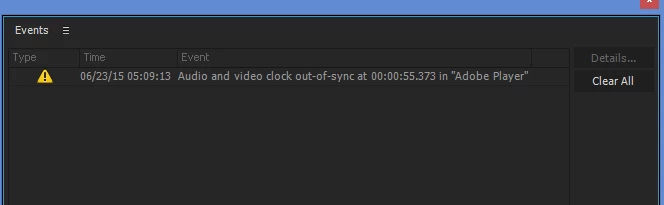
No problems with Adobe Premiere Pro 2014 - then I upgraded to 2015. Now my first file/project getting this error when I play my video in the project player. (screenshot included)

Video jumps back and forward, the error window pops up. And audio of course breaks in and out. I tried starting with a new project. Dropped a plain piece of video into the project which had NO audio - still get the error and jumpy playback.

Of course, I wish I had not upgraded but it's too late now. And for the first time the upgrade process REMOVED my 2014 version - this really sucks for my production schedule

Help - please!!

How Do I Fix this?

How Do I get CC 2014 Back!!
    This topic has been closed for replies.
    Correct answer Mitch W

    Hi All,

    There have been a few successful workarounds for this problem. You can:

         * Disable the input device listed in Default input through Device Manager (so that the default input device is "No Device Available").

         * Change the input device to something like Line in or Mic in and then plug a device into that input (even a set of headphones will generally work for this)

         * Or, install Asio4All to provide an alternative to the MME driver listed under Device Class.

    All of these options have been successfully used to resolve this issue. The Premiere Pro engineering team is aware of and is actively working to resolve this issue. Hopefully they'll have something soon!

    14 replies

    Inspiring
    June 23, 2015

    Same problem. Using SoundBlaster X-fi extreme audio PCI express.

    Don't know why adobe put this pre-release software out for users when it doesn't work. Rolling back to 2014.2

    stasym
    Known Participant
    June 23, 2015

    Same problem here.

    Choppy audio playback and constant error messages while working on my projects.

    Really disappointing behaviour, that prevents me from migrating fully to CC 2015.

    Is there going to be any fix for this issue soon?

    Wondering also if the problem is caused by the new MME Device Class Option.

    Please, could we get a quick response on this really serious issue?

    Thank you.

    Richard van den Boogaard
    Community Expert
    Community Expert
    June 23, 2015

    Try setting up a new CC 2015 project and use the import button to import your old (CC 2014) or existing (CC 2015) project.

    But before you do, make sure you hard delete all your cache files (through Finder / Windows Explorer). This is likely the source of the problem. It worked for me and I was frustrated.

    Participant
    June 23, 2015

    Hi everyone:)

    My similar question looks like this:

    and my Audio Hardware screenshot:

    Is it possible to fix it)?

    Thanks.

    Colin Brougham 1
    Adobe Employee
    Adobe Employee
    June 23, 2015

    Hi,

    Sorry about the troubles with playback. This is likely due to changes in the audio hardware engine in Premiere Pro CC 2015. Can you post a screenshot of your Preferences > Audio Hardware panel?

    lucindah51521249
    Participant
    June 23, 2015

    Hi Colin, Thank you for reading my post.

    Here is the requested screen-shot:

    FYI: Under the Device Class I have no other options other than MME.

    Thanks!

    Luci

    Colin Brougham 1
    Adobe Employee
    Adobe Employee
    June 23, 2015

    Thank you. Try setting your Latency to 30ms, and see if this helps with the playback issue.