


Audio Clips Stop Working After a Certain Point In The Timeline
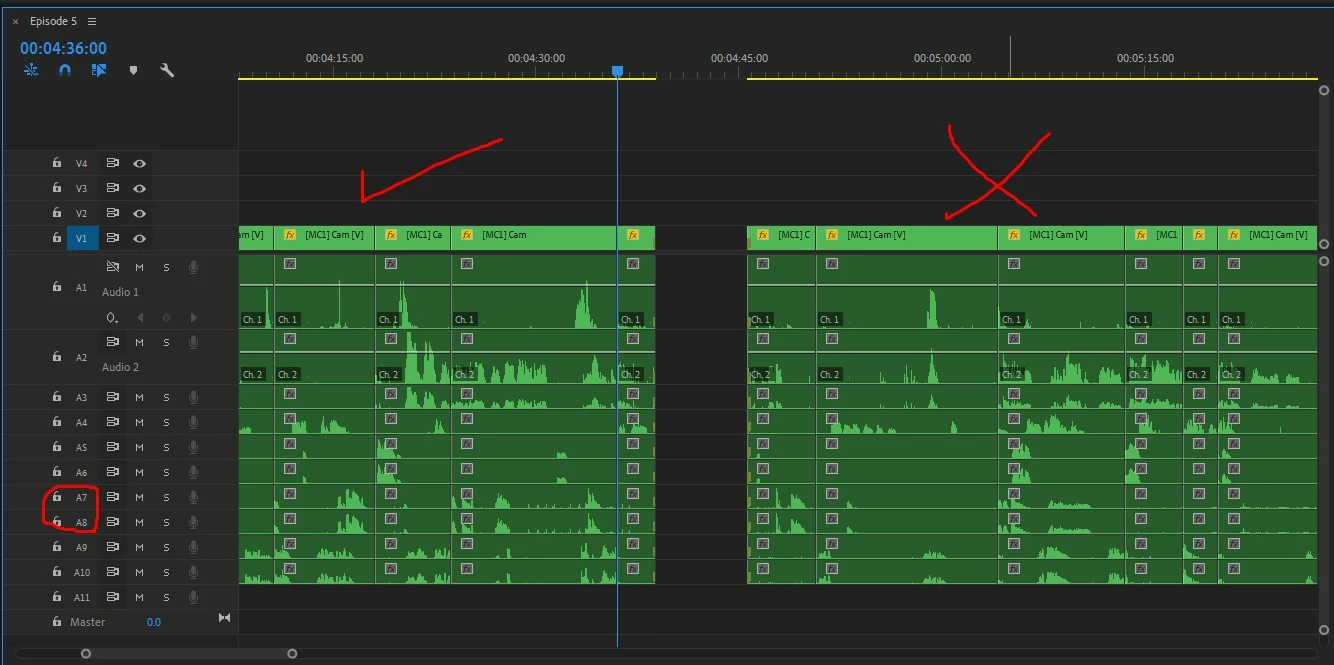
So I'm editing a multicam sequence at the moment, and everything is going well except for the audio. It's very strange, so I'll try my best to describe the problem.
Randomly, some of my audio clips will not play any sound. In the image I've attached, I've circled tracks 7 and 8. I've positioned the playhead to serve as a visual marker for the issue. Any audio clip from the multicam sequence to the left of where that playhead is right now will play just fine. Any audio clip placed in 7 or 8 to the RIGHT of that point in the timeline DOESN'T play any sound. I can drag audio files not from the sequence to play in those tracks, but any audio from the multicam sequence will not play. I'm really not sure what this could be, and wondering if it's just a bug. I've tried lots of things and nothing seems to do the trick. (Restarting, new sequences, changing audio devices, making sure there are no keyframes, etc.)
Does anyone have any idea what the issue could be?
Thank you so much.
EDIT: So if I delete a random combination of audio clips in other tracks, the issue is fixed. Very confused at this point. Is premiere just unable to play back so many audio tracks at once? I did this project a few months ago and did not have this issue then so I'm not sure if it's just a new bug in premiere or not.
 AdChoices