



glennm16330209
Known Participant
November 9, 2019
Answered

Audio effect level no longer centered in waveform in Premiere

  • November 9, 2019
  • 4 replies
  • 2484 views

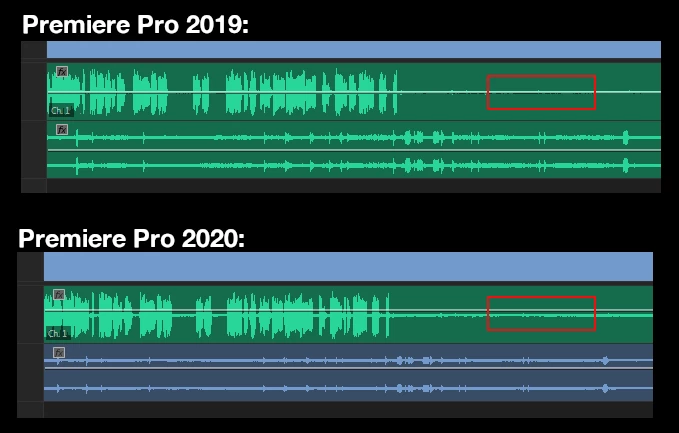
After upgrading to Premere Pro 2020 today, I've noticed that the keyframe lines (not sure if that's the correct term) are no longer centered on the waveform in audio tracks. The line I'm referring to is the one that I'd use to add keyframe for volume adjustments and whatever. I've loaded the same files into a new 2019 and new 2020 project, and added a red box to illustrate what I mean. Having this line off-center is not only distracting, it's making me constantly check to make sure that I don't have the gain turned up for the entire clip. Is there an option somewhere to fix this offset, or something?
 

This topic has been closed for replies.
Correct answer Ann Bens

This is by design: the volume centre point has changed.

Volume controls are now capable to go to +15 dB (was +6dB).

The so-called rubberband (envelope) is now more visible and closely matches Audition.


Yes is somewhat getting used to.


4 replies

R Neil Haugen
Legend
November 14, 2019

None of us can change where the bar is centered to begin. Actually it's probably easier for new editors to see there, if a bit annoying to those of us with time in the app.


As to the dropping thing, I'm not getting that behavior so I'm trying to guess how it happens.


Neil

Everyone's mileage always varies ...
Inspiring
November 9, 2019

Let Adobe know what you think here:

https://adobe-video.uservoice.com/forums/911233-premiere-pro 

I personally prefer the new display as it more closely emulates a standard audio fader, where 0db (unity gain) sits about 3/4's up on the slider:

MtD

glennm16330209
Known Participant
November 10, 2019

Hm. Well, personally I don't prefer the new placement, but I'm glad to hear that it's an intentional design decision, and not something on my part. The +15 dB change is very welcome, though. Well, I'll just get used to it, thanks for the reply!

New Participant
November 13, 2019

Hi guys, in addition to the graphics problem, which in my opinion, should be fixed with the bar at 0 in the center;  when you move the keyframes to change the volume, the bar automatically drops towards 0, it has to be fixed because it is an annoying problem

Ann Bens
Community Expert
Ann BensCommunity ExpertCorrect answer
Community Expert
November 9, 2019

This is by design: the volume centre point has changed.

Volume controls are now capable to go to +15 dB (was +6dB).

The so-called rubberband (envelope) is now more visible and closely matches Audition.


Yes is somewhat getting used to.


R Neil Haugen
Legend
November 9, 2019

That was by intent. I think it is to help make it easier to see. But there isn't an option to change it.


Neil


Nil

Everyone's mileage always varies ...