
Inspiring
July 2, 2015
Answered

Audio Hardware Changes in Premiere Pro CC2015

  • July 2, 2015
  • 19 replies
  • 31105 views

There seem to have been some big changes in the Audio Hardware preferences in the jump from CC 2014 to CC 2015.

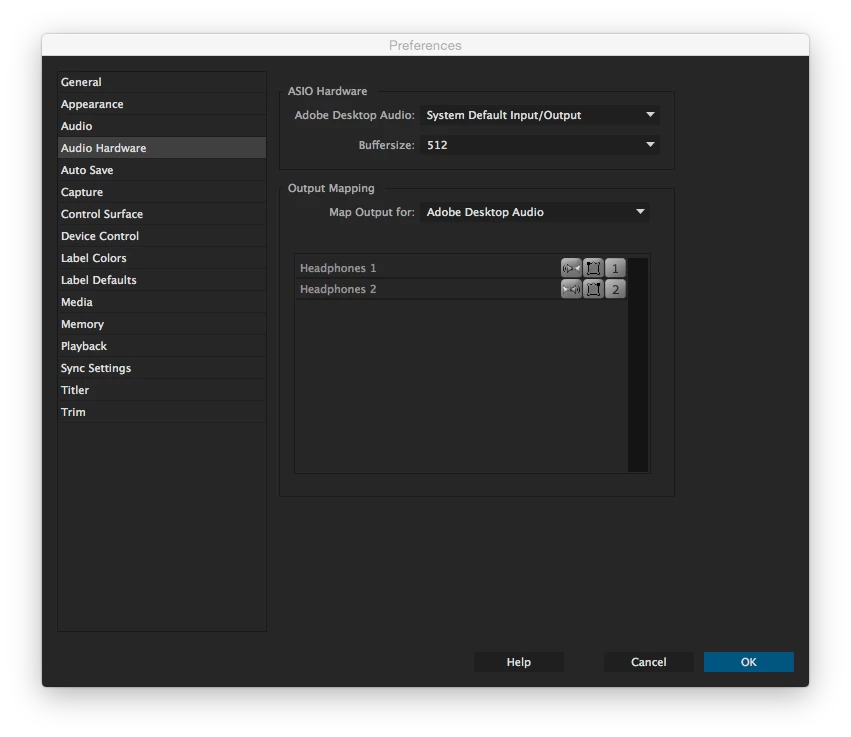
I am using Premiere on a MacPro. In CC 2014, under Audio Hardware, there is an ASIO Hardware section where I was able to set the Adobe Desktop Audio to "System Default Input/Output." This was perfect because if I changed my system output from headphones to line out, Premiere would follow suit.

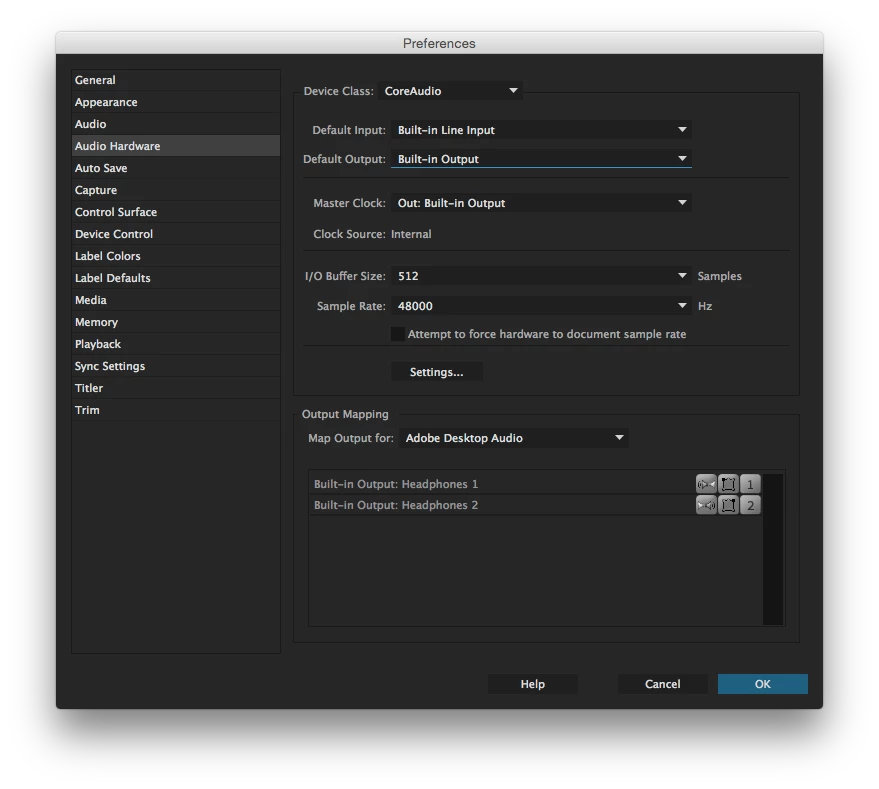
In CC 2015, that option has disappeared. There is a  Device Class dropdown, but the only option I'm given is "CoreAudio." In the default input and output options below there is no option to respect the system's input/output. Therefore, even if I have changed my system output to be line out, Premiere continues to just use the headphone output.

Is it possible to get that old functionality in CC 2015? Am I just missing it somewhere? In the help documents for 2015, it seems to suggest ASIO hardware options are only available for Windows and CoreAudio only for Mac. Why is this the case? It was available in 2014. I would appreciate any insight or help in this matter.
This topic has been closed for replies.
Correct answer JaredCreel

This was finally addressed in the 14.2 update. Only took 5 years to get it done, but better late than never!


https://adobe-video.uservoice.com/forums/911233-premiere-pro/suggestions/33897754-fix-the-default-audio-output-for-imac-pro


19 replies

Participant
December 2, 2019

I'm currently struggling with this! 

Has anyone found a solution yet?

JaredCreelAuthorCorrect answer
Inspiring
June 9, 2020

This was finally addressed in the 14.2 update. Only took 5 years to get it done, but better late than never!


https://adobe-video.uservoice.com/forums/911233-premiere-pro/suggestions/33897754-fix-the-default-audio-output-for-imac-pro


Adam_Miller
Inspiring
July 1, 2019

Please fix this! It's a huge waste of time to manual switch every time. I have already voted on the other forum.

Participant
June 12, 2019

Reading through this thread infuriates me. I have always thought maybe my setup is just too exotic and nobody would constantly switch audio devices like I do. Apparently I'm wrong: it's not just me, and it actually used to be supported. The way your representatives threw customers around in an endless loop of corporate frustation in this thread is disgusting to say the least. It is now 2019, four whole years later after the problem was initially raised and the same bloody problem is still there. Gladly my workplace paid for the (jaw-droppingly expensive btw) licence because I'm not paying a penny to a company that refuses to respond to such a simple feature restoration request.

Dear Adobe, what do you mean by "it's usually a question of manpower/bandwidth, etc. We don't have endless resources, unfortunately"? Wallmart resolves complaints better than this; Minecraft fixes bugs more actively than you do. You are paid thousands of US dollars each customer annually and you're telling me you can't add back a "default" option in four years? This is inacceptable.

And dear Kevin, what do you mean by "I am interested in pushing this issue forward. I hope we can make progress soon"? Your customers are interested in pushing forward; your customers hope to make progress. It's your job to make sure those hopes and interests are carried out. You sound like the classic condescending corporate PR manager who apologises all day and does nothing in the end. Can we see less talking and more action please? From you and from Adobe in general. Thank you.

Regards,

A very unimpressed user

softananda
Inspiring
September 4, 2018

Hi all. Please vote here to convey this bug to Adobe's technicians. It takes less than a minute.

Fix the Default audio output for iMac Pro – Adobe video & audio apps

Inspiring
December 13, 2018

We actually need people to vote HERE to raise this issue to a higher priority. The fact is, until people up vote this feature request, it won't be addressed.

Bring back System Default Input/Output in Audio Hardware! – Adobe video & audio apps

Known Participant
July 16, 2018

I have the same problem. 3 years in and nothing.

Participating Frequently
June 21, 2018

I am having the same issue. Is there a way to create a shortcut to audio hardware preferences? I do this 7 to 10 times per day.

Inspiring
July 19, 2018

sethe45774962 Yes--and that is exactly what I've done in the three years since this change was introduced.

If you go into your keyboard shortcuts (Premiere Pro > Keyboard Shortcuts...), under Preferences you can select the Audio Hardware panel and give it a keyboard shortcut.

This is my procedure anytime I need to switch between external speakers and headphones:

  • Option+click on the Mac OS volume icon in the toolbar to change the output device;
  • Press my keyboard shortcut for the audio hardware preferences (in my case, F16);
  • Change the default output and choose OK

It's not as simple as it should be (considering it used to function as desired), but it doesn't feel like it is going to be addressed anytime soon... so it's currently the easiest solution I know of.

TrueTerpenes
Participant
March 12, 2018

Three years later and this is still an issue.

Kevin-Monahan
Community Manager
Community Manager
August 10, 2016

Hi liamwhite,

I added this thread to the bug. Please everyone, file bug reports or feature requests.

Thanks,
Kevin

Kevin Monahan - Sr. Community and Engagement Strategist – Adobe Pro Video and Audio
Participant
March 31, 2016

Just read this thread to find out how to get premier's audio to follow the system default and cant believe thats not an option. Such a pain to switch back and forth from headphones to speakers. Cant believe the solution is to buy a $35 A/B audio switch. Not impressed.

Participant
March 3, 2016

Hey Folks,

Not sure if this is helpful, but I've been having a similar issue with the volume controls & outputs not auto-detecting when I switch.

I work on a Mac & the following seems to be working so far: Open 3 menus simultaneously: 1) on the Mac, system Preferences > Audio, 2) Premiere Pro CC > Preferences >Audio Hardware & 3) the Settings screen under the Audio Hardware menu.  It takes some fiddling with the setting combos, but so far it works - see below: 

:  

Participant
March 3, 2016

Not to take anything away from what you've posted, as I'm sure it might be helpful to someone, this isn't helpful in solving the current issue in this thread.  In fact, it points to the actual problem.  If you wanted to change from those headphones to speakers, you'd switch your mac to line out and then have to do the same in the Adobe window.  It's a constant back and forth between multiple windows.  It's also a step back from the way it was in CC2014 (pre-9.0).

The old way, there was an option that said, "system default input/output".  When that was selected, it would mirror your mac.  Thus when you switch from headphones to speakers on the mac, it automatically does it in Premiere.  In fact, After Effects still has the option as seen in my screenshot.  The fact that one of the Adobe staff marked this post as helpful as well as insisting it is a bug does not instill confidence that Adobe will ever in fact put back a feature that they removed for some odd reason.

Kevin-Monahan
Community Manager
Community Manager
March 3, 2016

Hi BMac,

The fact that one of the Adobe staff marked this post as helpful as well as insisting it is a bug does not instill confidence that Adobe will ever in fact put back a feature that they removed for some odd reason.

If it helps, I just added a link to this thread on the bug. I'm also tracking the issue.

If there are workarounds, they could be marked as "Helpful." Don't intend to mislead you. Sorry.

Thanks,
Kevin

Kevin Monahan - Sr. Community and Engagement Strategist – Adobe Pro Video and Audio