

Participant
December 26, 2022
질문

Audio levels are up every time I upload a video
  • December 26, 2022
  • 5 답변들
  • 599 조회

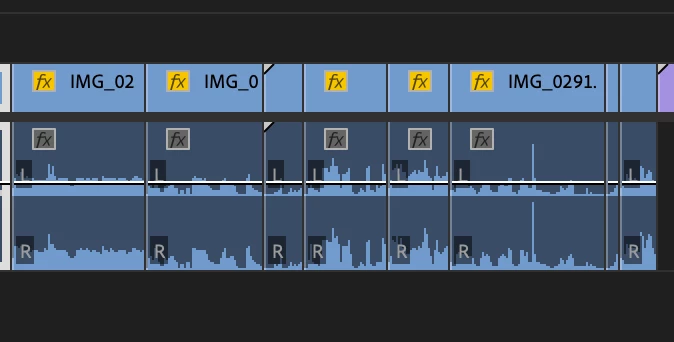
Hi guys! Everytime I upload footage to my timeline I notice the audio gain for all my clips are up a bit - any reason why? How can I normalize this so it's just regular levels?


Thank you!

이 주제는 답변이 닫혔습니다.

5 답변

MyerPj
Community Expert
Community Expert
May 11, 2023

It's good to make it sound right. There are some options on the pancake menu on the Sequence Tab. You can turn off Rectified Audio Waveforms. Perhaps you were viewing the differently. I haven's seen other complaints about this, so just adjust it the way you think best and also use the VU meters.

MyerPj
Community Expert
Community Expert
May 7, 2023

That's not "UP", that's where it sits as default. That line doesn't go in the middle (as default).


BigJimVideo
Participant
May 11, 2023

Really?  It never did that in Premiere Pro 2017 (or whatever old version I was using until very recently).  It was always in the middle, and the volume from my clips sounded just fine.  Since I downloaded 2023 (and got a new laptop), the audio levels always show up by default there, and everything sounds louder than it should - until I move it down to the "middle" line.

BigJimVideo
Participant
May 7, 2023

Did you ever get/find out an answer?  I'm having the same issue myself.

Averdahl
Community Expert
Community Expert
December 26, 2022
quote

Everytime I upload footage to my timeline I notice the audio gain for all my clips are up a bit


By @jadeweb3


Compared to what?


If you for example play back the footage in a software player such as VLC they often have a normalizer applied by default so audio becomes louder that it actually is. 

Ann Bens
Community Expert
Community Expert
December 26, 2022

Right clikc on clip > Gain or use the ESP.


Lingo: you do not upload a clip to the timeline: you drop. Ingest, insert, overwrite a clip in the timeline.