


Tiki_The_Horse
New Participant
January 20, 2018
Answered

Audio not Playing

  • January 20, 2018
  • 8 replies
  • 9920 views

Out of nowhere, i stopped being able to hear any sound from premier pro during playback despite it being detected, and when i export the video i can hear the audio in media player. its as if i hit some sort of hidden mute key bind on accident. Ive tried nearly every fix on the internet and none have worked.
This topic has been closed for replies.
Correct answer Meg The Dog

Hello Everyone,

Follow up to my previous post...

As a test I fired up my old (legal) copy of Premiere CS5.  In audio settings I see "Adobe Premiere WMD Sound" and it plays fine.

Not sure how to do the equivalent on my Adobe Premiere CC audio settings. 

Just adding this info as part of this troubleshooting of Premiere CC audio "issue".

....Rowby.


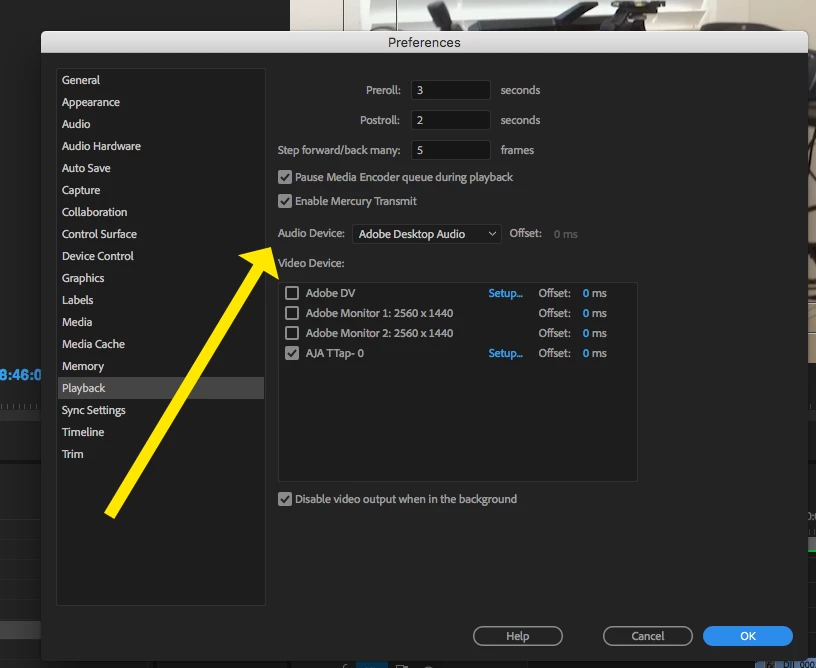
Go to Preferences > Playback, what is your Audio Device set to?

MtD

8 replies

r68tomlin
New Participant
November 8, 2019

So if I've tried the suggestions, or looked at my settings, and they're set to what they're supposed to be set, and the audio STILL isn't working, does anyone actually KNOW what the issue is? And going to an older version is NOT a fix. My Creative Cloud shows a 14.0 version but says Not Compatible. So I'm still using version 12.1.2.   My audio for everything else on my desktop works as it used to, no issues.  The only issue is in Premiere Pro. Nothing plays out with audio. But it does hit in the meters and exports fine. 


Not being a smartass, just would like real answers from Adobe.  Gracias

New Participant
October 3, 2020

Just a quick heads up if you come searching for an answer to this problem like I did.  Before you take any drastic steps, check your system sound with youtube...etc. can you hear it?  Then double click on a clip in your sequence and run it in the source panel, do you hear it?


If the answer is yes to these questions, check that you haven't accidently muted your Master Track by setting the Volume to -96db, just like I did... sigh.

johnm83807777
New Participant
May 25, 2018

HAVING SAME ISSUE!!! I AM NOT LIKING THIS... saw this fix on yt and tried it BUT I CANT EVEN GET TO THE WINDOW FOR SELECTING THE HARDWARE!!!    it keeps poping up and saying "Windows Installer" and "Canceling..."............ wtf??? im calling first thing in the moring lol...

bolshev
New Participant
May 24, 2018

I DID THIS AND IT WORKED.

I SOLO'D THE TRACK THAT WASN'T PLAYING AND THEN UN-SOLO'D IT.

R Neil Haugen
Braniac
May 24, 2018

Yes ... that's the process to fix this at the moment. I think this is an acknowledged issue that's being worked on, and for now, you're right ... audio disappears, solo/unsolo to get it back

Neil

Known Participant
April 17, 2018

The "audio not playing" issue cropped up for me as well. Everything is fine, hearing all audio, HWAM -- no audio. Mixers show there is audio, but it will not play. Sometimes it plays out of only the left channel, though the meters show from all channels in the clip, track and master. Sometimes I get it to work, quit Premiere Pro and come back and once again, no audio playback though the waveforms are still present, the meters show sound all around.

This is extremely frustrating. It is very inconsistent, and there is no pattern to what brings it back and what doesn't. It affects some sequences in the timeline, others it does not. Occasionally I can go into the Clip Mixer and solo a channel and it will then start playing on playback. Does not always work. I have tried emptying/deleting the caches, reconnecting all audio devices, uninstalling, etc.

This is nuts.

Adobe, are you listening? Or are the meters moving but no audio on playback?

johnm83807777
New Participant
May 25, 2018

its driving me crazy as well!!! i am calling in the morning!!! we should protest!!!  

New Participant
March 8, 2018

Thanks all for this string - I'm having the EXACT same issue with audio - I work on editing my sequence and the audio plays. then I might work on something else, come back to PP and the audio doesn't play. this is maddening. I've done all the above that has been suggested. So usually I have to restart the computer. UGH and TIME WASTER!

Why hasn't Adobe come out with a fix yet? This started after the latest update.

Ruach31
Participating Frequently
February 14, 2018

I'm having the same issue. My audio track is still in the timeline, but the audio mixers levels just drop flat and nothing comes out. However SOME of my audio continues to work. I shot some footage on my phone using the app Filmic Pro and for whatever reason that is the audio that drops. But I shot some footage with a Mark IV and the internal mic was running and all that audio works fine. Has anyone figured anything out cause I have a 1 week deadline and I'm starting to freak out... = /

New Participant
February 17, 2018

I Thought I Was The Only One !

Been Dealing With The Same Problem.

R Neil Haugen
Braniac
February 18, 2018

Have you tried the suggestions from the earlier posts?

Neil

New Participant
January 21, 2018

I’m With You I’ve looked Through every forum, Youtube video and website. Still cant find an answer.

Known Participant
January 20, 2018

ok

here are some suggestions that have worked for me in the past--you may have already tried them--

reboot

check sound settings in control panel--

make sure your playback is set to speakers/headset---whatever you want

also check on the icon lower right to make sure audio volume has the volume up (not muted) icon )))) as shown below

you've probably explored these but just in case

Best

Tony

Tiki_The_Horse
New Participant
January 21, 2018

Yea, i've tried that option, still cant hear anything for some reason. i'm starting to believe that i'm the only one with this issue, PP is totally mute.

Rowby
Inspiring
February 2, 2018

Hello everyone,

I am having the same problem.  No audio playback even though audio is showing in the mixers.  Tried various videos, including Premiere bars and tone.  No audio playback.

Latest version of Adobe Premiere CC via Creative Cloud.  Version 12.0.0.  Build 224.  Windows 7 Professional.  Other programs work fine with same audio settings --, such as Adobe Audition CC via creative Cloud, Camtasia, vMix, Using the same audio hardware settings. .

I've made captures of my default windows audio settings, settings in Adobe Premiere -- as well as  Adobe Audition (which works fine with audio playback -- using same test audio clips that I used in Premiere in Audition, Premiere settings, etc.  Audition works fine.  No audio in Adobe Premiere CC  

Baffling.  But at least others seem to be having this same problem.....

Thanks for any help!


Hello Everyone,

Follow up to my previous post...

As a test I fired up my old (legal) copy of Premiere CS5.  In audio settings I see "Adobe Premiere WMD Sound" and it plays fine.

Not sure how to do the equivalent on my Adobe Premiere CC audio settings. 

Just adding this info as part of this troubleshooting of Premiere CC audio "issue".

....Rowby.