


HGriffin
New Participant
July 14, 2020
Answered

Audio playback not working

  • July 14, 2020
  • 1 reply
  • 621 views

Hello - 


I'm having an issue with my audio and I'm hoping someone can help.  I had this same problem on my MacBook Pro last year and couldn't get it resolved until a new version of OSX or Premiere was released - not sure which.  Opened Premiere this morning and there's no audio being pushed.  I've got it visually in the mixer, nothing is muted, but still no sound.  I've used Premiere for more than a decade and would consider myself a very experienced user.  


Specs:

Premiere Pro 14.3

iMac Pro on Catalina

3.2GHz 8 Core Intel

64GB Ram

Radeon Vega 64 Graphics 


Here's the steps I've taken thusfar:

- Restarted OSX

- Re-installed Premiere Pro

- Tried different source clips

- Tried an another project

- Checked all sound levels in system

- Tried headphones and two other outputs

- Pushed audio through NDI

- Started a new project with clean sources

- Reset Settings

- Tried installing 14.2 and have sense come back to 14.3


None of the above steps yielded any sound.  


Any thoughts on this?  I never got it fixed the last time this happened, so I'm nervous one of my studio computers won't be able to use Premiere and would love to get this corrected ASAP.  
This topic has been closed for replies.
Correct answer HGriffin

Hey Gus -


I did figure it out!  


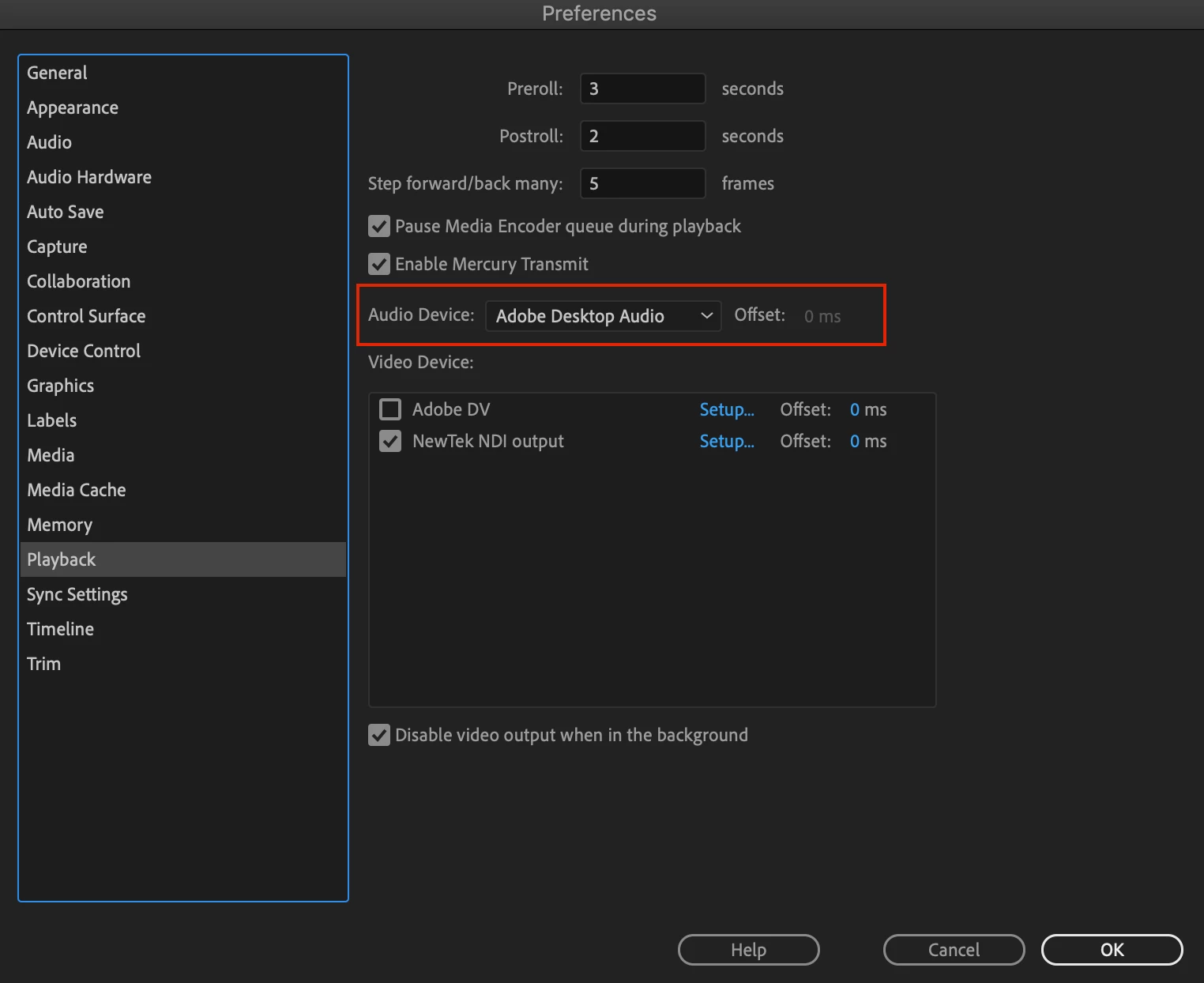
For OSX, I went to PREFERENCES and found some other audio settings in the PLAYBACK menu.  In there, I saw that my AUDIO DEVICE setting was set for NDI output, which was my problem.  I went ahead and changed that to Adobe Desktop Audio and it worked fine instantly after that.  See picture below.  Not sure if the new version set to that or NDI updated, but regardless that was my issue.


Don't know if that's what happened with you, but I do hope this helps.  Good luck!


Tony


1 reply

GusXI
New Participant
July 15, 2020

Hi

Did you reslove this. Im now experiencing the same problem.

Thanks

Gus

HGriffin
HGriffinAuthorCorrect answer
New Participant
July 15, 2020

Hey Gus -


I did figure it out!  


For OSX, I went to PREFERENCES and found some other audio settings in the PLAYBACK menu.  In there, I saw that my AUDIO DEVICE setting was set for NDI output, which was my problem.  I went ahead and changed that to Adobe Desktop Audio and it worked fine instantly after that.  See picture below.  Not sure if the new version set to that or NDI updated, but regardless that was my issue.


Don't know if that's what happened with you, but I do hope this helps.  Good luck!


Tony


GusXI
New Participant
July 15, 2020

Hi Tony

Yes! I managed to figure that too during trial an error, shortly after i posted my own question on the support forum. thanks for your reply! 


Much appreciated.

Gus